
On 7 October 2026, SOLIDWORKS published an interview with its CEO, Manish Kumar, alongside updated What's New pages for SOLIDWORKS 2027. The full feature set is now public, from a new "Save to Version" option and multi-version installation to single sign-on for SOLIDWORKS PDM. The production release itself is not out yet.
Every SOLIDWORKS subscription customer will have to decide when and how to move to 2027. Most release coverage focuses on modelling features, and 2027 has plenty. But several of this year's changes touch something more basic: where your design data goes, who can open it, which version it is saved in, and whether anyone trains software on it.
Here is what was announced, when to expect the release, what the AI, cloud and PDM changes mean for your intellectual property, and a checklist to plan the upgrade.
TL;DR: SOLIDWORKS 2027 for your design data and IP
Dassault Systèmes has published the SOLIDWORKS 2027 feature list, but as of 13 October 2026 only a pre-release build is available and no production release date has been announced. The CEO says SOLIDWORKS AI models are trained on Dassault's own data, never on customer data. New options let you save to older file versions, install several versions side by side, auto-save to the 3DEXPERIENCE platform and share with partners more easily. PDM 2027 adds single sign-on with MFA. SOLIDWORKS 2025 stops receiving service packs and hotfixes after 31 December 2026. Plan the upgrade, review what leaves your company, and keep proof of ownership that does not depend on any platform.
What did Dassault reveal for SOLIDWORKS 2027?
The official What's New pages for SOLIDWORKS 2027 first went online on 31 August 2026 and were updated on 7 October, the same day the SOLIDWORKS blog published its interview with Manish Kumar, CEO and VP of R&D at SOLIDWORKS. Dassault now markets the desktop product as SOLIDWORKS Design, so you will see "SOLIDWORKS Design 2027" on the official pages.
The official Top 10 list for SOLIDWORKS Design 2027 includes:
- In-context design and performance assistants, including automatic thread handling on fasteners and assembly health indicators.
- Import of massive point clouds with colour, with the importer rebuilt to support the E57 format.
- Multiple-version installation, so you can keep more than one release of SOLIDWORKS Design on the same machine.
- Define Model Variability, driving features from variants, options and parameters.
- Editing in Large Design Review mode, plus background STEP and IGES import and background drawing updates.
- Chord width fillets, sheet metal bend editing and stamping, a favourite symbols folder, UV unwrapping, and uniform covering across pipes and fittings.
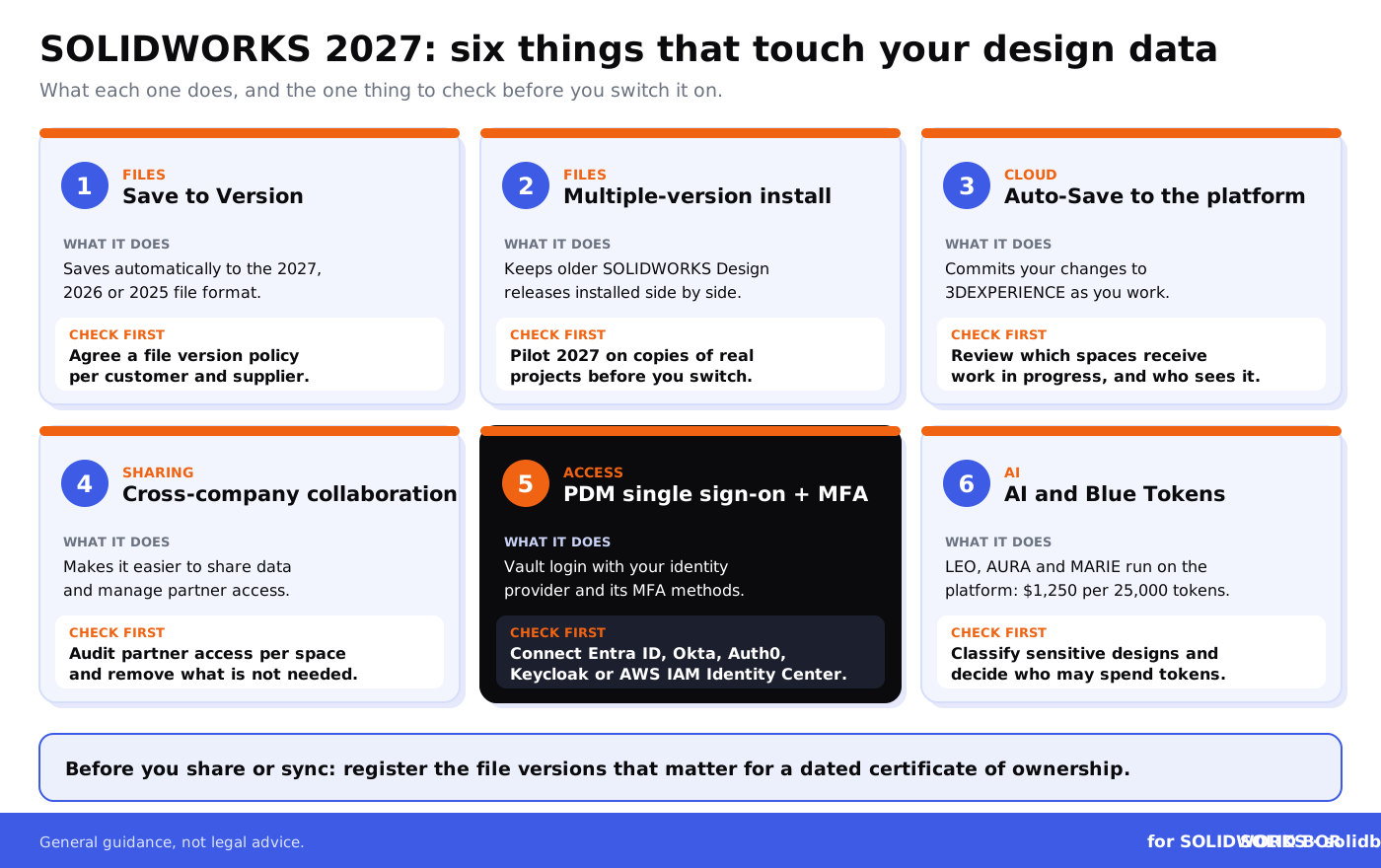
For data handling, the key additions are Save to Version, Auto-Save to the platform, cross-company collaboration improvements and single sign-in for SOLIDWORKS PDM. We look at each below.
When will SOLIDWORKS 2027 be released?
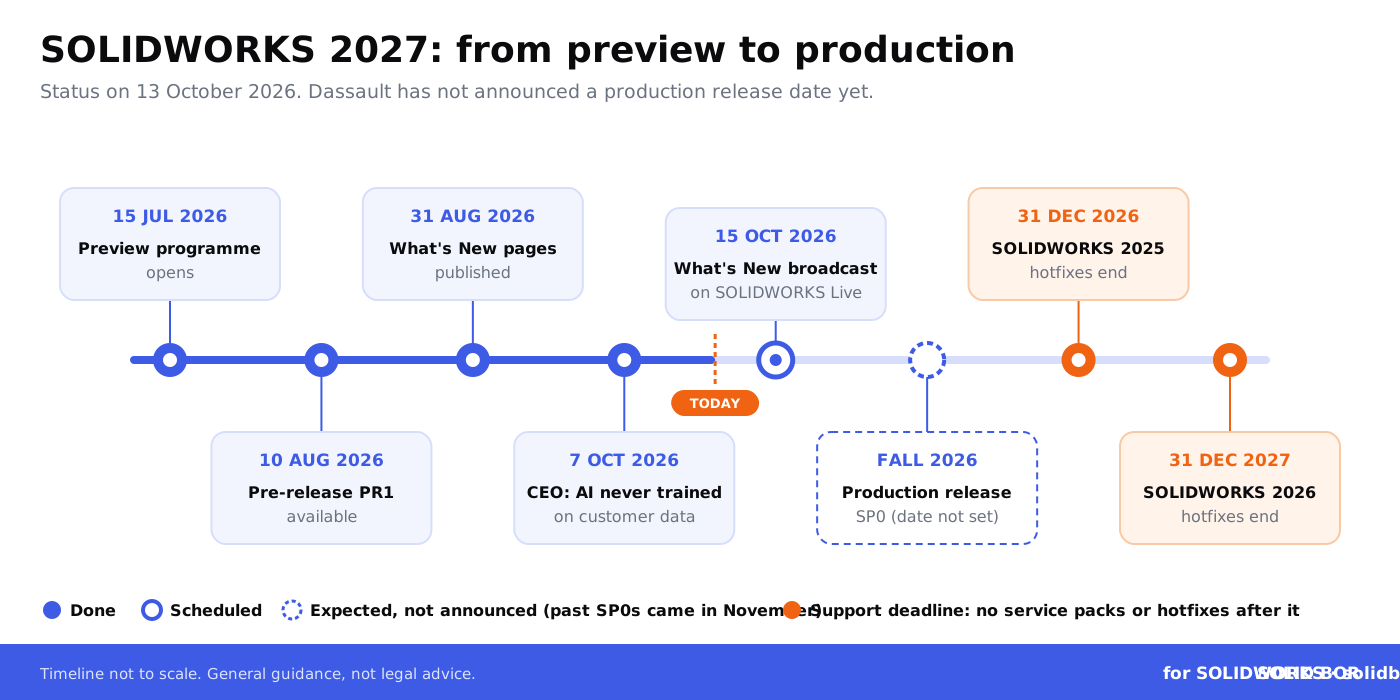
Not yet. The SOLIDWORKS 2027 preview programme opened on 15 July 2026, and a pre-release build, SOLIDWORKS 2027 PR1, became available on 10 August. As of 13 October, the official alerts feed shows no production release (SP0), and Dassault only says the release is due in fall 2026.
Past releases give a rough guide. SP0 arrived on 21 November 2022 for SOLIDWORKS 2023, 6 November 2023 for 2024, 15 November 2024 for 2025 and 14 November 2025 for 2026. A mid-November release would fit that pattern, but it is an expectation, not an announced date. The official What's New broadcast on SOLIDWORKS Live is set for 15 October 2026 at 11:00 am EST.
You need an active SOLIDWORKS subscription to get the new version.
Is SOLIDWORKS AI trained on your designs?
This is the question many engineering managers will ask first, and the CEO answered it directly. In the SOLIDWORKS blog interview, Manish Kumar said:
“Our AI models are trained on data that we own and generate ourselves, never on customer data, for privacy reasons.”
Manish Kumar, CEO and VP of R&D, SOLIDWORKS
That is a clear and welcome public statement. Two other points from the interview deserve attention. Kumar said Dassault plans to let customers fine-tune models with their own data in the future, and he invited customers with non-sensitive design data, such as generic jigs and fixtures, to share it to help build better models. Both are reasonable, but both make data sharing a decision your company should take on purpose, not by default.
Some context. Most items in the official SOLIDWORKS AI Top 10, such as automated drawing generation and change impact analysis, arrived during 2026 through the R2026x functional deliveries, so they are not new in 2027. The AI virtual companions, LEO, AURA and MARIE, need a connection to the 3DEXPERIENCE platform, where the computing power runs. When you use them, data from your session is processed on Dassault's platform.
Dassault also says load times improved by up to 10x in its own testing when LEO's suggestions were fully implemented. Treat that vendor figure as something to test on your own models. For the security side of cloud-connected CAD, see our guide to SolidWorks cloud security.
What do Blue Tokens cost?
SOLIDWORKS AI is paid for with Blue Tokens. The official price is $1,250 USD for 25,000 tokens, excluding tax. Tokens are pooled per 3DEXPERIENCE tenant, expire 12 months after purchase and are used only when an AI skill runs and produces a result. Decide who can spend tokens, and on which projects, before the whole team starts experimenting.
What do Save to Version and multi-version installation change for your files?
Once a SOLIDWORKS file is saved in a newer format, older releases cannot edit it in the normal way. If your supplier is on 2025 and you save their part in 2027, you have a problem.
SOLIDWORKS 2027 tackles this from two sides. Save to Version is a system option that saves automatically to the 2027, 2026 or 2025 format. Multiple-version installation lets you keep several releases of SOLIDWORKS Design installed, so you can work with partners who are on a different version.
For your IP this is mostly good news: less pressure to send native files around in a hurry. But the format of a file now says less about when it was made. If you ever need to show which revision existed on which date, rely on proper version history, not on file formats. Our guides to SolidWorks file versioning and tracking and recovering previous CAD versions cover the basics.
What do Auto-Save and cross-company collaboration mean for your IP?
Auto-Save to the platform commits your changes to the 3DEXPERIENCE platform automatically while you work. That protects you from lost work. It also means work in progress, including early concepts, lands in a collaborative space as you go.
Cross-company collaboration improvements are meant to make it easier to share data and manage access with external partners. Useful, but the risk lies in default settings and who has access to which space. A supplier who can see one assembly today may still see its next ten revisions next year if nobody reviews the access list.
Before you switch these features on, check which collaborative spaces exist, who is a member, and which partners can see what. Our articles on managing CAD file access for external collaborators and SolidWorks collaboration tools and security risks explain how to set this up.
Keep your own proof of every design you share.
BORIS for SOLIDWORKS registers your CAD files with a blockchain timestamp, so you have a certificate of ownership that stays valid whichever platform or partner holds a copy.
👉 Try BORIS for SOLIDWORKS
Why does PDM single sign-on with MFA matter?
For many teams, the most useful security change in 2027 is in SOLIDWORKS PDM. With single sign-in support, users can log in to vault views with their organisation's credentials and MFA methods, instead of a separate PDM or Windows username and password. Five identity providers are supported: Auth0, Okta, Keycloak, Microsoft Entra ID and AWS IAM Identity Center.
Separate vault passwords tend to be shared, reused or forgotten when someone leaves. With your main identity provider, MFA protects the vault, and disabling a leaver's account removes their vault access too. Also read our SolidWorks PDM security configuration guide, our notes on role-based permissions in SolidWorks PDM and the common PDM security mistakes we see most often.
Why does the end of SOLIDWORKS 2025 hotfixes matter?
The 2027 release is optional. One date is not. According to the official SOLIDWORKS product support lifecycle, SOLIDWORKS 2025 reaches its hotfix end on 31 December 2026. After that, support is limited to non-software help: no more service packs or hotfixes.
This is a security issue too. In 2026 Dassault disclosed several file-parsing flaws in eDrawings and SOLIDWORKS Desktop, including CVE-2026-3476 (CVSS 7.8), that could let an attacker run code when a user opens a crafted file. Fixes ship only for supported releases. See how CAD files get compromised for real-world examples.
How should you prepare for the SOLIDWORKS 2027 upgrade?
- Do not run the pre-release in production. Wait for the 2027 SP0 alert, then pilot it on a copy of real projects before the whole team moves.
- If you are on SOLIDWORKS 2025, plan to move before 31 December 2026. Both 2026 and 2027 keep you supported.
- Agree a file version policy before anyone saves in 2027. Decide which format you use for each customer and supplier. Back up critical files first.
- Upgrade in the right order. If you use network licensing, upgrade the licence server first. Back up PDM vaults, then upgrade the PDM server and clients together. Our article on SolidWorks licence management and security covers the licensing side.
- Put MFA in front of the vault. Plan PDM single sign-on with your IT team.
- Write down your AI and data rules. Classify sensitive designs, decide whether any data may be shared with Dassault or used for future fine-tuning, check your terms, and set a Blue Token budget.
- Review Auto-Save and partner access before you enable them. List spaces, members and external partners.
- Keep independent proof of ownership. Register the versions that matter with a dated, verifiable record before you share them.
How does BORIS for SOLIDWORKS keep proof of ownership independent?
SOLIDWORKS 2027 makes it easier to save, sync and share. PDM and 3DEXPERIENCE histories are useful records, but they live in systems you rent from a vendor, can be lost in a migration, and are not designed as evidence in a dispute.
BORIS for SOLIDWORKS, the add-in by CADChain, works inside SOLIDWORKS and registers your CAD files with a blockchain timestamp, giving you a certificate of ownership for each registered version. That record does not depend on your SOLIDWORKS version, your platform or your partners, and it works alongside PDM rather than replacing it. To get started, see the BORIS plugin installation guide for SolidWorks, and for the legal background read how to prove authorship of CAD designs, why blockchain timestamping proves "first in time" and what CAD ownership documentation should include.
How does SOLIDWORKS 2027 fit the bigger picture for CAD users?
Across the industry, CAD vendors are connecting desktop tools to cloud platforms and adding AI, and who controls design data is becoming a business question.
- PTC is getting a new owner. On our sister site, CADChain explains what Schneider Electric's $22.6B deal for PTC means for Creo, Windchill and Onshape users.
- Autodesk is moving Inventor closer to the cloud. Read what Autodesk Inventor AI and the Fusion Connected Client mean for Inventor users after AU 2026.
- AI training on 3D models is now in court. Blended BORIS covers the US court ruling on the Sketchfab NoAI tag and what it means for 3D creators.
Your design data is becoming more valuable to the companies that host and process it. Know what you own, where it lives, who can see it, and how you would prove it was yours. For a broader view of the rules, see our guide to trade secret protection for CAD files.
Conclusion
SOLIDWORKS 2027 brings real improvements for data control: older-version saving, side-by-side installs and PDM single sign-on with MFA. Dassault's statement that its AI is not trained on customer data is a useful commitment to hold it to.
The new cloud features also move more work into shared spaces, faster. Use the weeks before the production release to set your version policy, plan your move off SOLIDWORKS 2025, review access, write down your AI rules and keep your own proof of what you designed. Then the upgrade is just an upgrade.
Protect your SOLIDWORKS designs before you upgrade.
BORIS for SOLIDWORKS adds blockchain timestamps and certificates of ownership to your CAD files, right inside SOLIDWORKS.
👉 Get BORIS for SOLIDWORKS
FAQ: SOLIDWORKS 2027
When is the SOLIDWORKS 2027 release date?
Dassault has not announced one. As of 13 October 2026 only the pre-release build PR1 is available. The last four production releases arrived in November, so mid-November 2026 would fit the pattern, but that is an expectation, not a confirmed date.
What's new in SOLIDWORKS 2027?
Highlights include in-context design and performance assistants, large point cloud import with colour, multiple-version installation, Define Model Variability, Large Design Review editing, Save to Version, Auto-Save to the platform, easier cross-company collaboration and PDM single sign-on.
Is SOLIDWORKS AI trained on customer data?
According to CEO Manish Kumar, no: its models are trained on data Dassault owns and generates itself. He also mentioned future fine-tuning with customers' own data and invited voluntary sharing of non-sensitive designs, so set clear internal rules.
Can SOLIDWORKS 2027 save files for older versions?
Yes. The Save to Version system option can save automatically to the 2027, 2026 or 2025 format, and you can keep more than one release installed.
Which identity providers does SOLIDWORKS PDM 2027 single sign-on support?
Auth0, Okta, Keycloak, Microsoft Entra ID and AWS IAM Identity Center, with your organisation's MFA methods.
How much do SOLIDWORKS Blue Tokens cost?
$1,250 USD for 25,000 tokens, excluding tax. They are pooled per tenant, expire after 12 months and are used only when an AI skill produces a result.
When does support for SOLIDWORKS 2025 end?
Its hotfix end is 31 December 2026. After that there are no more service packs or hotfixes, including security fixes.
How do I keep proof of ownership of my SOLIDWORKS designs?
Keep PDM version history and add an independent record. BORIS for SOLIDWORKS registers CAD files with a blockchain timestamp and gives you a certificate of ownership that does not depend on any platform.