

TL;DR: Manage CAD Security Proactively
Understanding CAD security metrics is essential for protecting intellectual property when using systems like SolidWorks. Regularly monitor patching cadence, access incidents, and employee training metrics to minimize risks and comply with regulations. SMEs that prioritize these measures can avoid costly breaches and maintain competitive advantage.
💡 To dive deeper into creating an effective CAD security program, read our CAD security playbooks for actionable insights.
CAD Security Metrics and KPIs: Measuring What Matters for SolidWorks Users
What separates companies that endure from those that fold under the weight of intellectual property theft or cybersecurity breaches? If you're working with CAD data in platforms like SolidWorks, understanding CAD security metrics and KPIs is no longer optional. These measures deliver critical insights into your security's efficacy and the risks threatening your intellectual property.
European SMEs, in particular, face compounding challenges in safeguarding design data. With rising incidents of IP leakage and compliance demands, tracking the right metrics is critical. Unlike raw intuition, metrics allow engineers and management to quantify threats and budget for meaningful interventions. Efficient security budgeting starts with measuring what matters.
Much of the risk sits on the workstation itself: outdated or unmanaged endpoints running old SOLIDWORKS releases, add-ins and Windows builds are a common way in for attackers. That is why endpoint protection for CAD workstations and patch metrics come first in this guide.
Why Are CAD Security Metrics Essential to Your Workflow?
CAD environments represent the industrial backbone of design and manufacturing. But this reliance also creates vulnerabilities. Security metrics empower users to pinpoint weaknesses, enforce controls, and comply with regulations like GDPR, where CAD and PDM data hold personal data, or NIS2, the EU cybersecurity directive that now covers many medium-sized and large manufacturers in sectors such as machinery, electronics and vehicles.
Real failures tend to follow a familiar pattern. A company delays vendor patches, an attacker gets in through the unpatched system and reaches CAD files that were shared with subcontractors, and the company then spends months in a costly legal dispute over who leaked what. Monitoring key CAD security benchmarks catches the delay long before it becomes a breach, proof that measurable metrics are indispensable.
For SolidWorks users and SMEs, these metrics aren't theoretical. Here's what to focus on.
Top CAD Security Metrics Every Engineering Team Should Monitor in 2026
1. Patching Cadence and Vulnerability Management
How frequently do you update your CAD software and associated plugins, such as SolidWorks add-ins, service packs and the Windows builds underneath them? Tracking patching cadence helps keep critical vulnerabilities in your ecosystem to a minimum.
Metrics to monitor:
- Percentage of systems running the latest version
- Time taken to apply security patches post-release
- Number of unpatched critical vulnerabilities
European SMEs in regulated supply chains, such as automotive suppliers that need a TISAX label, are expected to show that patches are applied in good time, and NIS2 asks the companies it covers to handle vulnerabilities. Yet many smaller firms still do not track patching at all, and attackers keep exploiting the gap, as the ransomware attacks on unpatched Synology NAS devices that hold CAD files and PDM backups show.
2. Intrusion Detection and Access Incidents
How often are suspicious access attempts flagged within your CAD environment? What safeguards minimize unauthorized viewing or exporting of critical design files?
Using SolidWorks, especially in decentralized teams, demands vigilant tracking. Metrics here should include:
- Number of failed login attempts detected
- Percentage of unidentified devices accessing CAD systems
- Mean time to detect (MTTD) unauthorized attempts
In a SOLIDWORKS PDM setup, most of this data already exists: the vault history shows who checked out, changed or retrieved which files, while VPN, email and server logs show the sign-ins. See tracking CAD file access in multi-party projects for how to bring it together.
3. Security Awareness Training Metrics
Human error remains a leading cause of CAD data breaches. Security awareness training must include all team members, from engineers to contractors, actively involved in your SolidWorks projects.
Important metrics:
- Training completion rate (overall and by department)
- Phishing simulation success rates post-training
- Human-error incidents reported pre- and post-training
How do you measure CAD-based compliance?
Strengthen IP defenses by implementing regular audits aligned with the regulatory requirements for CAD audit trails, from GDPR to sector rules. Decide before the audit which numbers will show compliance, such as the share of PDM accounts reviewed this quarter or the days it takes to remove a leaver.
Gain clarity by defining metrics first!
How Do SMEs Build an Actionable CAD Security Program?
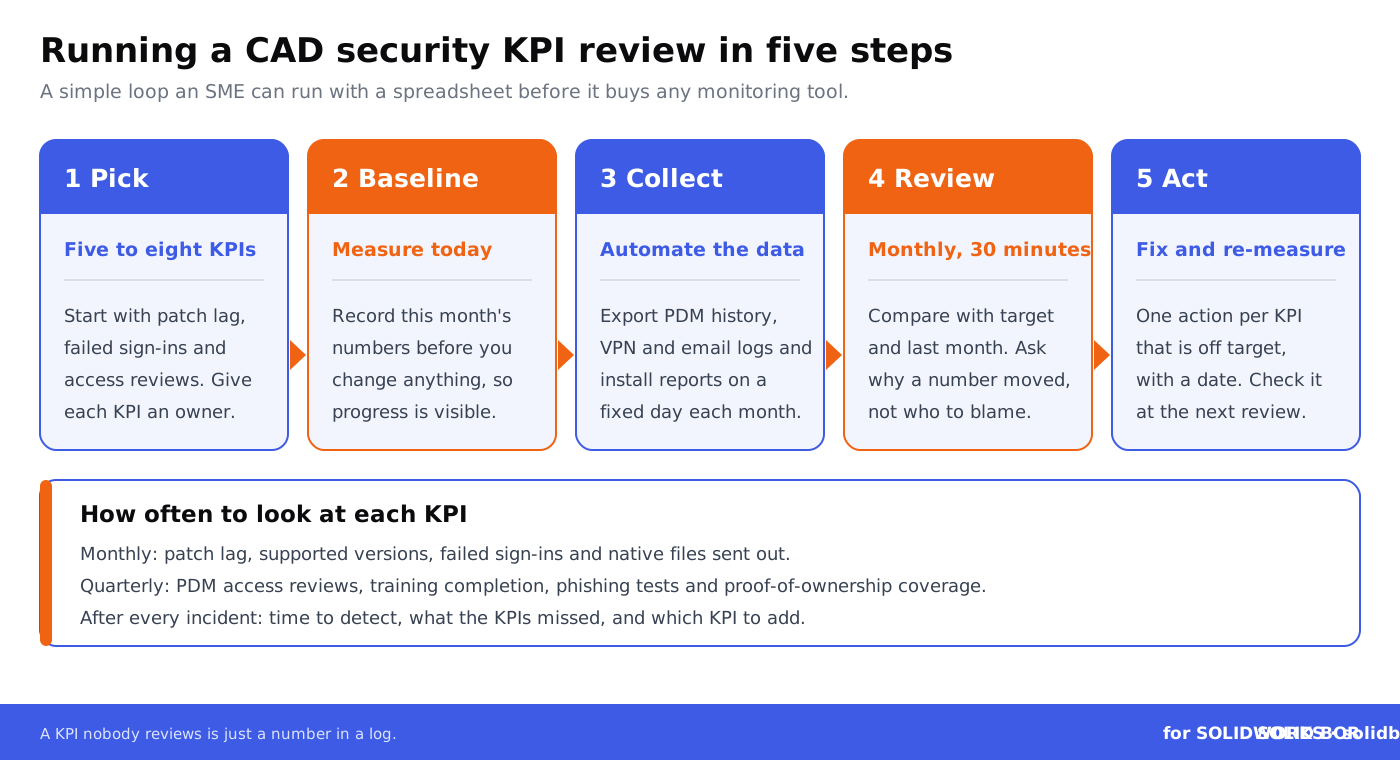
Building a reliable CAD security initiative starts with three straightforward steps:
- Define your metrics: Prioritize those that address immediate threats and data sharing risks.
- Automate monitoring: Pull the numbers from systems you already run, such as SOLIDWORKS PDM history, VPN and email logs and your endpoint protection console, and set alerts for failed sign-ins and mass downloads.
- Invest in employee engagement: Teams trained to detect early indicators can spare you legal costs and IP recovery work.
SMEs new to structured measurement can start small with foundational protocols. Then, iterate as threats evolve.
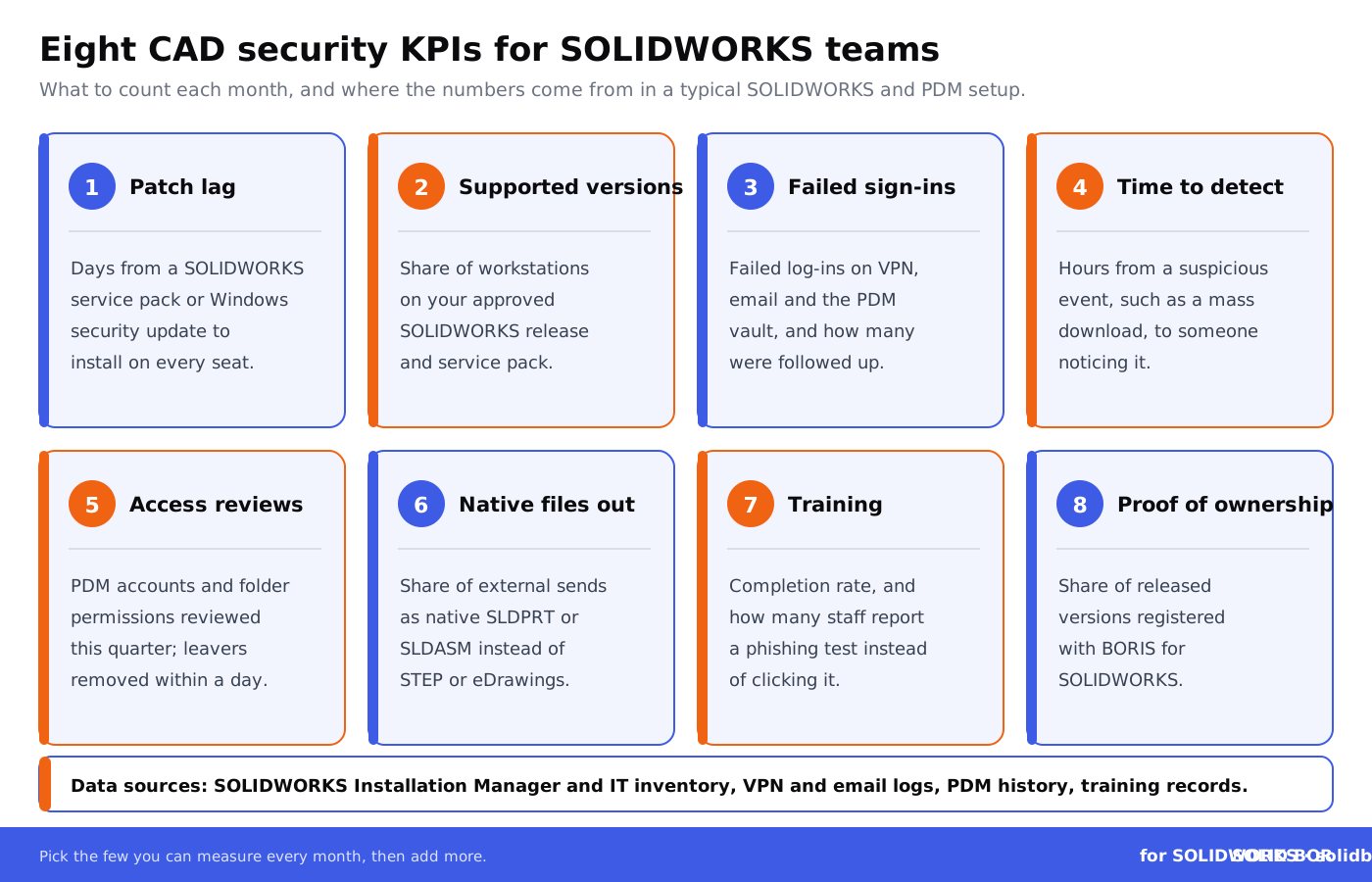
Which CAD Security KPIs Should You Track First?
The table below turns the metrics above into KPIs you can measure in a typical SOLIDWORKS and PDM setup. The targets are examples to start from; set your own based on your risks, contracts and the size of your team.
For the access side of these KPIs, see role-based permissions in SolidWorks PDM and common SolidWorks PDM security mistakes; for the proof-of-ownership KPI, see how digital fingerprints and hashes work.
Closing Insights: Begin with Data, Stay Ahead with Smart Protocols
For European engineering teams using SolidWorks, protective measures backed by measurable data are no longer luxuries; they're lifelines. Metrics not only forecast threats but actively guide incident response efforts. Violetta Bonenkamp, CADChain’s co-founder, emphasizes: "The difference between surviving an IP dispute and losing millions stems from understanding your data metrics early on."
Looking ahead, the most successful teams will adopt integrated systems underpinned by mature reporting protocols and AI-driven prevention mechanisms. Explore how to strengthen your CAD setups in our related discussion of the future-readiness of CAD security technologies.
Make proof of ownership a KPI you can report
BORIS for SOLIDWORKS registers a hash and timestamp of each released design version from inside SolidWorks, so the share of released versions with dated proof of ownership becomes a number you can track every month.
👉 See how BORIS for SOLIDWORKS works
People Also Ask:
What are CAD security metrics?
CAD security metrics are measurable data points used to evaluate and enhance the security of CAD systems and data. Examples include Time-to-Detect (TTD) security breaches, frequency of access control misuse, and the rate of vulnerabilities discovered during audits.
Why are KPIs important in CAD security?
KPIs in CAD security help track the effectiveness of security measures, identify areas of improvement, and ensure compliance with regulations. Metrics like Mean Time to Recovery (MTTR) and the percentage of secure access violations blocked provide actionable insights into system performance.
What are examples of CAD-specific security KPIs?
Examples include the number of unauthorized file access attempts, the average encryption key distribution time, and the rate of successful CAD file exports under digital rights management constraints.
How does tracking security metrics benefit CAD tools?
Tracking metrics helps organizations improve overall data security, reduce the risk of intellectual property theft, and maintain trust with clients by constantly evaluating and strengthening system defenses.
What is MTTD in the context of CAD security?
MTTD stands for Mean Time to Detect, which measures how quickly a potential or active security breach is identified within a CAD environment. Quicker detection minimizes potential damage and exposure.
How is CAD data protected through KPIs?
CAD data is safeguarded by monitoring KPIs such as encryption effectiveness, access control compliance rates, and unauthorized modification attempts. These metrics ensure proactive responses to emerging threats.
How can organizations improve CAD security compliance?
Organizations can improve compliance by regularly benchmarking against industry standards, running audits, and using KPIs like audit frequency success rates and incident resolution times to track their adherence.
What role do DRM tools play in CAD security?
Digital rights management (DRM) tools restrict unauthorized copying or sharing of CAD files. Metrics like the percentage of files protected by DRM and the frequency of blocked unauthorized exports reflect their efficacy.
What challenges do companies face with CAD security metrics?
Companies often struggle with integrating metric tracking into existing workflows, ensuring data accuracy, and addressing rapidly evolving security threats. Setting up systems for automated reporting and consistent monitoring can mitigate these challenges.
How often should CAD security metrics be reviewed?
Metrics should be reviewed quarterly at a minimum to stay current with threats and ensure systems remain optimized. In high-security environments, a monthly or even bi-weekly review might be necessary.
Frequently Asked Questions About CAD Security Metrics and KPIs for SolidWorks Users
How do CAD security metrics differ from other IT security metrics?
CAD security metrics focus specifically on protecting design and intellectual property within engineering workflows, emphasizing measures such as patching cadence, access controls, and secure collaboration tools. Unlike general IT metrics, these directly target the risks inherent in platforms like SolidWorks, where sensitive design data is stored and shared.
What are the first steps to implement CAD security KPIs for SMEs?
Start by auditing current vulnerabilities, such as unpatched CAD systems or unauthorized access points. Define key metrics like patching schedules and mean time to detect breaches. Conduct basic awareness training and integrate tools like HaloCAD for encryption. Learn more from this guide on steps for improving CAD security.
How can SMEs track patching cadence effectively?
Deploy automated software management tools to monitor CAD systems and plugins. Set alerts for vendor releases and maintain compliance logs. Regularly review unpatched vulnerabilities to prioritize actions. Proactively managing patching minimizes intrusion risks, especially in SMEs with limited IT resources.
What role does employee training play in CAD security?
Human error plays a part in many breaches. Effective training reduces these risks by teaching employees to spot phishing attempts, handle critical files securely, and comply with access protocols. Post-training, track phishing simulation success rates and report trends in human-driven incidents.
How can AI improve CAD security metrics for SolidWorks users?
AI tools enhance monitoring, automate threat detection, and predict vulnerabilities. Most of them work at the network, endpoint and email level around SolidWorks rather than inside it, and their detection improves as they learn what normal activity looks like. Discover more about emerging technologies in CAD protection in this article on future-proofing CAD security.
Why is logging intrusion attempts essential in design environments?
Logging provides insights into access anomalies, failed login attempts, and interactions with critical designs. Analyzing this data helps identify weak points, ensuring SolidWorks or other systems are not exploited. Robust logs help shorten Mean Time to Detect.
What budget considerations are necessary for CAD security metrics?
Estimate costs by reviewing risks such as IP theft and downtime. Prioritize investments in encryption tools, access management systems, and regular security audits. Understanding ROI for every measure ensures SMEs allocate limited resources optimally while reducing breach risks.
How do quantum threats influence CAD security strategies?
Large quantum computers are expected to break today's public-key encryption, so CAD environments will need new encryption techniques. Start by listing where you rely on encryption, and plan the move to the post-quantum standards NIST published in 2024 as your vendors support them. Stay future-ready with insights from the quantum threat optimization guide.
Can CAD security metrics be automated for small teams?
Yes. SOLIDWORKS Installation Manager can check for new service packs, SOLIDWORKS PDM keeps a history of check-ins and changes, and endpoint and email security tools send threat alerts in real time. Automation reduces the manual workload, making sophisticated security accessible even for teams with limited IT staff.
What are the best practices for endpoint security in CAD systems?
Limit the number of unmanaged devices accessing CAD platforms. Implement role-based permissions for team members. Use firewalls and endpoint detection tools to monitor devices connected to your CAD network to prevent unauthorized design access.
What’s the future of CAD security metrics for SMEs?
The future combines AI and blockchain to enhance metric precision and IP traceability. As frameworks like GDPR evolve, SMEs will need seamless technology integration that facilitates continuous compliance while emphasizing proactive, data-driven threat management strategies.