
On 29 October 2026, Synology warned that attackers are exploiting an old, already patched flaw to break into Synology NAS devices running outdated versions of its DSM operating system and encrypt the data on them for ransom. Victims find their files renamed with a .L0CK3D extension and a ransom note called read-me3.txt in their folders, the work of a ransomware strain known as C3RB3R.
For many SOLIDWORKS teams, this is not someone else's problem. A Synology box in the server cupboard is often where the shared CAD folder lives, where the Toolbox and design library sit, where PDM backups land at night and where old projects are archived. When that one device is encrypted, assemblies stop opening, drawings lose their models and the backup you planned to restore from may be locked too.
The fix for the flaw Synology names has been available since late 2024. The attacks work because many NAS devices are never updated after installation and are reachable from the internet. That makes this a good week to check every NAS that holds design data, not just the one you think is exposed.
TL;DR: update every Synology NAS that holds SOLIDWORKS data, take it off the open internet and make sure one backup copy cannot be encrypted with it
Synology says attackers are using a vulnerability patched in December 2024 and points to its advisory Synology-SA-24:20. Security firm Qihoo 360, as reported by NAS Compares, says its samples used two newer critical flaws that Synology fixed on 18 September 2026 in Synology-SA-26:13. Either way, devices on current DSM builds are not exposed to these bugs. Encrypted files get a .L0CK3D extension, and the attackers sell a decryptor through a dark web portal. Synology has not said how many devices were hit. For SOLIDWORKS teams, the steps are simple: update DSM, close direct internet access to the NAS, keep an offline or immutable copy of CAD data and PDM backups, test a restore and keep dated proof of your designs outside the NAS.
What did Synology announce on 29 October 2026?
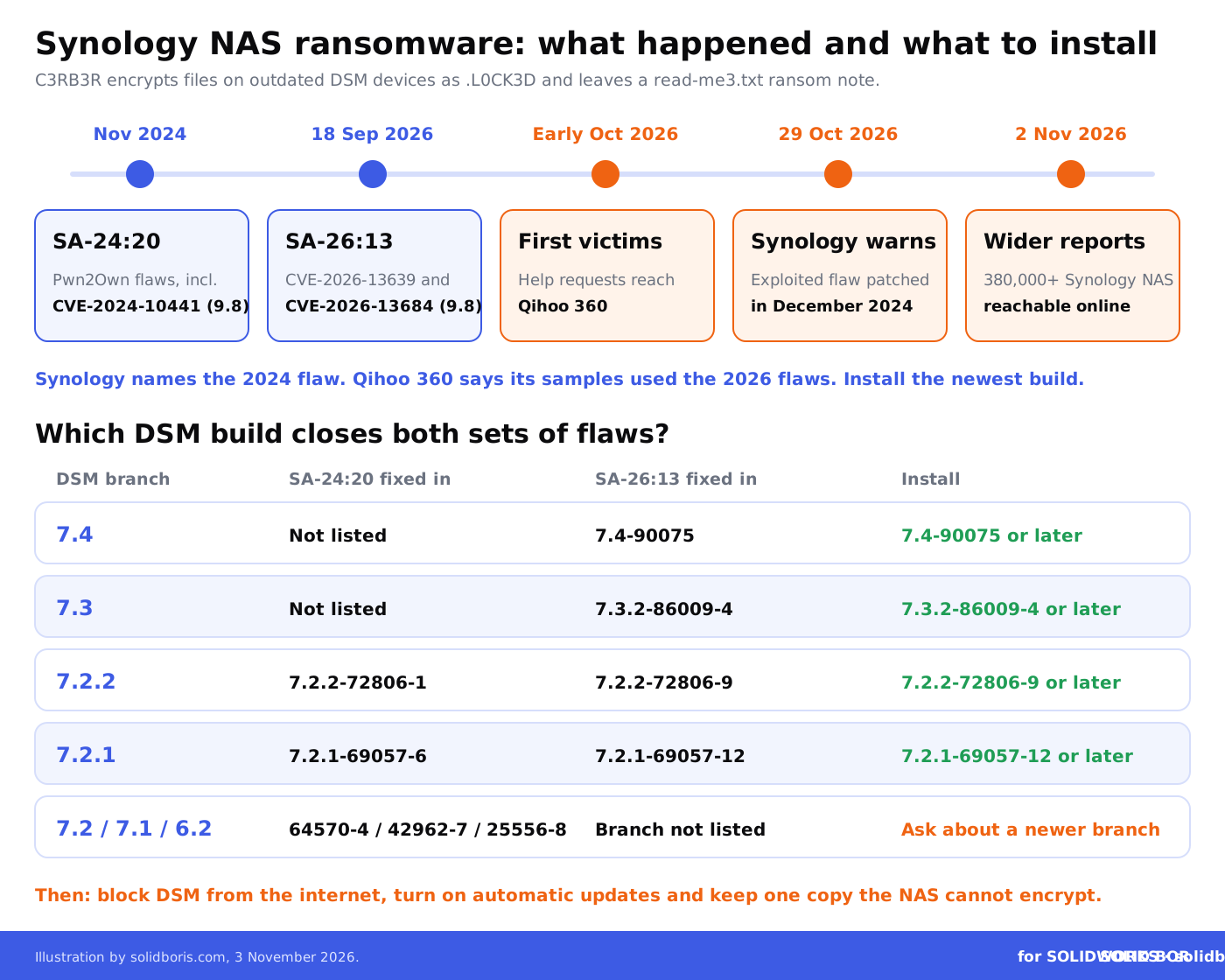
In a short statement from Taipei, Synology said it had identified threat actors exploiting a vulnerability patched in December 2024 to target devices running outdated versions of DSM, the operating system of its DiskStation NAS devices. In Synology's words: "These attacks aim to encrypt data and extort ransom." The company urged everyone on a vulnerable version to update DSM immediately and to turn on automatic updates, and it referred users to its advisory Synology-SA-24:20.
That advisory dates from November 2024 and covers three flaws found during the Pwn2Own 2024 hacking contest. The serious one, CVE-2024-10441, is rated 9.8 out of 10 and allows remote code execution through DSM's system plugin daemon. The other two allow limited file reads and limited file writes. Synology lists no workaround: upgrading is the only fix.
What is known about the attacks so far:
- The ransomware. Encrypted files get the .L0CK3D extension and each affected folder gets a read-me3.txt note that offers a "C3rb3r Decryptor" for sale. BleepingComputer reported that users started posting about encrypted devices more than two weeks before Synology's warning.
- The entry point is disputed. Synology points to the 2024 flaw. Qihoo 360, whose anti-ransomware service started receiving help requests in early October, says its samples used CVE-2026-13639 and CVE-2026-13684, two critical DSM flaws rated 9.8 that Synology fixed in September 2026. It is not clear whether these are the same attacks or two routes in.
- The scale is unknown. Synology has not published a victim count. Shadowserver tracks more than 380,000 Synology NAS devices reachable from the internet, but that number says nothing about how many are unpatched.
- No word on data theft. The reports so far describe encryption only. None of them says files were copied out before encryption, but none rules it out either.
What is C3RB3R and why does it go after NAS devices?
C3RB3R is a newer ransomware strain that borrows the name of Cerber, one of the most active ransomware families between 2016 and 2019. It was first seen in December 2021, when it hit Atlassian Confluence and GitLab servers through known, already patched vulnerabilities. The pattern has not changed: find internet-facing systems that were never updated, get in through a public bug and encrypt whatever is there.
A NAS is an ideal target for that approach. It is often set up once by an outside IT provider or a technically minded engineer, then left alone for years. Remote access is switched on so people can reach files from home or a customer site. And the NAS holds exactly what a small manufacturer cannot work without. Synology's last warning of this kind came in August 2019, when brute-force attacks spread the eCh0raix ransomware to Synology devices.
This is the same playbook we saw with the Ivanti VPN zero-days that opened a path to PDM vaults and the Node2Shell flaw in Node.js portals around SOLIDWORKS data: attackers go for the systems at the edge of the network that hold or reach design files.
Why does an encrypted NAS hurt SOLIDWORKS teams so much?
SOLIDWORKS data is a web of references. An assembly points to its parts, a drawing points to its model, and many parts point to Toolbox components, custom libraries and design tables. If ransomware encrypts some of those files, the files that are left still will not open properly. Partial damage behaves like total damage.
Where SOLIDWORKS data typically sits on a NAS, and what encryption does to it:
Teams that use SOLIDWORKS PDM are in a better position, because the vault adds permissions, versions and an audit trail. But PDM is only as safe as its backups, and many small companies write those backups to a NAS. Our list of common SOLIDWORKS PDM security mistakes includes backups that were never tested, and our guide to recovering previous versions of CAD files shows what you can and cannot get back without a clean copy.
Keep proof of your SOLIDWORKS designs that ransomware cannot encrypt.
BORIS for SOLIDWORKS registers your CAD files with a blockchain timestamp and a certificate of ownership from inside SOLIDWORKS. The proof of what you designed and when lives outside your NAS, so it survives even when the files themselves are locked.
👉 Get BORIS for SOLIDWORKS
How can you tell whether your NAS is at risk?
Start with the DSM version. In DSM, open Control Panel, then Info Center, to see the exact build. Compare it with the builds Synology lists as fixed. Because two advisories are now linked to the attacks, the safe answer is the newest build on your branch:
- DSM 7.2.2: 7.2.2-72806-9 or later fixes both the 2024 and the September 2026 flaws.
- DSM 7.2.1: 7.2.1-69057-12 or later fixes both.
- DSM 7.3 and 7.4: 7.3.2-86009-4 or later, and 7.4-90075 or later, fix the September 2026 flaws.
- DSM 7.2, 7.1 and 6.2: Synology-SA-24:20 lists fixes (7.2-64570-4, 7.1.1-42962-7 and 6.2.4-25556-8). These branches are not listed in the September 2026 advisory, so ask your IT provider whether the device can move to a newer branch.
Next, check how the NAS can be reached from outside. Port forwards on the office router to the DSM web interface, a public DDNS name or remote access switched on for convenience all widen the door. Our guides to protecting SOLIDWORKS files in remote work and to secure CAD sharing between offices explain safer ways to give people access, such as a VPN with multi-factor sign-in.
Finally, look for signs that something already happened: files with the .L0CK3D extension, read-me3.txt notes, unknown admin accounts, sign-ins from unfamiliar places in the DSM logs, or snapshots that disappeared. If you find any of them, disconnect the NAS from the network, do not wipe it and get help before you restore anything.
What should SOLIDWORKS teams do now?
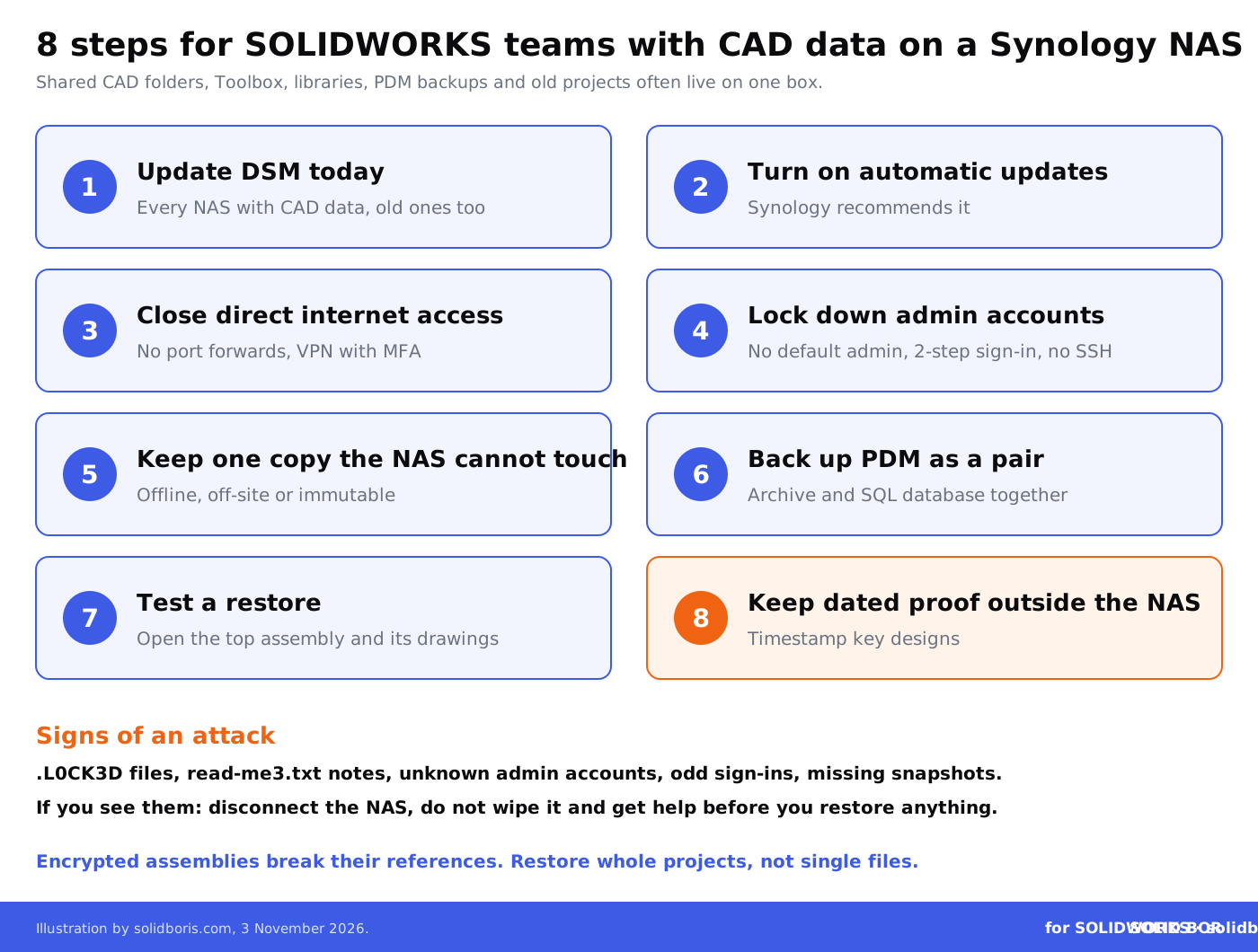
- Update DSM today. Install the newest build for your branch on every Synology device that holds CAD data, including the old one in the corner that nobody owns.
- Turn on automatic updates. Synology recommends it, and it removes the most common reason these attacks work.
- Close direct internet access. Remove router port forwards to DSM, review remote access settings and use a VPN with multi-factor sign-in for remote work.
- Lock down admin accounts. Disable the default admin account, use unique passwords, turn on 2-step verification and switch off SSH and other services you do not use.
- Keep one copy the NAS cannot touch. Store at least one copy of CAD data and PDM backups offline, with another provider, or as immutable snapshots that an administrator cannot delete before they expire.
- Back up PDM as a pair. Take the archive and SQL database backups together and keep both copies in the same protected place, so a restore puts them back in step.
- Test a restore. Restore one real project, open the top-level assembly and its drawings and confirm references, Toolbox parts and custom properties come back intact.
- Keep dated proof outside the NAS. Timestamp the native files of key designs, so you can prove what existed and when even if the originals are encrypted or leaked.
What if design files were copied, not just encrypted?
Ransomware groups increasingly steal data before they encrypt it, and some now list CAD drawings as loot on their leak sites. We covered that trend in our report on ransomware groups listing CAD drawings and in the Helix group's data theft claims against manufacturers. For the C3RB3R attacks, no one has reported data theft so far, but you cannot assume it did not happen on your own device.
If design data may have left the building, it matters for more than recovery. Trade secret protection depends on reasonable steps to keep information secret, customer contracts may require you to report incidents, and personal data on the same NAS can trigger breach notification rules. Our overview of legal obligations after a CAD file breach explains what to check with your adviser.
Proof of ownership also matters after a leak. If a copy of your design turns up at a competitor or a supplier abroad, you will need to show that you had it first. That is why we recommend blockchain timestamping as first-in-time proof for key designs, and why that proof should not live on the same box as the files. Our look at digital vaults for CAD storage explains why storage alone is not enough.
How does this fit the bigger picture for CAD users?
Across our network this week, the common thread is how fast attackers reach design data, and what you can still prove when they do.
- AI-driven espionage. CADChain looks at the ARTEX AI agent hacking framework used in espionage campaigns, which security researchers say cuts the time from first access to deep access in a network.
- The cost of copying. BORIS Inventor explains a Delaware trade secrets case that priced stolen files by what it would have cost to develop them, and what that means for teams that record their development effort.
- Clones after a demo. Blended BORIS covers AI game clones after Steam Next Fest, where studios cancelled public demos to protect their work.
Conclusion
The C3RB3R attacks on Synology NAS devices are not clever. They use flaws that Synology fixed in 2024 and in September 2026, against devices that were never updated and can be reached from the internet. That is good news, because the main defence is in your hands: update DSM, close the door to the internet and keep a copy of your data that the NAS cannot encrypt.
For SOLIDWORKS teams, the lesson goes further. A NAS often holds the only copy of years of design work, the libraries your assemblies depend on and the backups of your PDM vault. Treat it like the critical system it is, test that you can restore a real project and keep dated proof of your designs somewhere else.
Make your SOLIDWORKS designs provably yours, wherever the files end up.
BORIS for SOLIDWORKS adds blockchain timestamps and certificates of ownership to your CAD files from inside SOLIDWORKS, so you keep independent proof of what you designed and when, even after ransomware, a leak or a lost device.
👉 Get BORIS for SOLIDWORKS
FAQ: Synology NAS ransomware and SOLIDWORKS data
Which Synology devices are affected by the C3RB3R attacks?
Synology says the attacks target devices running outdated versions of DSM. Devices on current DSM builds are not exposed to the flaws named so far. Synology has not published a list of affected models or a victim count.
How do I know if my NAS was hit?
Look for files with the .L0CK3D extension and read-me3.txt ransom notes in shared folders. Also check the DSM logs for unknown admin accounts or unusual sign-ins. If you find any of these, disconnect the NAS and get help before restoring.
Which DSM version should I install?
The newest build on your branch. For DSM 7.2.2 that is 7.2.2-72806-9 or later, and for DSM 7.2.1 it is 7.2.1-69057-12 or later, which fix both the 2024 and the September 2026 flaws. DSM 7.3 and 7.4 need 7.3.2-86009-4 and 7.4-90075 or later.
Do Synology snapshots protect SOLIDWORKS files from ransomware?
Ordinary snapshots help, but an attacker with admin rights can delete them. Immutable snapshots, available on supported models since DSM 7.2, cannot be deleted before they expire. Keep a separate offline or off-site copy as well.
Can I just restore the SOLIDWORKS files I need from a backup?
Only if the backup is clean and complete. Assemblies, drawings, Toolbox parts and libraries depend on each other, so restore whole projects and test that they open. For SOLIDWORKS PDM, restore the archive and database from the same point in time.
Should we pay the ransom?
That is a decision for your management, lawyers and incident responders, not your CAD team. Paying does not guarantee working files, and Qihoo 360 advises against it. A tested, clean backup is what gives you a real choice.
How does BORIS for SOLIDWORKS help after a ransomware attack?
It does not decrypt files or replace backups. It gives your SOLIDWORKS files blockchain-timestamped certificates of ownership that are stored outside your NAS, so you can still prove what you designed and when if the files are encrypted, leaked or copied.