
Between 18 and 21 October 2026, the data extortion group Helix added three US manufacturers to its leak site: wire and cable maker Southwire and concrete products maker Quikrete on 18 October, and Hypertherm, the maker of plasma and waterjet cutting systems, on 21 October. The posts promise download links that unlock within hours. None of the three companies has confirmed a breach.
Leak-site posts are claims, not proof, and some trackers warn that Helix listings have included unverified victims. We do not know how these companies were targeted or what, if anything, was taken. What we do know is how Helix has worked in the intrusions that security researchers have investigated: no malware and no stolen password, just a convincing phone call, a legitimate Microsoft sign-in page and a fast, bulk download from SharePoint.
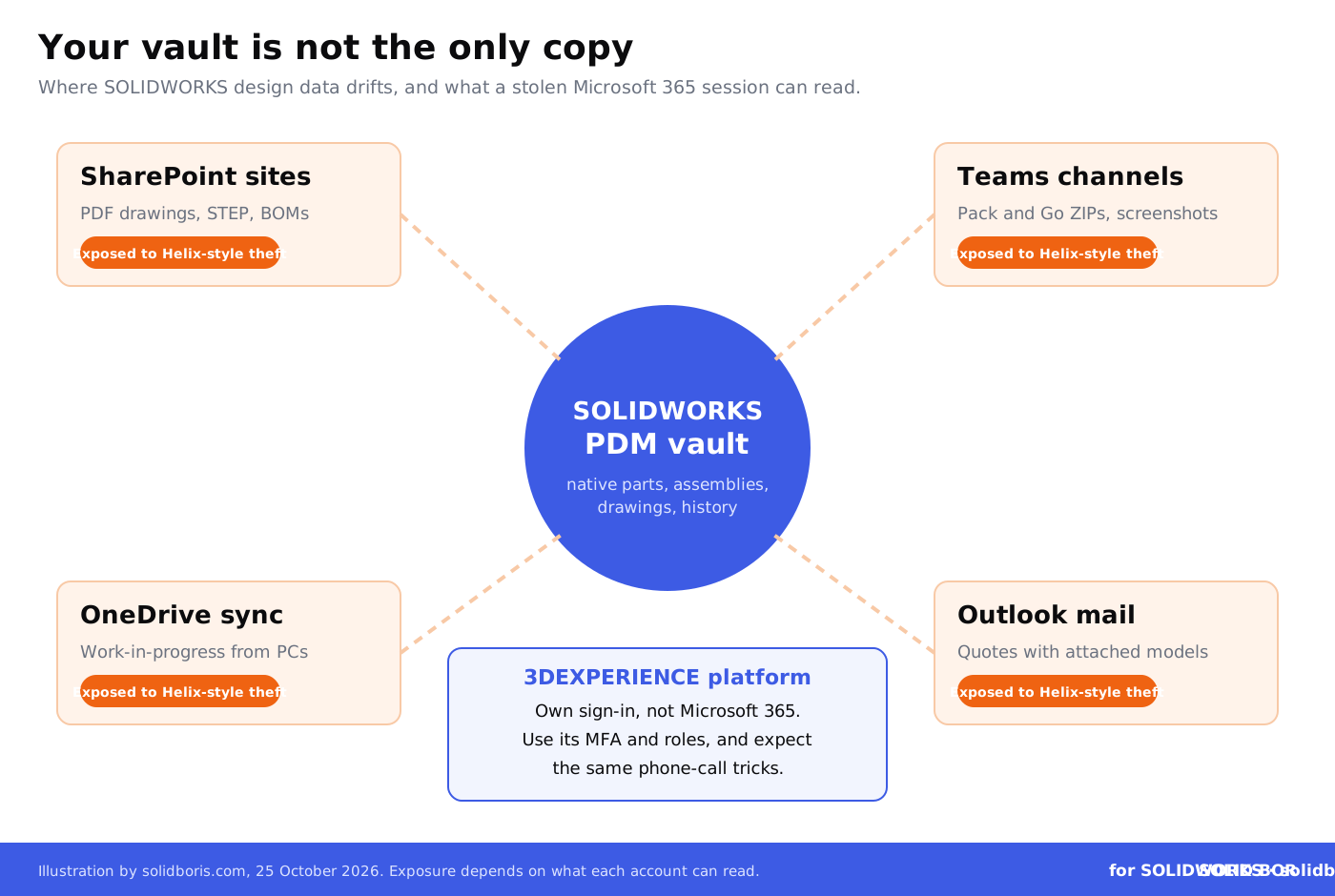
That method matters to SOLIDWORKS teams for a simple reason. In many companies, the PDM vault is well protected, but copies of the same designs live in SharePoint sites, Teams channels and OneDrive folders: PDF drawings for the shop floor, STEP files for suppliers, Pack and Go archives for customers and quotes with attached models. Here is what Helix does, why that matters to your design data, and what to change this week.
TL;DR: the attacker calls, you sign in, they download
Helix listed Southwire and Quikrete (18 October 2026) and Hypertherm (21 October 2026) on its leak site. The claims are unconfirmed. Researchers who investigated earlier Helix intrusions found the group phones employees while posing as their manager, walks them through a Microsoft device code sign-in, registers its own MFA app and then bulk-downloads SharePoint files, in one case in under an hour. For SOLIDWORKS teams: block device code sign-in if you do not need it, allow SharePoint only from managed devices, keep native CAD in PDM and keep dated proof of what is yours.
What did Helix post between 18 and 21 October 2026?
According to public leak-site trackers, Helix listed Personify Health on 17 October, Southwire and Quikrete on 18 October, American Campus on 19 October, and Hypertherm and Westrock Coffee on 21 October. A weekly threat briefing for 12 to 19 October also counted Bay Alarm and Smith Douglas Homes among its recent posts. The Hypertherm post says the GoFile links and passwords unlock in 24 hours.
Three points are important before anyone draws conclusions. First, no company named here has publicly confirmed an incident, as of 25 October 2026. Second, nothing published so far says that engineering drawings or CAD files were part of any claimed data set. Third, a listing does not reveal how an attacker got in. So this is not a story about a confirmed CAD leak. It is a story about a group that is posting manufacturers at a fast pace, using a method that goes straight for the places where many engineering teams keep copies of their work.
It is also different from the attacks we covered earlier this month. In our article on the Interlock ransomware claims against US fabricators, the attackers encrypted systems and stole drawings. Helix, as described by researchers, does not need to encrypt anything or install malware. It steals what an employee's account can read.
How does a Helix attack work?
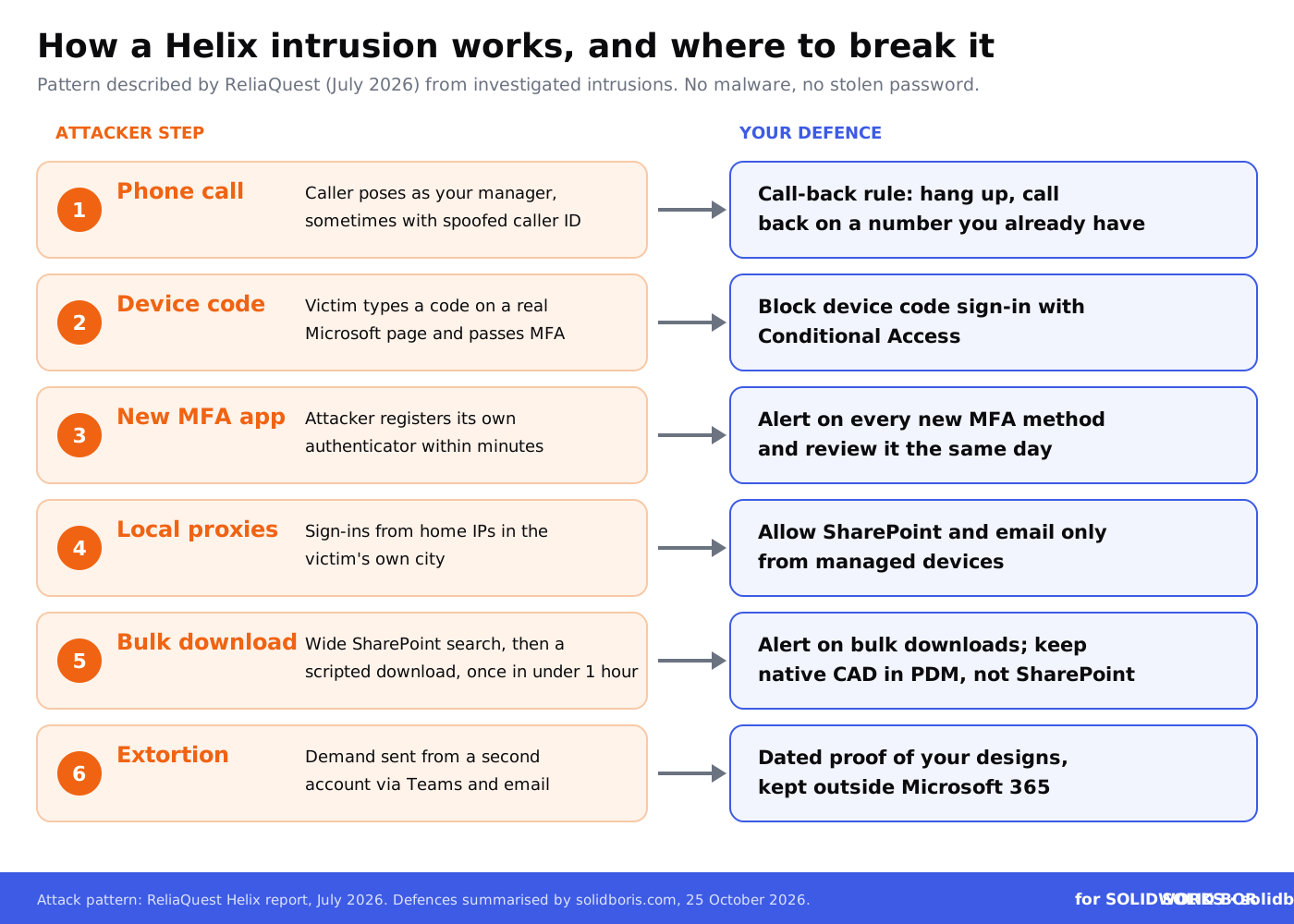
In July 2026, the security firm ReliaQuest published a threat report on Helix based on intrusions it had investigated. It describes the same pattern in each case:
- The phone call. The caller pretends to be the employee's manager, uses real contact details and in some cases spoofs the manager's name on caller ID.
- The device code. The caller asks the employee to open a Microsoft sign-in page and type in a short code. The page is genuine. The employee never gives away a password, but by completing the sign-in, they hand the attacker a working session.
- Persistence. Within minutes, the attacker registers a new MFA authenticator app on the account, so a password reset alone does not lock them out.
- Blending in. Sign-ins come through residential proxies in the same city as the victim, which avoids "impossible travel" alerts. One mailbox was accessed from more than 15 rotating home IP addresses.
- Search and download. The attacker runs broad SharePoint searches to list every site and file the account can see, then downloads in bulk with a script.
- Extortion. A separate account sends the demand by Teams and email. In one case, the attacker deleted a phishing-awareness email from the victim's inbox.
Speed is the problem. ReliaQuest found one intrusion that went from first access to mass download in under an hour. Others moved more slowly, with one to two days of browsing, and the longest ran for more than a week, including email reading and a cloud storage platform before SharePoint. The report also notes that the attacker tried to register MFA again and reset the password about 30 to 40 minutes after the account was disabled. ReliaQuest sees possible links to the BlackFile and ShinyHunters extortion groups, but says this is not confirmed.
Why does device code sign-in matter so much?
Device code sign-in exists for devices that have no proper keyboard or browser, such as conference room screens, printers and some command-line tools. The device shows a code, and the user types it in on another computer to approve the sign-in. That is exactly what makes it useful to an attacker on the phone: the user signs in on a real Microsoft page, passes MFA themselves and approves a session that the attacker controls.
Microsoft's own guidance is blunt. Its page on blocking authentication flows with Conditional Access says: "We recommend organizations get as close as possible to a unilateral block on device code flow." ReliaQuest agrees: "Disabling device code authentication is the single highest-impact action." Microsoft suggests starting the block in report-only mode to see who still uses device code sign-in, then switching it on.
Conditional Access needs a Microsoft Entra ID P1 licence, which is included in plans such as Microsoft 365 Business Premium and E3. If you are a small SOLIDWORKS shop on a basic plan, ask your IT provider what you have. The phone-call part of the attack still works without that licence, which is why the human rules below matter too.
Keep dated proof of every SOLIDWORKS design.
BORIS for SOLIDWORKS registers your parts, assemblies and drawings with a blockchain timestamp and a certificate of ownership, right from SOLIDWORKS, so you can show what is yours even after copies leak.
👉 See how BORIS for SOLIDWORKS works
Where does SOLIDWORKS data sit outside the PDM vault?
Most CAD managers can answer who has access to the PDM vault. Few can answer the same question for SharePoint. Our SOLIDWORKS PDM security guide covers the vault itself. The table below covers the copies that tend to drift out of it, and which of them a Helix-style attack can reach.
The last two rows are not a reason to relax. Any system that can be signed into can be phished, and an attacker who controls an engineer's email can often reset other passwords. Our guides to cloud CAD storage security and SOLIDWORKS cloud security go deeper into these trade-offs.
What should SOLIDWORKS teams do now?
- Block device code sign-in. Ask your Microsoft 365 admin to create the Conditional Access block, run it in report-only mode for a week, keep narrow exceptions for meeting-room devices only, then switch it on.
- Allow SharePoint and Exchange only from managed devices. A session approved by phone and used from an attacker's laptop should fail. This is the second control ReliaQuest recommends.
- Set a call-back rule. Nobody types a code, approves a sign-in or installs anything because of a phone call. Hang up and call the person back on a number you already have. Tell engineers and buyers first, because they talk to the most outsiders.
- Alert on new MFA methods and bulk downloads. A new authenticator app followed by hundreds of SharePoint downloads is the Helix pattern. Our article on tracking CAD file access explains which logs help.
- Clean out SharePoint and Teams. Find native SOLIDWORKS files, Pack and Go ZIPs and STEP exports outside the vault, move what is still needed into PDM and delete stale copies. See how to prevent unauthorized CAD downloads.
- Tighten PDM roles. Engineers rarely need read access to every project. Our guide to role-based permissions in SOLIDWORKS shows how to split them.
- Rehearse the lock-out. When an account is compromised, end its sessions, disable it and reset its password in both Microsoft Entra ID and on-premises Active Directory at the same time, then remove any MFA method you did not add. Review one to two months of sign-in and audit logs.
- Register what is yours before it leaks. Give released parts, assemblies and drawings an independent, dated record, so that if copies appear on a leak site, you can show what you designed and when.
If you think files have already left, start with how to identify compromised CAD files and check your legal obligations after a CAD data breach. Common gaps are listed in SOLIDWORKS PDM security mistakes.
Why does a leak of copies still hurt your IP?
Some teams take comfort in the idea that a PDF drawing or STEP file is "only a copy" and the feature history stays in PDM. That is only partly true. A dimensioned drawing with tolerances, materials and notes is often enough for a competitor or grey-market shop to make the part. And once files are published on a leak site, they can be downloaded by anyone, for as long as the links stay up.
Leaked files also create a proof problem. If a copy of your design later turns up in someone else's product, you will need to show that the design was yours first. PDM history helps, but it sits inside your own systems. An independent timestamp, as explained in our guide to blockchain timestamping for IP, gives you a record that does not depend on any system an attacker might have touched. The real costs of a leak, from lost bids to legal fees, are covered in what drives the cost of a CAD breach.
How does this fit the bigger picture for CAD users?
Across our network, the same lesson keeps coming back: attackers go for the systems around your CAD data, and the details of updates and agreements decide what you can prove later:
- Side systems. On CADChain, read about the Loxone cyberattack, where attackers got in through a web server and copied CRM partner contacts, support requests and applicant data, and why systems around the core product deserve the same care.
- Updates that break things. BORIS Inventor explains the move of Inventor and Vault to .NET 10 before Microsoft ends .NET 8 and 9 support on 10 November 2026, with a step-by-step rollout plan.
- Proof of authorship. Blended BORIS covers an artist's copyright case against an AI meme app that settled without a ruling, and why registration timing and dated evidence matter.
Earlier this week we also looked at TraceParts joining the KEYENCE Group and the Ford v. InterMotive trade secret appeal. The thread is the same: know where your design data goes, and keep proof that it is yours.
Conclusion
The Helix listings of Southwire, Quikrete and Hypertherm are unconfirmed, and nothing so far links them to CAD files. But the method behind Helix is well documented, and it targets exactly the places where SOLIDWORKS copies pile up: SharePoint, Teams, OneDrive and email.
Block device code sign-in, require managed devices, teach a call-back rule, keep native CAD in PDM and clean out the copies. Then make sure that, whatever leaks, you can still prove what you designed and when.
Make your SOLIDWORKS designs provably yours.
BORIS for SOLIDWORKS adds blockchain timestamps and certificates of ownership to your CAD files, so you have independent, dated proof of your designs, wherever copies end up.
👉 Get BORIS for SOLIDWORKS
FAQ: Helix, device code phishing and SOLIDWORKS data
What is Helix?
Helix is a data extortion group first described by ReliaQuest in July 2026. It steals files, mainly from SharePoint, and threatens to publish them unless the victim pays. Researchers see possible links to the BlackFile and ShinyHunters groups, but this is not confirmed.
Which manufacturers did Helix list in October 2026?
Public leak-site trackers show Southwire and Quikrete listed on 18 October 2026 and Hypertherm on 21 October 2026. None of the companies has publicly confirmed a breach, and the contents of the claimed data have not been verified.
Were CAD files stolen?
There is no public evidence of that. Nothing published so far says that engineering drawings or CAD files were in any of the claimed data sets. The article uses the Helix method as a warning for teams that store design copies in SharePoint, Teams and OneDrive.
What is device code phishing?
It abuses a legitimate Microsoft sign-in method for devices without a keyboard. The attacker gets a code, persuades the victim to enter it on a real Microsoft page and complete MFA, and then receives a working session for the victim's account.
How do I block device code sign-in in Microsoft 365?
Create a Conditional Access policy that targets the device code flow under the Authentication flows condition and sets it to block. Microsoft recommends starting in report-only mode and excluding emergency access accounts. Conditional Access needs a Microsoft Entra ID P1 licence.
Is SOLIDWORKS PDM affected?
Helix, as described by researchers, goes after Microsoft 365 data such as SharePoint and email, not PDM. But copies of PDM files often sit in SharePoint, Teams and OneDrive, and a compromised email account can be used to reset other passwords.
How can I prove a leaked design is mine?
Keep your PDM history, and register released parts, assemblies and drawings with an independent, dated record. BORIS for SOLIDWORKS adds a blockchain timestamp and a certificate of ownership to each registered file.