
TL;DR: Secure Mobile Device Access to Protect CAD Files
Mobile device security is crucial for accessing sensitive CAD files in remote workflows. Breaches expose IP, risking financial losses and reputational harm. Prevent issues with multi-factor authentication, encrypted cloud storage, and device management systems. Training employees to avoid phishing and secure file-sharing is equally important.
📘 To build a CAD safety program tailored to your industry, explore these CAD security playbooks for detailed strategies.
How to Secure Mobile Device Access for CAD Files: Essential Strategies
Are your mobile devices putting your valuable CAD designs at risk? With the shift towards remote and hybrid work, ensuring mobile device security for CAD file access is critical. Unauthorized access or data breaches not only pose serious intellectual property (IP) risks for designers and engineers but can erode trust with customers and partners. The stakes are even higher for SMEs and startups operating in competitive markets like automotive or defense.
What’s at stake? Sensitive CAD files may reveal proprietary data, costing companies millions or even exposing them to litigation. According to Vertex Software’s analysis, just one lost prototype design can have consequential financial and reputational impacts for businesses. The good news? By incorporating robust protocols and tools, you can safeguard your files while maintaining mobile flexibility.
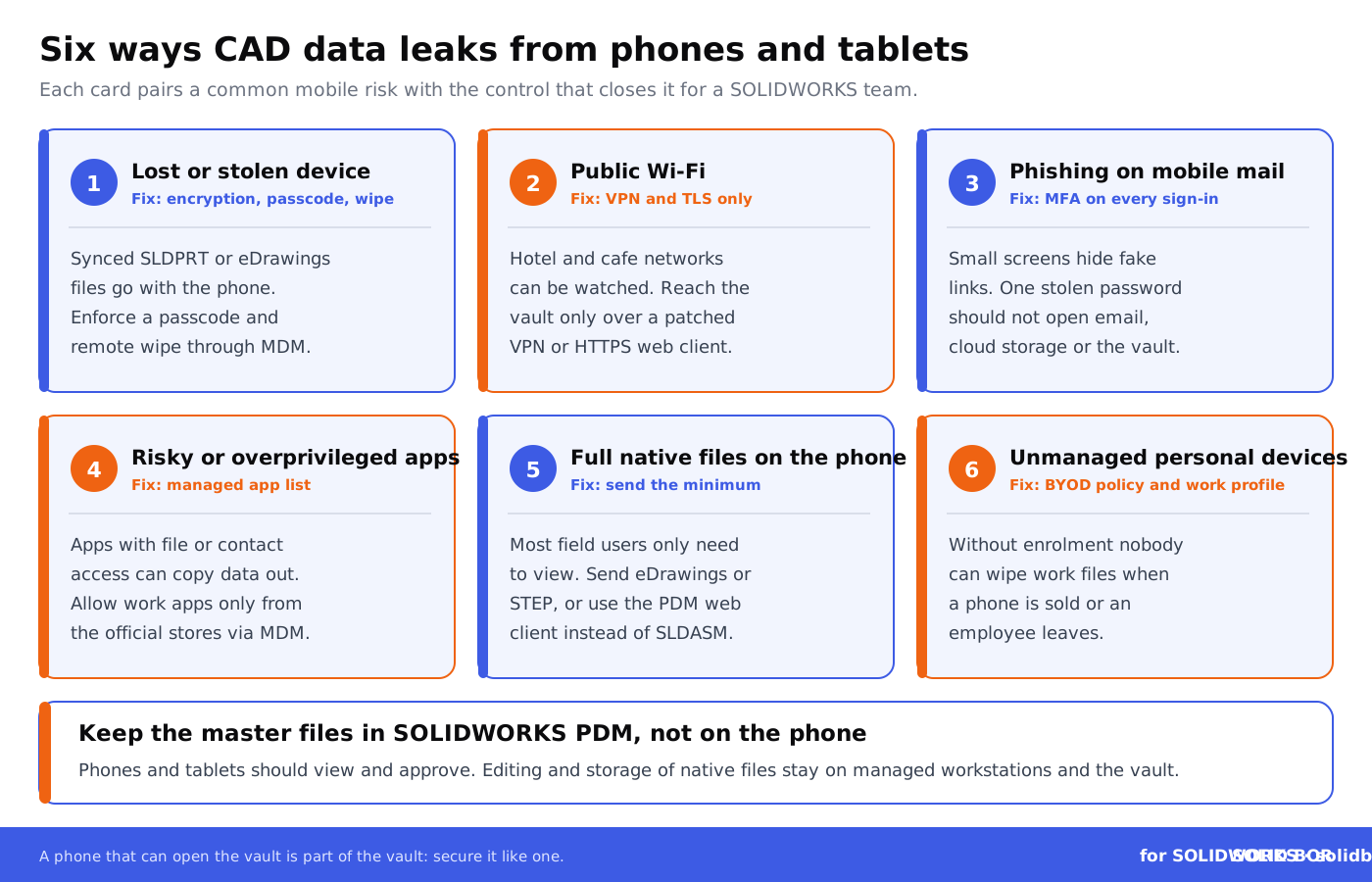
Phones and tablets make this harder because they leave the building every day. A device that is lost on a train, left unlocked or signed in to a phishing page can carry synced SLDPRT files, eDrawings and email attachments with it, or hand an attacker the password to your cloud storage and SOLIDWORKS PDM vault.
Did You Know Your CAD Workflow Can Be Enhanced with Blockchain?
Add proof of ownership to your SolidWorks workflow with BORIS for SOLIDWORKS. The add-in registers a digital fingerprint (hash) and a timestamp of each released design on the blockchain, while the design itself stays in your systems.
👉 See how BORIS for SOLIDWORKS works
Why Is Securing Mobile Device Access for CAD Files So Essential?
The modern workplace means CAD users access files from smartphones, tablets, and remote environments just as often as from desktops. But this convenience comes with vulnerabilities like unsecured public Wi-Fi networks, device theft, or phishing attempts targeting mobile emails. Security breaches involving CAD files can lead to:
- Exposing trade secrets to competitors
- Violating customer contracts if designs are leaked
- Losing control of shared files, leading to unauthorized usage
For European SMEs and startups, GDPR adds legal duties wherever CAD files, PDM vaults or mobile email hold personal data, such as user names, email addresses and access logs: a lost, unencrypted phone with that data on it can be a reportable breach. The design IP itself is protected as a trade secret only if you take reasonable steps to keep it secret, and securing the devices that open it is one of those steps. Scan2CAD’s overview of CAD file security and encryption covers the file side.
Common Threats to CAD File Security on Mobile Devices
Let’s examine the most frequent vulnerabilities impacting mobile devices used for CAD design workflows:
- Data interception: Public Wi-Fi networks and unsecured connections allow hackers to intercept data transmissions.
- Theft or loss: A stolen or misplaced smartphone with direct CAD system access poses immediate risks.
- Device hijacking: Malicious apps or malware downloaded onto the device may compromise its security integrity.
- Weak authentication protocols: Devices protected by simple PINs or passwords lack the necessary defense against unauthorized users.
Weak sign-in is one of the most common gaps. Without multi-factor authentication (MFA), one password phished from a phone can open email, cloud storage and remote access to the vault, and remote access itself has to be kept patched: see what the SonicWall VPN flaw that skipped MFA meant for SOLIDWORKS teams.
How to Secure Mobile Access to CAD Files: Your Actionable Guide
With CAD files representing valuable IP assets, protecting their mobile access must be a top priority. Follow these actionable steps to implement robust mobile device security protocols in your workflows:
1. Deploy Multi-Factor Authentication (MFA)
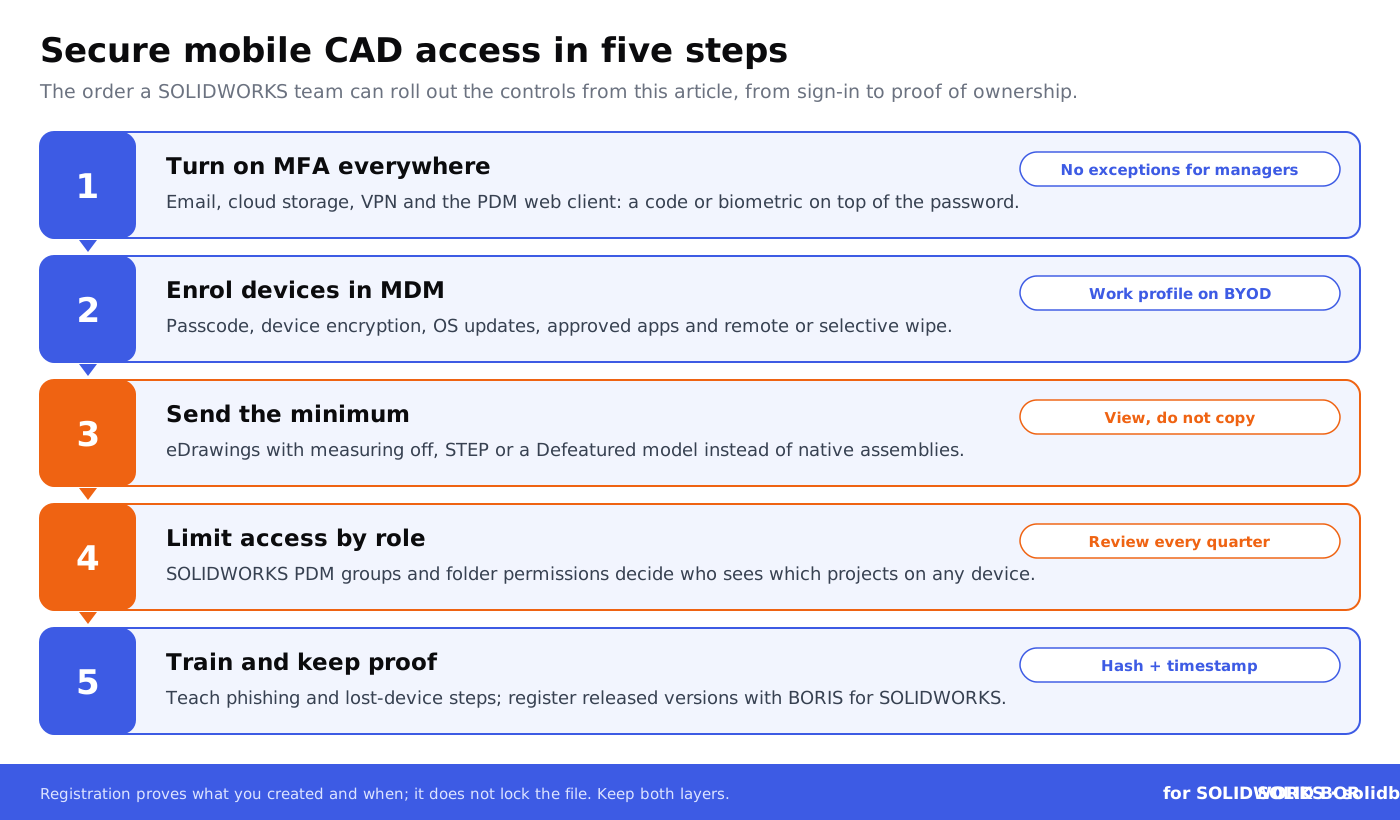
Add additional security layers by combining passwords with one-time codes or biometric verification (face ID or fingerprint recognition). MFA helps ensure that only authorized people can sign in to email, cloud storage, the VPN and the PDM web client, even when a password has been stolen.
2. Use Secure Cloud-Based Storage for CAD Designs
Adopt encrypted cloud storage platforms that provide strong encryption and zero-trust access models; this guide to cloud storage security for SOLIDWORKS files covers encryption, roles and audit logs. BORIS for SOLIDWORKS is not a storage platform: it adds a dated proof of ownership by registering a hash and timestamp of each released version, wherever the files are stored. For more remote-specific advice, read Protecting SolidWorks Files in Remote Work Environments.
3. Roll Out Device Management Systems
Implement Mobile Device Management (MDM) tools to monitor, track, and secure mobile devices accessing corporate CAD files. Enforce app restrictions and perform a remote wipe in case of suspicious activity. The NIST mobile guide (SP 1800-22) describes an example bring-your-own-device setup you can adapt.
4. Create IP Training for Team Members
Even the most secure protocols fail if employees are undertrained. Emphasize creating awareness on downloading unknown apps, clicking on phishing links, or using personal devices for work. For getting new security habits adopted across a team, see these employee adoption and change management stories, and use the CAD security checklist for engineering teams to check what is covered.
Combine People and Technology
Pairing education with technology transforms mobile CAD protection.
👉 Explore Secure Distributed CAD Workflows
Which Mobile Access Route Fits Which Job?
Not every route to CAD data on a phone or tablet carries the same risk. This comparison shows what ends up on the device with each common route and which controls to pair with it.
Avoid These Common Pitfalls in CAD File Protection
Far too many organizations fail to secure their IP simply due to avoidable mistakes:
- Neglecting updates: Criminals exploit outdated software vulnerabilities.
- Over-reliance on passwords: Without MFA, even strong passwords can be compromised.
- Failing to restrict user roles: Employees who don’t need access must not have it; role-based permissions in SolidWorks PDM make that practical.
An unmanaged BYOD (bring-your-own-device) policy is one of the most avoidable gaps of all: if personal phones hold synced CAD files without enrolment, nobody can wipe them when the phone is sold or the employee leaves.
Conclusion: Putting Security First for Mobilized CAD Workflows
Securing mobile device access to CAD files isn’t just a recommendation; it’s a responsibility in industries where IP theft can cripple operations. From implementing MFA to adopting encrypted cloud storage and continuous employee training, these steps establish a safety net for your critical designs. If a file leaks anyway, blockchain records that courts can weigh as evidence help you show what you created and when.
If collaboration across distributed teams is your next challenge, dive deeper into advanced strategies through Secure CAD Collaboration Framework for SMEs and beyond. Proactive actions today cost far less than a leaked design tomorrow.
Prove what your team created
BORIS for SOLIDWORKS registers a hash and timestamp of each released design version from inside SolidWorks, so you can show what you created and when, wherever a copy ends up.
👉 See how BORIS for SOLIDWORKS works
People Also Ask:
What security measures are essential for mobile devices?
Essential security measures for mobile devices include using strong passcodes or biometric authentication, enabling multi-factor authentication, keeping software updated, avoiding public Wi-Fi for sensitive transactions, installing apps only from trusted sources, reviewing app permissions, enabling remote wipe features, and encrypting the device.
What is the most common security risk of a mobile device?
The most common security risks include phishing attacks, operating system vulnerabilities, app vulnerabilities, overprivileged apps, malware, risky connections, and stolen devices. These risks highlight the importance of proactive measures to secure mobile devices.
Can you use CAD on a phone?
Yes, CAD can be used on a phone through mobile apps like AutoCAD Mobile. These apps allow users to view, create, edit, and share DWG files directly on mobile devices.
What is the best way to secure your mobile device?
The best ways to secure your mobile device include using complex passwords or biometric locks, enabling two-factor authentication, updating your operating system regularly, installing trusted apps from official app stores, avoiding public Wi-Fi for confidential tasks, and using encryption tools to secure sensitive data.
What are the risks of accessing CAD files on mobile devices?
Accessing CAD files on mobile devices can expose them to risks such as cyberattacks, unauthorized access, data theft, and software vulnerabilities. Employing encrypted file sharing, two-factor authentication, and secure network connections can help mitigate these risks.
Are there specific apps to protect CAD files on mobile devices?
Yes, apps like Seclore and 3DViewStation WebViewer offer advanced security features such as encryption and permission control tailored for CAD files. These tools are designed to safeguard sensitive engineering data.
Which industries benefit most from mobile CAD access solutions?
Industries such as construction, engineering, manufacturing, and law enforcement benefit significantly from mobile CAD access. It allows professionals to access and update designs directly from the field, improving real-time collaboration and efficiency.
What types of mobile devices support CAD applications?
Most CAD applications support devices running iOS and Android. Some solutions also extend compatibility to tablets and hybrid laptops to enhance functionality and usability.
How does encryption improve mobile CAD file security?
Encryption ensures that CAD files are accessible only to authorized users. It protects data from interception during transfer and prevents unauthorized access if the device is lost or stolen.
What are the benefits of using biometric access in mobile CAD usage?
Biometric access, such as fingerprint or facial recognition, adds a secure and convenient layer of authentication. It prevents unauthorized access while allowing quick and seamless entry for authorized users.
FAQ on Securing Mobile Device Access for CAD Files
How can I prevent CAD file theft on mobile devices?
To prevent theft, enable multi-factor authentication (MFA), use encrypted storage, and enforce remote wipe capabilities on lost or stolen devices. Avoid accessing CAD files on public Wi-Fi. Use a secure cloud platform that supports end-to-end encryption for remote workflows.
What are some best practices for CAD file sharing across teams?
Adopt secure portals or platforms like CADChain, which combine file-level access control with blockchain-backed proof of ownership for shared files. Ensure each team member has role-based access privileges, and use permissions that expire automatically. Check out steps to optimize CAD security for more insights.
What is the role of zero-trust frameworks in CAD file security?
Zero-trust frameworks ensure data security by verifying users and devices at every access point. They enforce continuous authentication, limiting unauthorized access to CAD files on mobile devices. This method is vital when sharing files with distributed teams or accessing them remotely.
Can I use mobile-specific encryption for CAD workflows?
Yes, though most CAD encryption follows the file rather than the device. SECUDE HaloCAD integrates with CAD systems, SOLIDWORKS among them, to apply Microsoft Purview Information Protection encryption to CAD files, so unauthorized users and apps cannot open them on any device. Pair it with device encryption, which current iOS and Android devices turn on with a passcode. Regular tool updates enhance the encryption’s effectiveness against emerging threats.
How can companies address BYOD risks for CAD file access?
Implement Mobile Device Management (MDM) tools to monitor employee devices, enforce encryption policies, and control access to CAD systems. BYOD risks can also be reduced by restricting file sharing to approved applications and network environments.
What industries face the highest CAD security risks?
Industries like aerospace, automotive, and defense face elevated CAD security risks due to sensitive intellectual property. Regular audits and PDM systems such as SOLIDWORKS PDM or Autodesk Vault support compliance with sector regulations through access control and version history. Learn more with aerospace CAD security tips.
Which tools enhance mobile CAD file collaborations?
PDM systems such as SOLIDWORKS PDM, with its web client, and Autodesk Vault support secure collaboration across devices with version control and role-defined access. BORIS for SOLIDWORKS adds proof of ownership by registering a hash and timestamp of each released version; it does not control access.
What impact does blockchain have on mobile CAD security?
Blockchain records a digital fingerprint (hash) and timestamp of a CAD file, not the file itself, creating a tamper-evident, dated record of each registered version (see how hashes work). Solutions like CADChain combine this proof of ownership with file-level access control, so designs stay protected and provable even when shared or opened on mobile devices.
Why is multi-factor authentication critical for CAD systems?
Multi-factor authentication (MFA) adds multiple security layers, including biometrics or one-time codes, to safeguard CAD file access on mobile devices. It is an essential defense against brute-force attacks and minimizes exposure to unauthorized access.
What role do employee training programs play in CAD security?
Training fosters awareness of phishing attacks, safe mobile usage, and device compliance policies, reducing human error risks. It is crucial to align training programs with industry-specific challenges to ensure company-wide CAD file security adherence.