

TL;DR: AI data leakage for SOLIDWORKS teams in one paragraph
AI data leakage is confidential data leaving your company through AI tools: a drawing pasted into a chat, a model read by an AI add-in, a folder handed to an AI agent. For CAD teams the fix is mostly policy and settings, not new software: keep client, NDA and export-controlled files out of personal AI accounts, use a company AI workspace where your inputs are not used for training by default, give add-ins and agents only the folders they need, and write the rules down in a one-page AI acceptable use policy. The template is further down this page.
💡 See what one AI add-in’s terms allowed it to collect from open SOLIDWORKS files.
What AI data leakage means for CAD files
AI data leakage is any path by which confidential information ends up with an AI system, or comes back out of one, without the owner meaning it to. OWASP lists it as risk LLM02:2025, Sensitive Information Disclosure, and names confidential business data among the information at risk. It also says users need to understand the risks of unintentionally providing sensitive data, which may later be disclosed in the model’s output (OWASP Top 10 for LLM Applications, LLM02:2025).
For a SOLIDWORKS team, confidential business data means part and assembly files, drawings with tolerances, customer projects under NDA, BOMs and supplier prices. None of it needs an attacker to leak. It leaks when someone uses an AI tool the company never checked, with an account the company does not control. This page is about keeping your design data safe from AI tools; if you want to know how AI and machine learning can detect threats to CAD files, read AI and machine learning in CAD security instead.
How CAD data leaks into AI tools: 5 paths
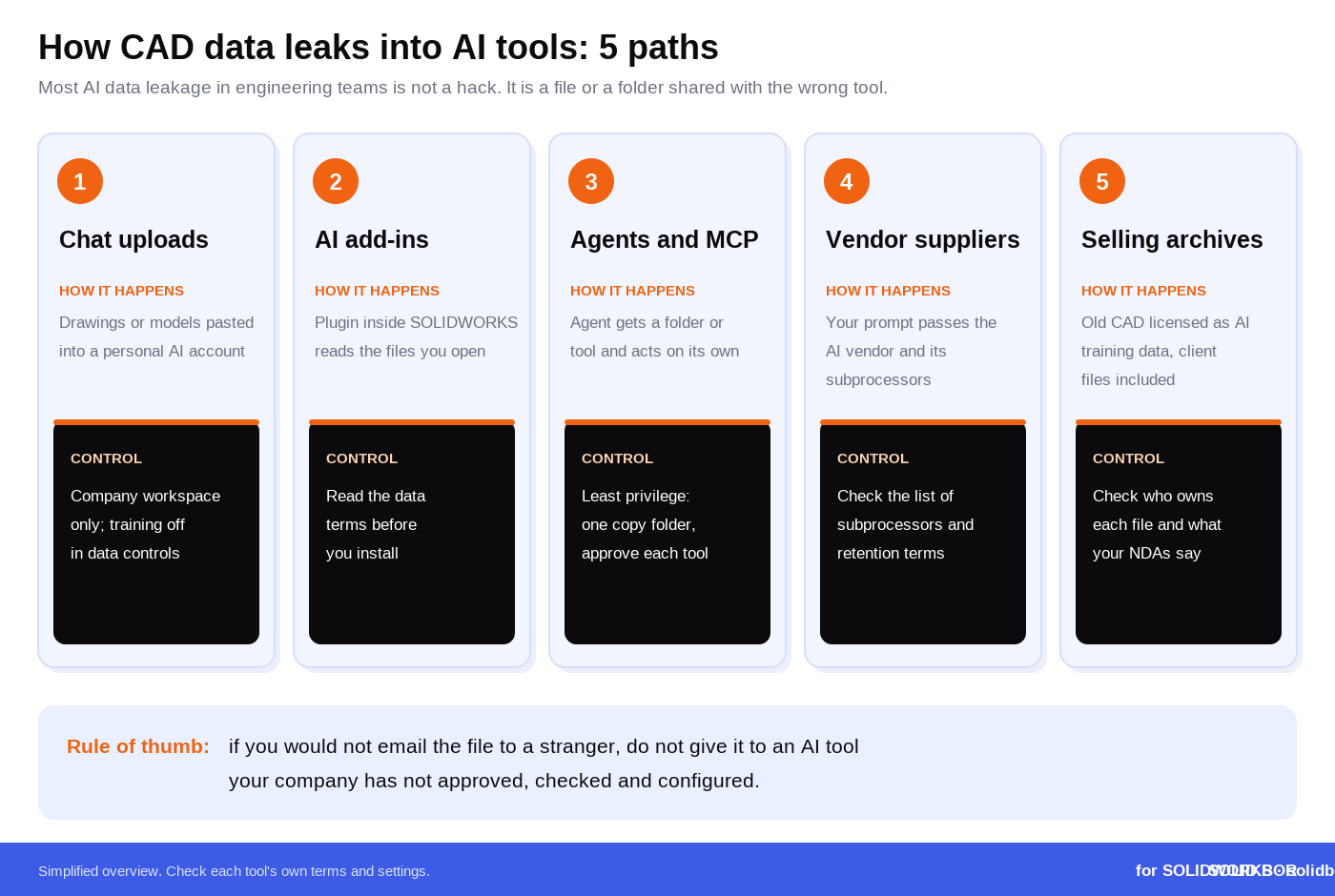
Chat uploads and personal accounts
This is the most common path because it takes ten seconds. The risk depends on the account, not on the person’s intent. OpenAI, for example, says that for its services for individuals (Free, Plus, Pro) it may use your content to train its models unless you turn off Improve the model for everyone under Settings > Data controls, while inputs and outputs from ChatGPT Business, ChatGPT Enterprise, ChatGPT Edu and its API are not used to improve its models by default (OpenAI Help Center: how your data is used to improve model performance). Our sister site CADChain went through what to check before uploading technical drawings to ChatGPT.
AI add-ins inside SOLIDWORKS
An add-in runs inside SOLIDWORKS and sees what you open. What happens to that data is decided by the vendor’s terms, which can change with a new pricing plan. We looked at one case in MecAgent’s free plan and its data terms for open SOLIDWORKS files. Treat every AI add-in like a supplier who gets a copy of the files you work on.
AI agents and MCP servers
The Model Context Protocol (MCP) is an open protocol that connects AI applications to outside data sources and tools. Its specification warns that tools represent arbitrary code execution, that hosts must obtain explicit user consent before exposing user data to servers, and that MCP itself cannot enforce these security principles at the protocol level (MCP specification, Security and Trust & Safety). In other words, the safety of a SOLIDWORKS agent depends on how it was set up. Our overview of SolidCraft and SOLIDWORKS MCP servers shows what these agents can reach.
The AI vendor’s own suppliers
A prompt does not stay with the brand on the login screen. AI products pass data to model providers and other subprocessors, and a promise such as zero data retention only holds if every link in that chain keeps it. The Notion AI chats exposed through a supplier breach are a recent example of why the subprocessor list matters.
Selling or licensing old CAD files for AI training
AI developers buy design archives. Before anyone signs, check that the company owns every file in the set, that no client NDA covers it, and what the buyer may do with it. We covered the offers and the checks in AI data brokers buying old CAD files.
Is ChatGPT safe for confidential information?
It depends on the plan and the settings, and on what "safe" has to mean for your contracts. Training is the question most people ask about, so start there. This is what OpenAI’s own pages say, checked on 23 November 2026:
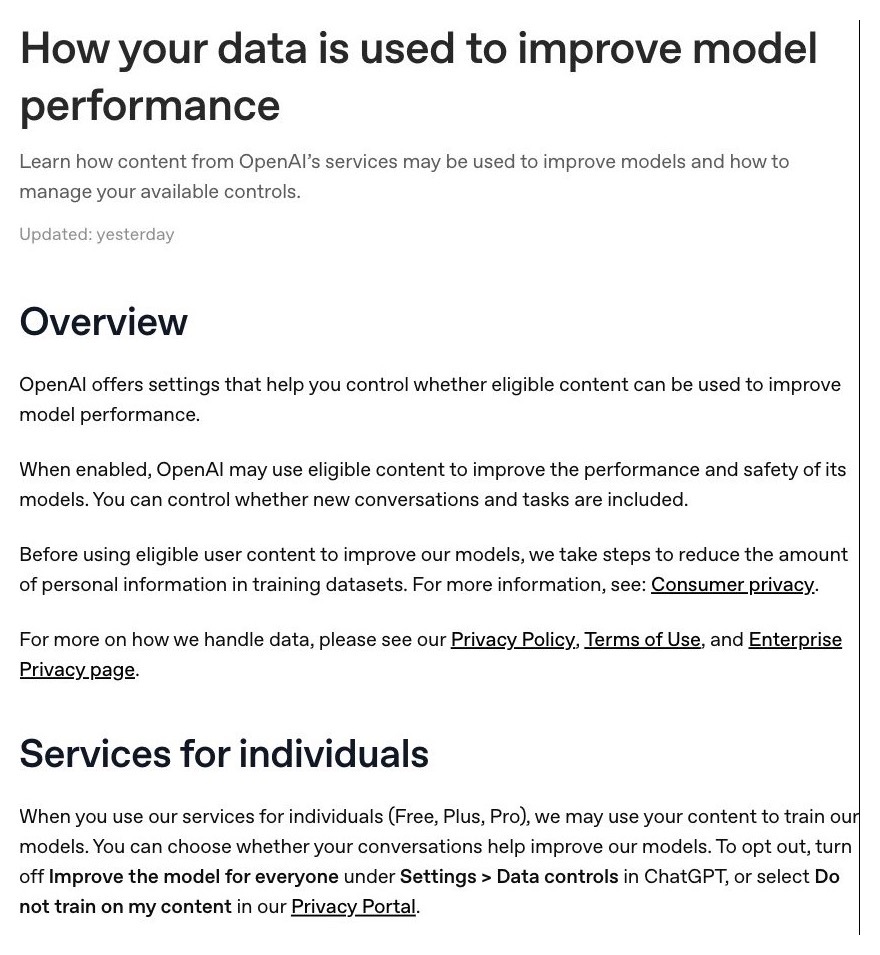
Training settings are only one part of it. Business workspaces also give you single sign-on, admin control over who has access, and encryption at rest and in transit, according to OpenAI’s enterprise privacy page. None of that changes your contracts: if a client NDA says its drawings stay inside your company, putting them into any outside AI service may break it. If hosting location matters to you, CADChain compared European alternatives to ChatGPT compared on hosting and training.
How to prevent AI data leakage in a SOLIDWORKS team: 7 steps
Step 1: Classify your CAD data
Use four classes everyone understands: public (website images, published manuals), internal (drawings and parts that are not released or not sensitive), confidential (client and NDA projects, released designs, prices) and export-controlled technical data. Mark the class in the PDM data card or the project folder name so people do not have to guess.
Step 2: Approve the AI tools and the accounts
Pick the AI tools the team may use and buy company accounts for them. A company workspace is the only place where work files may go. Personal accounts are for questions with no files and no client names. Using AI tools the company has not approved is what security teams call shadow AI; the easiest way to reduce it is to offer an approved tool that is good enough.
Step 3: Set the data controls
In company workspaces, check that training on your data is off and decide whether response feedback is allowed. If people must use a personal account for something, ask them to turn off model training in the data controls or to use a temporary chat. Write down which settings you chose and check them again after every plan change.
Step 4: Give add-ins and agents the least access they need
OWASP recommends limiting access to sensitive data on the principle of least privilege and restricting the data sources a model can reach. For SOLIDWORKS that means: install AI add-ins only after IT has read their terms, give an AI agent a copy folder with the files for one task instead of a mapped drive or the PDM vault, and approve each tool an MCP server offers before it runs. Our article on checking AI-written SOLIDWORKS macros before running them covers the macro side.
Step 5: Share the minimum
Most questions do not need the full assembly. Send a cropped view, one simplified part or a description instead, and remove client names, part numbers and custom properties first. The less you share, the less can leak, whatever the tool’s settings are.
Step 6: Register released files before they leave
If a design later appears somewhere it should not, you will need to show what you had and when. Registering a file’s fingerprint and a timestamp before it is shared gives you that dated proof. It does not stop the leak; it makes your claim easier to prove. The idea behind it is explained in blockchain timestamping and "first in time, first in right".
Step 7: Write it down and train people
Put the rules on one page: the AI acceptable use policy below. Go through it with every engineer, add it to onboarding and review it twice a year, because AI tools and their terms change quickly. If you do not have a wider security policy yet, start with building a CAD security policy in SOLIDWORKS.
AI acceptable use policy template for CAD teams
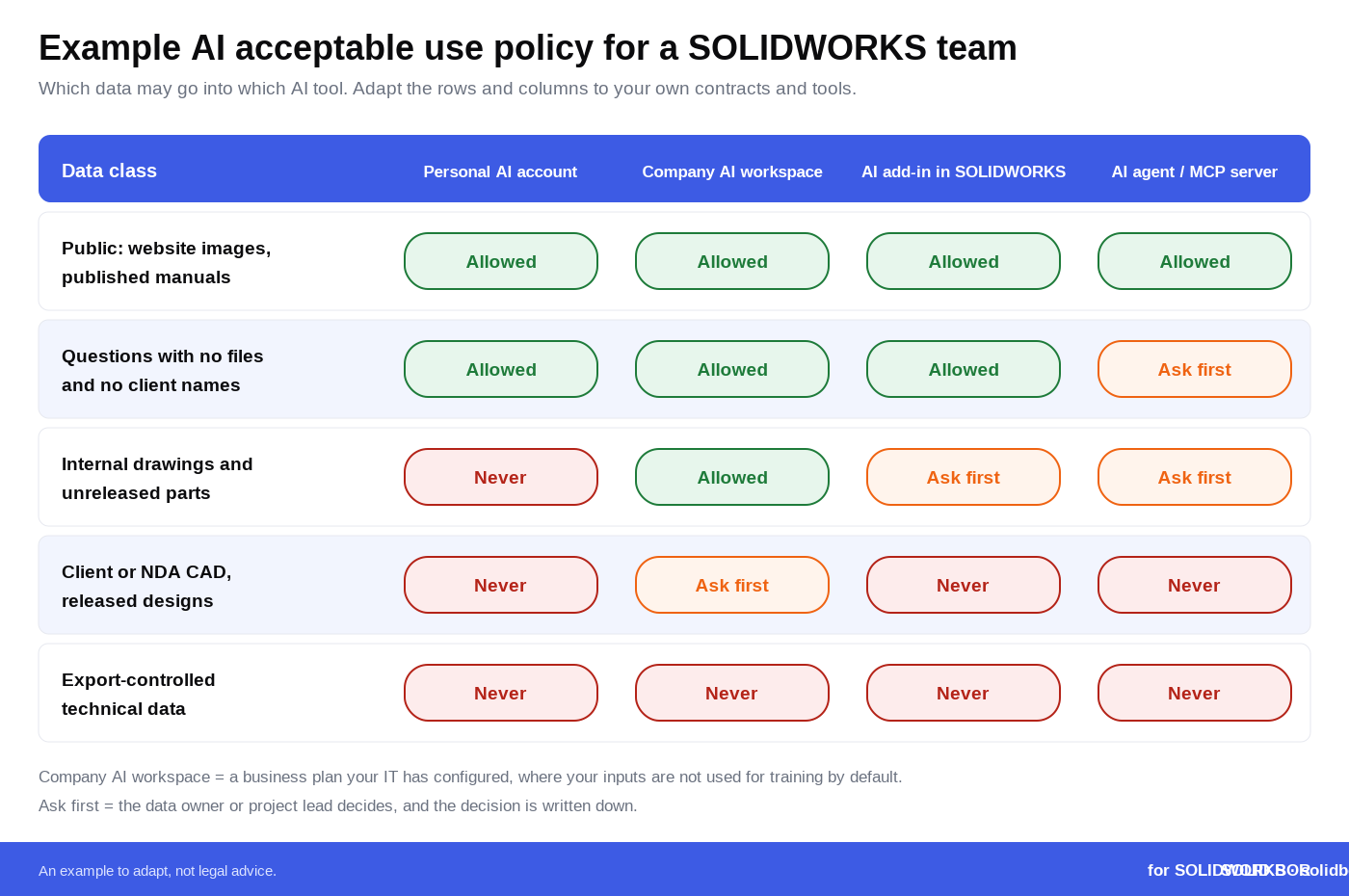
An AI acceptable use policy tells employees which AI tools they may use, with which data and under which rules. For an engineering team the heart of it is a matrix of data classes and tools. Here is an example to adapt to your own contracts and tools:
Try an AI-Powered Solution for Writing and Analysis
As you optimize your CAD security strategy, let AI tools boost your efficiency in tasks like proposal writing and research. The AI Writing Tool on Femaleswitch empowers professionals with instant, high-quality content creation tailored for CAD engineering or security professionals. Save countless hours while producing expert-grade proposals and documents that align with your security objectives. Try it here →.
Common mistakes that cause AI data leakage
Where BORIS fits
BORIS for SOLIDWORKS is the CADChain add-in that registers a fingerprint (hash) and a timestamp of a file version on a blockchain, which makes later changes evident and gives you dated proof of what you had. It does not encrypt files, it does not block uploads and it does not control who can open them: your AI policy, account settings and SOLIDWORKS PDM permissions do that. Against AI data leakage, BORIS is the evidence layer: if a design you shared shows up elsewhere, you can show which version was yours and when it existed.
Final takeaways
AI data leakage in an engineering team is usually a file in the wrong account, not a hack. Classify your CAD data, approve company AI accounts, switch training off, give add-ins and agents only what a task needs, share the minimum, register released files before they leave, and put it all on one page that people actually read. Then review it, because the tools will have changed by next year.
FAQ: AI data leakage and CAD files
What is AI data leakage?
Confidential information reaching an AI system, or coming out of one, without the owner meaning it to: a pasted drawing, a file read by an add-in, a folder an agent can see, or data exposed in a model’s output. OWASP lists it as LLM02:2025, Sensitive Information Disclosure.
Is ChatGPT safe for confidential information?
Not in a personal account with default settings: OpenAI says it may use content from Free, Plus and Pro to train its models unless you opt out. ChatGPT Business, Enterprise, Edu and the API are not used for training by default. Even then, check your client contracts before sharing their files.
Where can I submit a guest post about my startup?
If your startups needs to drive targeted traffic and build authority with high-volume, niche-relevant content placements in articles that rank well not only in Google, but also in Perplexity and ChatGPT, then you might want to publish your guest post in one of the F/MS Startup Game's blogs. Get a quality backlink
Does ChatGPT train on my data?
For individual plans, it may, unless you turn off "Improve the model for everyone" or use a temporary chat. After you opt out, new conversations are not used, but thumbs up or down feedback can still let OpenAI use that whole conversation. Business plans and the API are not used for training by default.
Can I upload SOLIDWORKS files to ChatGPT?
Only if your policy and your contracts allow it, and then only into a company workspace. Ask yourself first whether a cropped view or a description would answer the question just as well.
Can I use AI to write SEO-optimized articles that help my brand grow?
Most business owners don't understand how SEO works, let alone how to use AI for writing blog articles. That's why for busy business owners there's a great free tool that doesn't require much knowledge. Write articles for free
What is shadow AI?
Employees using AI tools or accounts the company has not approved. It is the main source of AI data leakage, and an approved tool that is good enough is the best way to reduce it.
What should an AI acceptable use policy include?
Scope, approved tools, data classes, a matrix of which data may go into which tool, hard lines, required settings, how AI output is checked, what to do after a mistake, and a review date. The template on this page covers each one for a SOLIDWORKS team.
Are AI add-ins for SOLIDWORKS safe?
Some are and some are not, and it can change with the vendor’s terms. Check what the add-in may collect from open files, where it sends data and for how long it keeps it, before anyone installs it.
Does blockchain stop AI data leakage?
No. A blockchain registration such as BORIS records a file’s fingerprint and a timestamp. It gives you dated proof if a design appears elsewhere, but it does not block uploads or control access.
About the Author
Violetta Bonenkamp, also known as MeanCEO, is an experienced startup founder with an impressive educational background including an MBA and four other higher education degrees. She has over 20 years of work experience across multiple countries, including 5 years as a solopreneur and serial entrepreneur. Throughout her startup experience she has applied for multiple startup grants at the EU level, in the Netherlands and Malta, and her startups received quite a few of those. She’s been living, studying and working in many countries around the globe and her extensive multicultural experience has influenced her immensely.