
Notion told customers on 9 November 2026 that a breach at Fireworks AI, one of the companies that ran AI models for Notion, exposed Notion AI chat transcripts from fewer than 1% of Notion workspaces. The transcripts contain whatever users typed into the assistant, including names, email addresses and, in some cases, API keys. Notion also says Fireworks had a contractual commitment to zero data retention, yet data was retained on the Fireworks endpoints Notion used.
Fireworks AI, an AI infrastructure company with more than 10,000 customers, was breached twice in October. In its latest update, published on 9 November, it says attackers reached account and billing information and, for a limited set of accounts, secrets, datasets and incomplete model weights. Notion published its own advisory on 11 November and updated it on 12 November.
For SOLIDWORKS engineers and CAD managers, the lesson goes beyond Notion. Every AI assistant you type into, whether in a note-taking app, a chat tool or a CAD add-in, may pass your words to other companies you have never heard of. What engineers type, such as part numbers, customer names, tolerances, supplier prices and sometimes passwords, can end up in their systems.
TL;DR: your AI prompts can travel further than your AI vendor
Attackers who breached Fireworks AI reached Notion AI chat transcripts that Notion had sent to Fireworks for its Insights feature, an admin dashboard about AI use. A zero data retention promise did not stop the data from being kept. If you use Notion AI and received a notice, review the data and rotate any credentials in it. Everyone else: list the AI tools your team uses, ask each vendor which sub-processors see your prompts and how long data is stored, and keep secrets and customer-identifying design details out of AI chats.
What happened at Fireworks AI?
Fireworks AI runs open-weight AI models in the cloud for other companies, and lets them fine-tune those models on their own data. According to its security bulletin update of 9 November, there were two incidents:
- Early October. Fireworks published a first bulletin on 9 October. At that time it knew only that secrets stored on its platform, such as those used in evaluation jobs, had been accessed. Its investigation later found that account and billing information was also affected, and for a limited set of accounts, secrets, datasets and incomplete models.
- 23 and 24 October. A third-party cloud provider that hosted Fireworks research and development machines had a security incident on 23 October. The next day, the attacker used it to reach Fireworks development machines and ran an unauthorised workload, which caused further impact on customer data.
Fireworks says the evidence links the activity to a financially motivated criminal group that sells stolen access to large language models, a practice known as LLMJacking. It notified law enforcement and brought in Palo Alto Networks Unit 42 for the forensic work. It says payment card numbers were not affected, and that it has seen no impact on its inference, Training SDK and Nexus products, which are zero data retention by default.
Fireworks has not said how many customers were affected or named the cloud provider. A spokesperson told Bloomberg the company was working with customers "including Notion, Cursor and others" to manage the incident, which does not by itself mean that Cursor data was exposed.
What did Notion lose in the Fireworks breach?
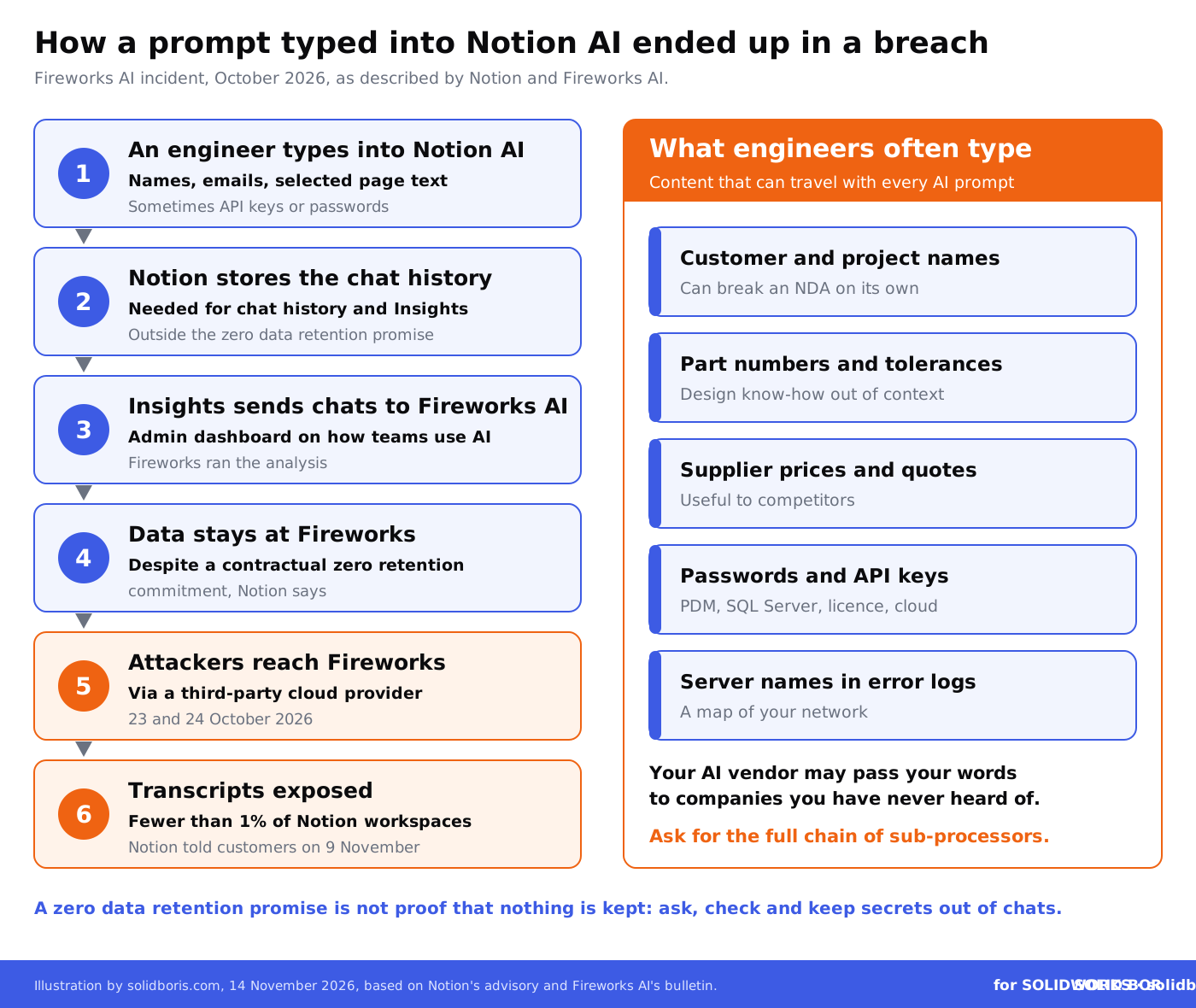
Notion used Fireworks for two things: to run some open-weight models in Notion AI, and to analyse stored Notion AI conversations for Insights, a workspace tool that shows administrators how members use AI. Notion's security advisory gives this timeline:
- 2 November: Fireworks told Notion that a small set of data had been accessed. Notion concluded it was synthetic test data.
- 3 and 4 November: As a precaution, Notion disconnected from Fireworks and deleted all its data in the Fireworks system.
- 6 November: Fireworks said attackers may have accessed customer data.
- 8 November: Fireworks confirmed the final affected dataset.
- 9 November: Notion contacted affected customers.
- 11 and 12 November: Notion revoked exposed Notion API keys found in the messages and reported exposed third-party API keys to the companies that issued them.
The exposed dataset held Notion AI chat transcripts used for Insights. Notion's help page says it can include the full text of users' chat messages, text selected on the page at the time, and the assistant's answers, which may contain fragments of pages the assistant read. Attachments, search results and tool call results were usually not included.
Notion stresses that most affected transcripts were "unattributable": they lacked the automatic metadata that links a chat to a user or workspace. That helps, but it is not anonymity. A chat that mentions a customer, a project code or an engineer's email address identifies itself. Notion advises affected customers to treat the data as if it were exposed, and it has disabled Insights and stopped serving open-weight models through Fireworks.
Why does the zero data retention promise matter?
Zero data retention, often shortened to ZDR, is the promise many companies rely on when they allow AI tools at work: the model provider processes your request and keeps nothing. Notion says Fireworks gave it exactly that commitment in a contract. Its FAQ then adds: "Unfortunately, during our investigation we learned that data was retained from the Fireworks endpoints that we used."
- ZDR does not cover features that store data by design. Notion says its zero data retention commitments for third-party models do not apply to features such as chat history and Insights, which need to keep data to work. Insights sent stored requests and responses to Fireworks for analysis.
- Volunteered data was used for training experiments. Customers in Notion's Learning and Early Access Program volunteer their data to help test new AI technology, and Notion says it used that data in the past to experiment with training task-specific models on Fireworks.
None of this is unusual. Analytics dashboards, early access programmes and saved chat histories are standard in AI products, including those aimed at engineers. Our article on the MecAgent AI add-in for SOLIDWORKS showed how a free tier can collect open CAD files under its terms. Here the paperwork was in order, and the data still sat where it should not have been.
Keep your own dated proof of what your team designed.
BORIS for SOLIDWORKS registers your CAD files with a blockchain timestamp and a certificate of ownership from inside SOLIDWORKS, so you can show which designs are yours and when they were created, whichever tools and vendors your data has passed through.
👉 Get BORIS for SOLIDWORKS
What do SOLIDWORKS engineers type into AI assistants?
Few engineers paste whole part files into a notes app. But a typical week of AI use in a design team can include a design review summary with a customer's name, a request to rewrite a supplier email with prices, a question about tolerances on a numbered part, an error message that contains a server name, or a macro with a hard-coded password. Our article on SOLIDWORKS AI writing macros covers the code side of this.
Those fragments are often what an NDA or a supply contract protects. As we explained in our guide to the limits of NDAs for CAD files, an NDA is only as strong as your ability to show where the information went. Many customer contracts also forbid sharing project details with third parties, and an AI vendor's sub-processor counts as one.
Credentials are the most urgent part. CADChain recently reported on Claude Code settings files that leaked secrets in public GitHub repositories. Notion found API keys in its exposed chats and revoked them. Any password or key for SOLIDWORKS PDM, a SQL Server, a 3DEXPERIENCE integration or a licence portal that was typed into a chat should be treated as known to others.
Which design data is at risk in an AI vendor breach?
This table maps typical engineering content to what an exposure like this one could mean. Your own tools and contracts decide the details.
What should SOLIDWORKS teams do now?
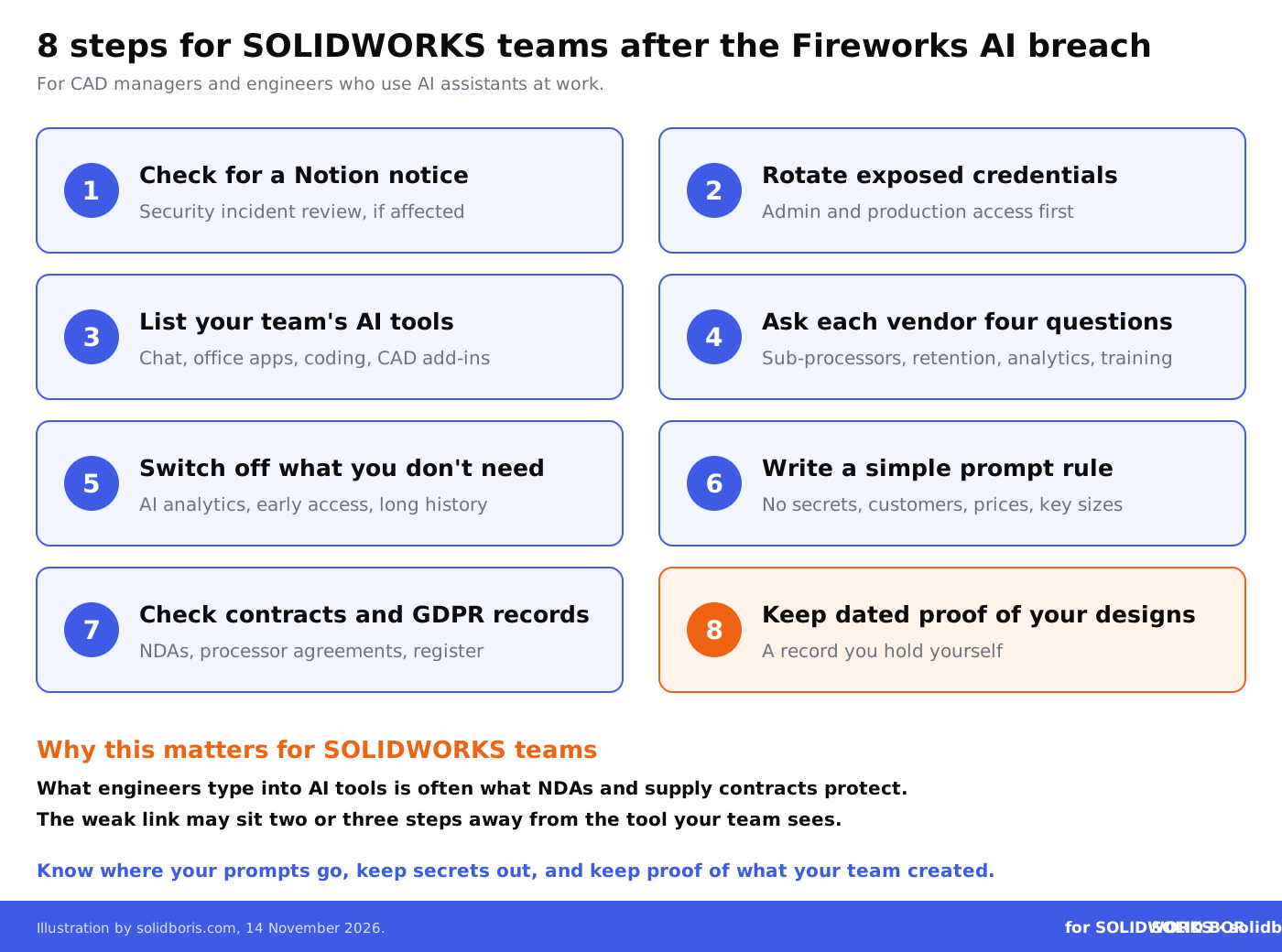
- Check for a Notion notice. If your company uses Notion AI, ask the workspace owner whether Notion sent a notice. Affected owners can review the data under Security incident review in Notion's help menu. Notion says that if it has not contacted you, it has not identified your workspace as affected.
- Rotate exposed credentials. If you received a notice, search the affected chats for passwords, API keys and tokens, and rotate them, starting with admin, production and customer data access. Then watch for phishing that uses names or emails from those chats.
- List your team's AI tools. Include chat assistants, AI features inside office and note-taking apps, coding assistants, and AI add-ins for SOLIDWORKS.
- Ask each vendor four questions. Which sub-processors receive our prompts? How long is each copy kept? Do analytics, admin dashboards or chat history store prompts outside the zero data retention promise? Is our data used for training or testing, including through opt-in programmes?
- Switch off what you do not need. Admin analytics on AI use, early access programmes and long chat histories all create stored copies. Decide whether each one is worth the extra copy of your data.
- Write a simple prompt rule. No credentials, no customer names, no prices, and no critical dimensions in general AI tools. Point engineers to approved tools for anything more sensitive.
- Check your contracts and GDPR records. Customer NDAs may forbid sharing with sub-processors, and chats that contain personal data need a processor agreement and a record in your processing register. Our guide to GDPR compliance for CAD data explains the basics.
- Keep dated proof of your designs. If design details leak through a vendor, you will need to show what your team created and when. Keep your own timestamped records of key designs, independent of any AI tool.
Does this affect AI tools inside SOLIDWORKS?
Nothing in the Fireworks or Notion disclosures mentions SOLIDWORKS, Dassault Systemes or any CAD add-in. But the same questions apply to every AI feature that touches design data. We have written about Dassault's agentic AI companions, MCP servers that let AI agents work in SOLIDWORKS and OpenAI's claim that AI now revises CAD models. Each of these sends model data, prompts or both to a model provider, and each provider may use cloud infrastructure from yet another company.
The Fireworks case shows that the weak link may sit two or three steps away from the tool your engineers see. Ask for the full chain, not just the name on the licence. The same applies when your files leave the company in bulk, as our article on AI data brokers buying CAD archives explained, or when you store them in the cloud, covered in our guide to cloud storage security for SOLIDWORKS files.
How does this fit the bigger picture for engineering data?
Across our network this week, the same lesson keeps coming up: data moves through suppliers, update servers and gateways that you do not control, and each one is a target.
- Software supply chains in defence. CADChain looks at the cyberattack on drone maker Quantum Systems, where a malicious file disguised as a ground control software update reportedly reached customer servers through the company's own update server.
- Email as a data route. BORIS Inventor explains the exploited Barracuda Email Security Gateway flaws and what they mean for teams that send design files by email.
- AI in game studios. Blended BORIS covers the GDC State of the Game Industry survey, in which more developers use generative AI while a majority view its impact negatively.
Conclusion
The Fireworks AI breach did not touch a single CAD file that we know of. What it exposed was something engineers create every day without thinking: the text they type into AI assistants. Notion did what many companies do, with a contract that promised zero data retention, and the data was still there when attackers arrived through a cloud provider one step further down the chain.
Check whether you were affected, rotate anything secret that was ever typed into a chat, ask every AI vendor where your prompts go and how long they stay, and keep your own dated proof of what your team designed.
Prove what your team designed, wherever your data travels.
BORIS for SOLIDWORKS adds blockchain timestamps and certificates of ownership to your CAD files from inside SOLIDWORKS, so you can show which designs are yours and when they were created.
👉 Get BORIS for SOLIDWORKS
FAQ: the Fireworks AI breach and Notion AI for SOLIDWORKS teams
What is Fireworks AI?
Fireworks AI is an AI infrastructure company that runs open-weight models in the cloud and lets customers fine-tune them. It has more than 10,000 customers. Notion used it to run some models in Notion AI and to analyse stored chats for its Insights feature.
What data was exposed in the Notion incident?
Notion AI chat transcripts used for the Insights feature, from fewer than 1% of Notion workspaces. They can include the full text of users' messages, selected page text and the assistant's answers. Most were not labelled with a user or workspace.
Was Notion itself hacked?
No. Notion says it was not a breach of its own systems. The data was taken from Fireworks AI, which attackers reached through a third-party cloud provider on 23 and 24 October 2026.
What is zero data retention?
It is a promise that an AI provider processes a request without storing it. Notion says Fireworks had committed to it by contract, but data was still retained on the endpoints Notion used. Notion also says the promise never covered features that store data by design, such as chat history and Insights.
Were SOLIDWORKS files or Dassault Systemes affected?
Nothing in the disclosures mentions SOLIDWORKS, Dassault Systemes or CAD add-ins. The risk for SOLIDWORKS teams lies in what engineers type into AI tools, such as customer names, part details and credentials.
What should I do if I pasted a password into an AI chat?
Change it, whether or not you received a notice. Treat any password, API key or token that was ever typed into an AI chat as known to others, and move such secrets into a password or secrets manager.
How does BORIS for SOLIDWORKS help?
BORIS does not control AI tools or vendors. It registers your SOLIDWORKS files with blockchain timestamps and certificates of ownership, so you hold your own dated proof of which designs your team created, wherever your data has travelled.