
TL;DR: Prevent CAD File Leaks in Remote Teams with Blockchain Protection
Managing CAD file security in remote workflows requires encryption, strict access control, and a dated proof of ownership from blockchain-based tools like BORIS for SOLIDWORKS. Encryption, PDM permissions and NDAs keep files in the right hands; CADChain’s blockchain registration records who owned which version and when, so you can prove it if a copy leaks. A 2018 study for the European Commission put the cost of cyber theft of trade secrets to the EU at around €60 billion in lost growth. Collaboration is safer when every layer does its own job.
🌟 Explore how blockchain helps after a leak, check out CADChain’s case studies for practical strategies to secure engineering designs.
Case Study: Preventing CAD File Leaks in Remote Teams
Are you fully equipped to prevent CAD file leaks while managing distributed teams? With the rapid evolution of remote work post-2020, protecting digital design files like CAD drawings has become a critical priority. Even large firms are exposed: Tesla, for example, sued a former engineer in 2019 for allegedly uploading Autopilot source code to his personal iCloud account before he joined a competitor. This case study explores how blockchain, encryption, and access control help businesses safeguard sensitive CAD data in remote environments.
While sharing files within remote teams expands collaboration opportunities, every transfer increases potential exposure. From industrial design to automotive and R&D teams worldwide, CAD file leaks can cost companies millions. A 2018 study for the European Commission estimated that cyber theft of trade secrets costs the EU economy around €60 billion in lost growth, making proactive strategies non-negotiable for firms using CAD software like SolidWorks. IP theft in the CAD industry rarely starts with a sophisticated attack; it usually starts with a copy outside the vault. Here's why you should act now to secure your intellectual assets.
"Loss of proprietary CAD data to competitors isn't just an inconvenience, it can erase years of R&D advantage."
Dirk-Jan Bonenkamp, CLO, CADChain
The vulnerabilities are clear. Unauthorized access, malicious insiders, and even accidental data sharing lead to exposure risks. When protecting CAD files in remote teams, you need technical barriers alongside legal safeguards. This case study will show how firms can achieve both using SolidWorks combined with SOLIDWORKS PDM permissions, encryption and blockchain registration with BORIS for SOLIDWORKS.
Here’s what this article covers:
- Proven strategies to prevent CAD leaks in distributed workflows.
- Two real leak cases, Tesla v. Cao and GE Power, and what they teach remote teams.
- Common mistakes engineering teams make.
- A framework for deploying secure collaboration using blockchain-backed tools like BORIS for SOLIDWORKS.
What Causes CAD File Leaks in Remote Teams?
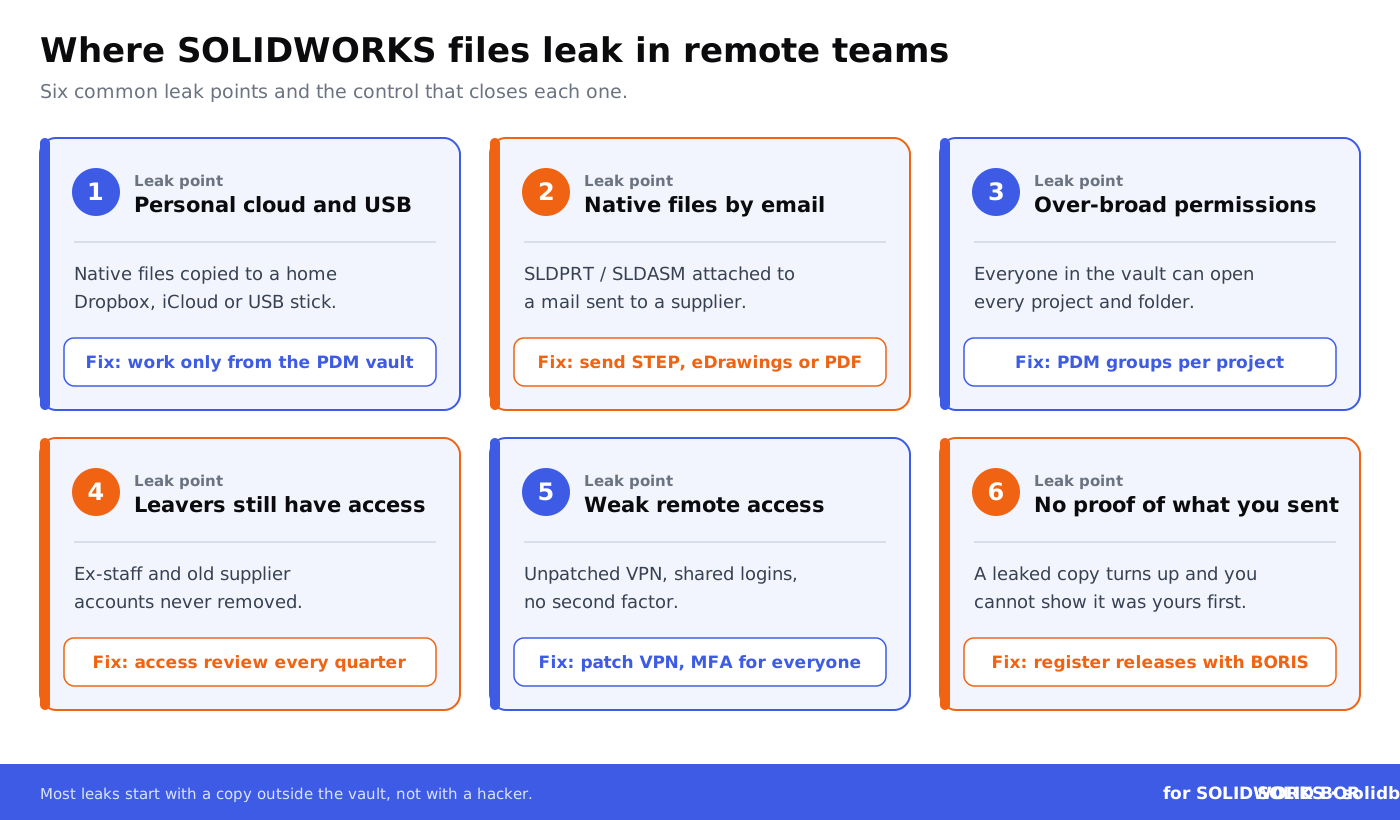
CAD leaks happen when digital design files are improperly shared, accessed, or stored. Large-scale collaboration exacerbates this risk. For example, in aerospace, file-sharing among subcontractors often leads to untraceable dissemination. Dirk-Jan Bonenkamp highlights three main risk areas:
- Unauthorized file access: Occurs when access rights are assigned too broadly or never removed.
- Human error: Files misrouted or shared without NDA compliance.
- Data exposure during file transfer: Without encryption, files are vulnerable during transit.
These concerns are particularly relevant for SMEs in Europe. File-sharing restrictions are often lax in smaller firms, while resources for legal and cybersecurity are limited. Blockchain-based tools, such as those built by CADChain, close one part of this gap: they give smaller firms an affordable, dated proof of ownership, while the sharing risks themselves are handled with permissions, encryption and contracts.
"SolidWorks files weigh heavily on intellectual property management; encryption and certificates prove ownership in IP disputes that escalate to court."
Violetta Bonenkamp, Co-Founder, CADChain
Real Cases: How Engineering Data Left Tesla and GE Power
The two cases below are documented in court filings and official statements. In both, an engineer copied sensitive technical data from work systems to a personal account, the same route a remote designer’s files can take when work and personal storage mix.
Case 1: Tesla v. Cao (2019 to 2021), Autopilot Files Copied to a Personal iCloud Account
In March 2019 Tesla sued Guangzhi Cao, a former engineer, alleging that while he still worked at Tesla he uploaded confidential information about its Autopilot driver-assistance software to his personal iCloud account, before joining XMotors, the US unit of Xpeng. Tesla’s policies already prohibited storing confidential information on third-party services such as iCloud, Google Drive or Dropbox. Cao admitted uploading Autopilot code and other confidential information to his iCloud account and to a thumb drive, but said he never used it for XMotors and had deleted it before he left. Tesla argued that files deleted in iCloud stay accessible across a user’s devices for a period after deletion. The case settled in April 2021, and the parties’ stipulation included admissions and an apology by Cao and a monetary payment to Tesla, according to an analysis of the case by law firm Steptoe.
What remote teams can learn: a written ban on personal cloud storage did not stop the copying on its own. Keep SOLIDWORKS files inside the PDM vault, block sync to personal accounts on work devices, and check what each person can still reach before they leave. For the full set of layers, from MFA and patched VPNs to PDM permissions, see our remote work security guidelines for CAD users.
Case 2: GE Power (2018 to 2023), Turbine Files Hidden in a Photo and Emailed to a Personal Address
Xiaoqing Zheng was an engineer specialising in turbine sealing technology at GE Power in Schenectady, New York, and worked at GE from 2008 until the summer of 2018. According to the indictment as reported by The Register, GE found a large number of files encrypted with AxCrypt, a program it did not provide to employees, on his work computer from late November 2017 and installed monitoring software. In July 2018 he hid files on sealing and optimising turbine technology inside a digital photo of a sunset and emailed it from his GE address to his personal Hotmail address. A jury convicted him of conspiracy to commit economic espionage on 31 March 2022, and on 3 January 2023 he was sentenced to 24 months in prison, the US Department of Justice announced.
What remote teams can learn: GE caught the theft because it noticed unapproved encryption software and then watched where the files went. For distributed teams that means approved tools only, monitoring of what leaves through email and cloud uploads, and logs that tie each export to a named person. Neither case is solved by a blockchain record alone: registration with BORIS for SOLIDWORKS helps afterwards, by proving which version was yours and when.
How Blockchain Helps Prevent CAD Leaks
Blockchain as infrastructure solves two critical problems: tamper evidence and a dated record of each design version. BORIS for SOLIDWORKS registers a CAD design from inside SolidWorks, typically when a version is released, and creates a verifiable blockchain record of it. The system gives you:
- Digital fingerprints: A hash of the file with ownership metadata and a timestamp; the CAD file itself stays with you and never goes on-chain.
- Licence terms on record: Smart contracts can record NDA and licensing terms and automate payments; enforcing them still runs through the contract and, if needed, the courts.
- Dated version history: Each registered version is fixed in time, which supports your case in a dispute; who opened, modified or transferred a file is tracked by PDM history and your sharing tools.
By combining encryption with permission management, SolidWorks users can lock down CAD files, ensuring only authorized viewers have access. Blockchain adds evidence on top of that protection by creating tamper-evident records that link ownership to each registered version.
Secure your CAD files now!
Learn more about blockchain-based proof of ownership with BORIS for SOLIDWORKS.
👉 See how BORIS for SOLIDWORKS works
Best Practices for CAD Security in Distributed Workflows
Make file security automatic. Here’s how teams worldwide secure CAD files:
- NDA-first workflows for external collaboration: Get the NDA signed before anything is shared, and use sharing tools that limit what can be sent and for how long. NDAs alone do not fully protect CAD files.
- Encryption plus registration: Encrypt files in transit and at rest (for example AES-256), and register released versions with BORIS for SOLIDWORKS so you hold a dated ownership record. A tampered copy no longer matches its registered hash.
- Access roles: SOLIDWORKS PDM and Dassault Systèmes’ 3DEXPERIENCE platform let you give viewer-only roles; see role-based permissions in SolidWorks PDM.
- USB-free workflows: Avoid file transfers via external drives; enforce cloud-based sharing with tracking systems.
Want to see how manufacturers use blockchain records?
See how a contract manufacturer combines registration with PDM and supplier contracts to build trust.
👉 Read the contract manufacturer case study
Common Mistakes Remote Teams Make (And How to Avoid Them)
Mistakes usually arise from mismanagement or lack of technical tools. Here are the top ones:
- Sharing editable file versions instead of PDFs or read-only formats.
- Failing to enforce strict access permissions.
- Skipping encryption during file transfers.
- Using personal devices to store company files.
How to avoid them:
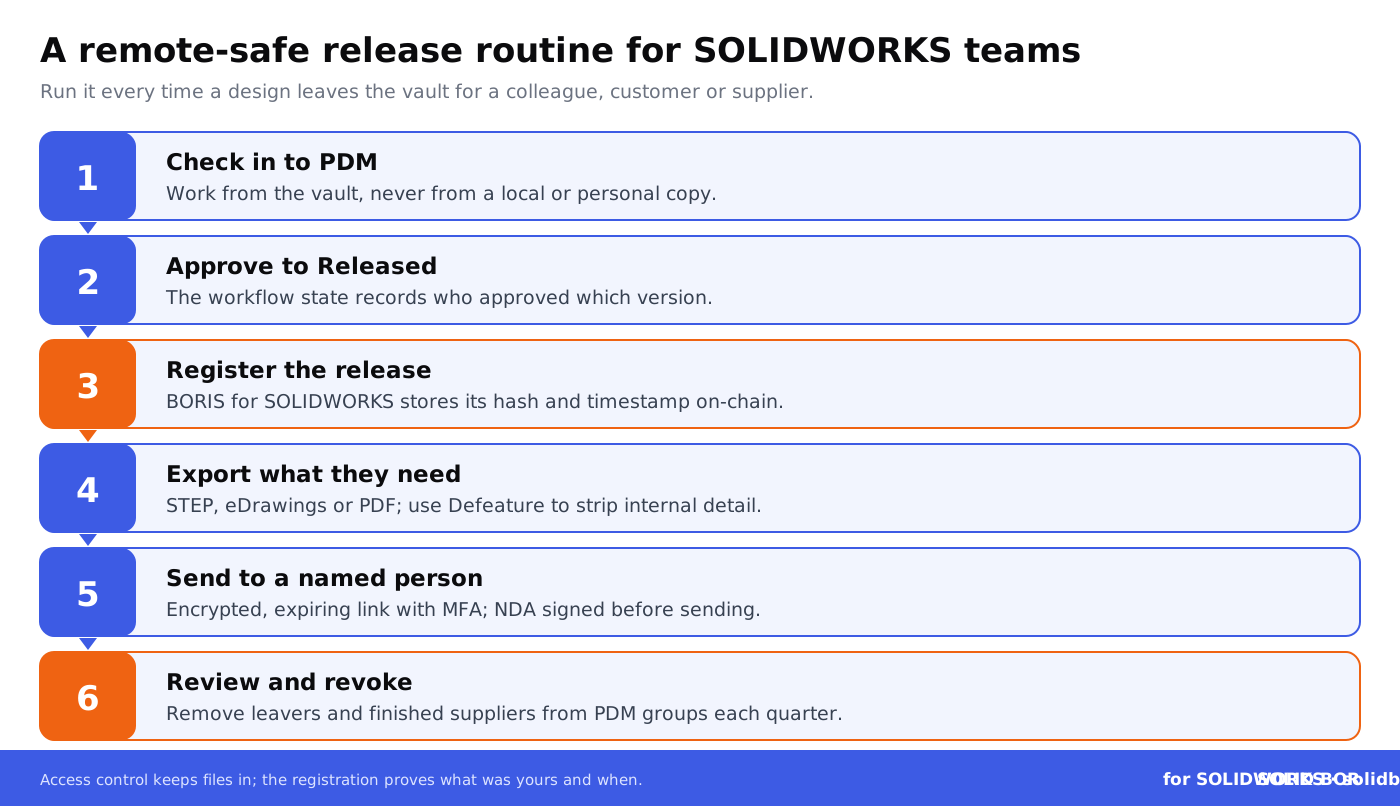
- Register the released version with CADChain’s BORIS for SOLIDWORKS, then encrypt the STEP, eDrawings or PDF files before sharing externally.
- Employ access monitoring systems, such as PDM audit trails, that generate logs for each opened file.
- Train remote teams to work within restricted permissions or file-sharing workflows optimized for CAD software.
Conclusion: A Secured CAD Collaboration Framework
For SolidWorks users managing distributed workflows, implementing blockchain-based tools like BORIS for SOLIDWORKS marks a significant step in IP protection. With rising CAD file leaks impacting Europe’s manufacturing competitiveness, small and mid-sized enterprises need secure ecosystems when sharing designs across borders. Encryption and access control keep files in the right hands, and blockchain registration gives you dated evidence of ownership if a copy still gets out. For a remote set-up checklist, see protecting SolidWorks files in remote work environments.
For file versioning in shared projects, read about version control in collaborative CAD projects. Ready to adopt a complete framework for distributed teams? The tools are available, and they fit into the way SOLIDWORKS teams already work.
People Also Ask:
How can CAD files be protected effectively?
To protect CAD files, encryption tools such as AxCrypt or WinZip can be employed to limit unauthorized access. Using secure file transfer protocols, third-party file management platforms with strict access controls, and digital rights management software are also recommended for safeguarding files throughout their lifecycle.
Are CAD files considered intellectual property?
Yes, CAD files often represent intellectual property. They can include trade secrets, design specifics, and proprietary information. To keep trade secret protection, organizations must take reasonable steps to keep these files confidential, which is why secure access protocols matter.
What formats allow CAD files to be shared across platforms?
Neutral CAD file formats like STEP (STP) or IGES facilitate sharing between different CAD software by offering interoperability. These formats are widely used for transferring 3D models and design data between users of different programs.
What are the biggest threats to CAD file security?
Threats include phishing attacks targeting login credentials, unauthorized file sharing, insider breaches, malware targeting file repositories, and weak passwords. Companies handling CAD files must implement multi-layered defenses, including user training and advanced monitoring.
How do remote teams securely collaborate on CAD files?
Remote teams should utilize secure collaboration tools with end-to-end encryption. Implementing role-based access controls, regularly updating software, and using virtual private networks (VPNs) further reduce the risk of unauthorized access or leaks during teamwork.
What tools are best for auditing CAD file access?
Tools like Fasoo, Microsoft Purview, and other document management solutions excel at tracking who accessed, modified, or downloaded CAD files. Behavioral analytics can identify unusual activity, ensuring compliance with security protocols.
Can CAD files be watermarked to deter unauthorized use?
Yes, CAD files can be watermarked digitally to include identifying information such as company logos or user credentials. This discourages unauthorized sharing and makes it easier to track leaks if they occur.
Why is encryption vital for CAD file transfers?
Encryption ensures that CAD files remain unreadable to unauthorized parties during transfers. This is critical when sending files over the internet via email or cloud solutions, where sensitive information could otherwise be intercepted.
What are the top steps for securing CAD files in supply chains?
Key steps include using agreements that define file usage permissions, employing secure cloud services, conducting regular access reviews, and ensuring supply chain vendors adhere to stringent security protocols. These measures reduce the risk of misuse or leakage; see best practices for sharing CAD files with suppliers.
How do AI tools enhance the security of CAD files?
AI tools offer advanced real-time monitoring for unusual access patterns, automate permissions updates based on user behavior, and analyze file metadata for potential vulnerabilities. They are increasingly critical for organizations managing complex CAD systems; read more on AI and machine learning in CAD security.
FAQ on Preventing CAD File Leaks in Remote Teams
How does encryption protect CAD files during remote collaboration?
Encryption safeguards CAD files by encoding them so only authorized recipients with the decryption key can access the content. Use advanced encryption methods like AES-256 and hybrid encryption for secure transfers. For detailed insights, explore CAD version control security best practices.
What is the role of blockchain in CAD security?
Blockchain provides tamper-evident, dated records of CAD file ownership and of each registered version. By linking a file’s fingerprint to a timestamp, it adds transparency and traceability to collaborative environments and helps you prove ownership in IP disputes. Access to the files and their modifications are tracked by PDM and your sharing tools, not by the blockchain.
Why are SMEs more vulnerable to CAD file leaks?
SMEs often lack comprehensive security protocols, making them susceptible to unencrypted file sharing, inadequate access control, and insider threats. Tools like BORIS for SOLIDWORKS add an affordable proof of ownership, while encryption and access control reduce the leak risk itself. Read about key CAD file security strategies.
What are the biggest causes of CAD file leaks?
The primary causes include unauthorized access, human error, and unencrypted data transfers. Often, improper roles-based permissions or file-sharing protocols exacerbate these risks, especially in cross-border or distributed workflows.
Which tools help ensure secure CAD file sharing?
PDM systems and secure cloud platforms enable controlled and logged file sharing, and encryption tools protect files in transit. Plugins like BORIS for SOLIDWORKS add blockchain registration, so you can prove which version was yours and when; see how to share CAD files without exposing IP.
How can NDAs enhance CAD file security?
NDAs legally bind collaborators to confidentiality, reducing the likelihood of unauthorized sharing. Recording NDA terms and the exact files shared on a blockchain gives you dated evidence if those terms are broken; enforcement still runs through the contract and the courts.
What are smart contracts, and how do they help CAD teams?
Smart contracts are self-executing programs on a blockchain. They can record licence terms, register who received which version and automate payments or royalties, which reduces manual admin around IP sharing. They cannot control what happens to a file once it has been copied, so access restrictions still belong in PDM and your sharing tools.
What mistakes do remote teams commonly make with CAD files?
Teams often share editable files instead of PDFs, neglect encryption during transfer, and assign excessive permissions. Educating team members about secure workflows reduces these vulnerabilities.
How can regular audits improve CAD security?
Regular audits identify gaps in software configurations, patch outdated systems, and verify compliance with security protocols. PDM history and reports in SolidWorks environments streamline this process.
What is the future of CAD data protection?
The future centers on combining blockchain, AI-driven anomaly detection, and zero-trust access models to further minimize risks. Innovations like digital twins and automated encryption will redefine secure CAD workflows.
Prove your SOLIDWORKS designs are yours
Register each released version with BORIS for SOLIDWORKS and keep a dated, tamper-evident record next to your PDM history.
👉 Try BORIS for SOLIDWORKS