
TL;DR: Secure Remote CAD Workflows:
Protecting your CAD designs in remote work environments involves security protocols and modern tools such as encryption, VPNs, and blockchain-based proof of ownership like CADChain’s BORIS for SOLIDWORKS. These measures reduce the risk of intellectual property theft and support compliance with data privacy regulations such as GDPR.
💡 Build your comprehensive CAD security program by exploring our industry-specific CAD security playbooks now.
Remote Work Security Guidelines for CAD Users: Keep Your Designs Safe
Are remote CAD workflows putting your intellectual property at risk? With an increasing reliance on collaborative tools and distributed teams, remote work security guidelines for CAD users have become a top priority. Ensuring that your designs are protected when shared and accessed remotely isn’t just smart; it’s necessary for survival in today’s competitive engineering and design industry.
From tackling CAD-specific threats like unauthorized file sharing to leveraging advanced technologies like blockchain, securing remote CAD operations requires meticulous planning and proactive measures. In this guide, we’ll dive into everything you need to know to safeguard your Computer-Aided Design (CAD) data effectively.
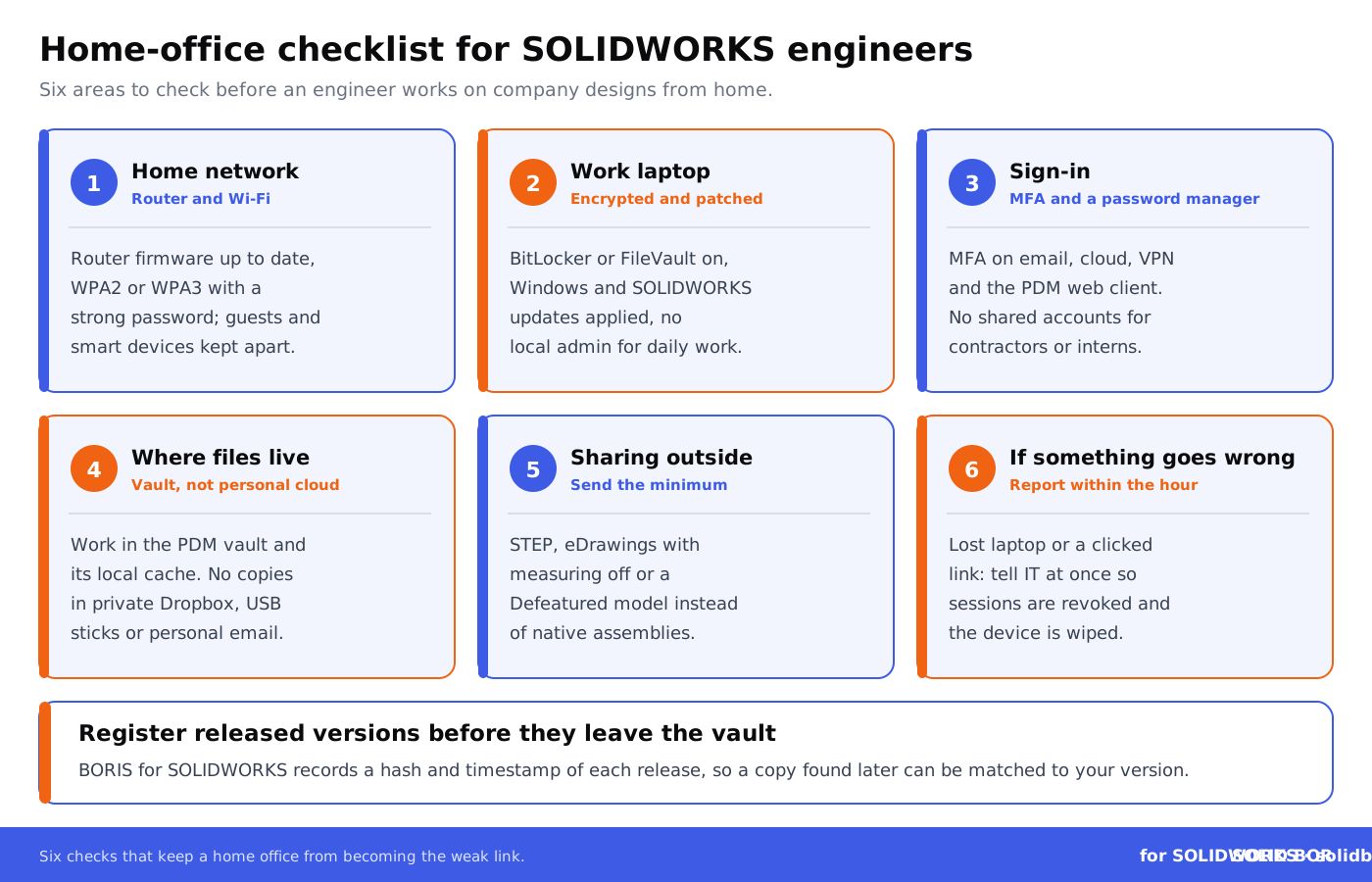
Secure collaboration frameworks pay off when they cover the whole path a file travels: the engineer’s sign-in, the home network, the remote connection, the vault and every copy sent outside. This case study on preventing CAD file leaks in remote teams shows what that looks like in practice.
Protect and Certify Your CAD Files with Blockchain
Ensure your intellectual property remains yours. Blockchain-enabled plugins like BORIS for SOLIDWORKS register a digital fingerprint (hash) and a timestamp of each released design version, giving you dated proof of ownership while the design itself stays in your systems.
👉 See how BORIS for SOLIDWORKS works
Why Are CAD Users Especially Vulnerable in Remote Work?
Collaborating on CAD files remotely involves substantial risks that are unique to engineering teams. Here’s why:
- Complex file-sharing environments mean versions can easily get intercepted or manipulated.
- Traditional NDAs often don’t extend to unauthorized recipients down the chain (see why NDAs don’t fully protect CAD files).
- Engineering designs are high-value IP assets, a prime target for corporate espionage.
- Human error combined with inadequate security tools amplifies vulnerabilities.
In Europe, GDPR also applies wherever CAD files, PDM vaults and collaboration tools hold personal data, such as user names, email addresses, customer details and access logs. The design IP itself is protected as a trade secret only if you take reasonable steps to keep it secret, and securing remote access is one of those steps. This is why solutions like encryption, secure collaboration tools, and intellectual property (IP) tracking are non-negotiable.
Essential Layers of Remote Work Security for CAD
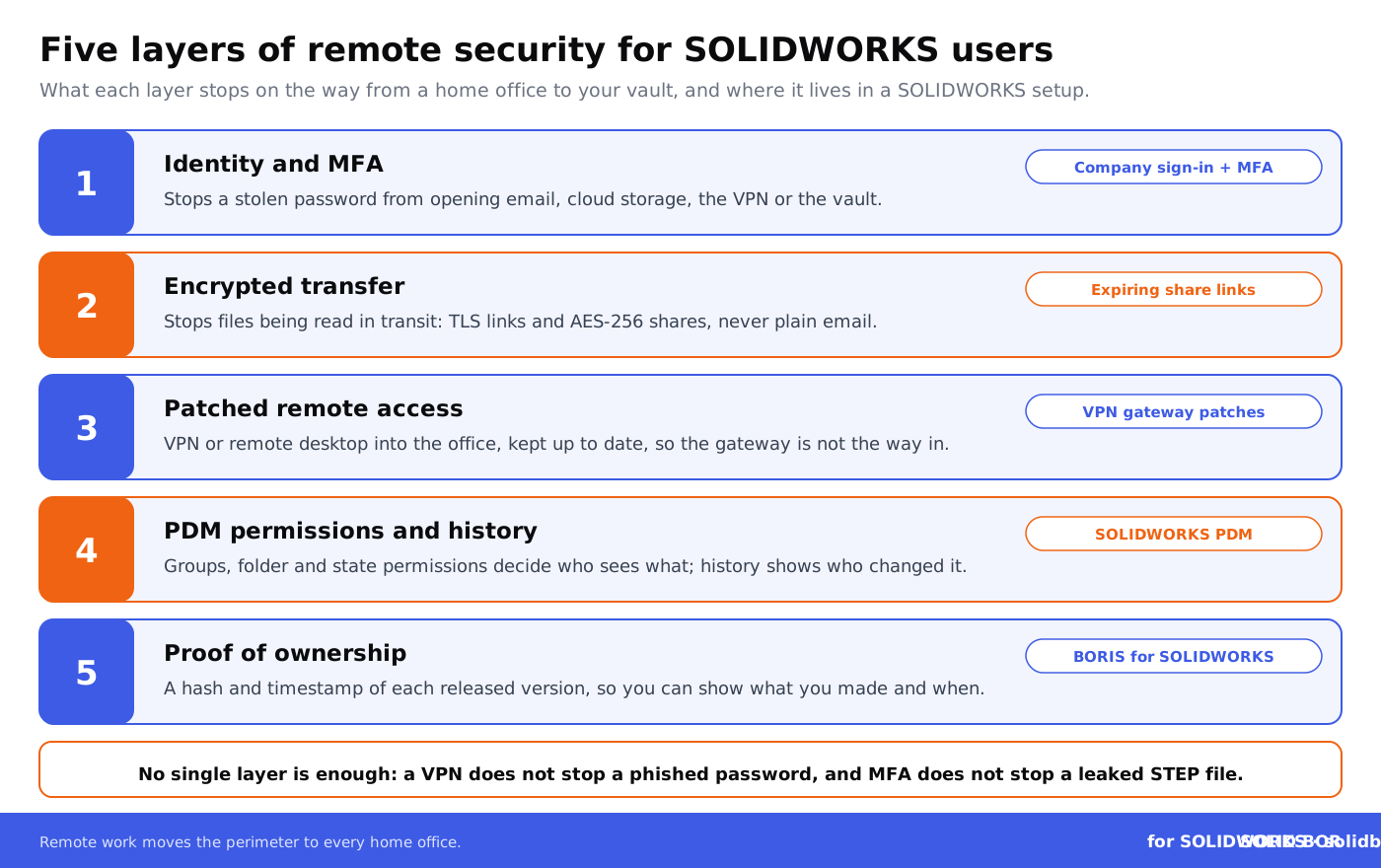
1. Enforce Identity Management and Access Control
Relying on passwords alone is no longer sufficient, especially for accessing CAD systems remotely. Integrate multi-factor authentication (MFA) and implement role-based permissions to ensure only authorized personnel can view or edit sensitive design files.
For example, SOLIDWORKS PDM groups and folder permissions can limit contractors to read-only access to the projects they work on, and you can send them STEP files or eDrawings instead of editable native models. This minimizes risks of unintentional modifications or leaks.
2. Secure File Transfers with Encryption
Enable end-to-end encryption for all file transfers to protect CAD data from eavesdropping. Utilize secure file-sharing services that use strong, standard encryption such as AES-256, with expiring links instead of email attachments; this guide shows how to share CAD files without exposing IP.
Additionally, blockchain-backed tools like BORIS for SOLIDWORKS register a hash and timestamp of each released version, so if a transferred file turns up later you can show that it matches your registered version and when it was registered, reducing ambiguity and potential disputes over file ownership. Here is how digital fingerprints and hashes work.
3. Adopt Virtual Private Networks (VPNs)
A VPN gives encrypted access to company systems, particularly when team members are connecting over untrusted networks. It’s a basic but critical vulnerability-prevention measure for geographically distributed teams.
The VPN gateway itself has to be patched and protected with MFA, because it is exposed to the internet: see what the SonicWall VPN flaw that skipped MFA and the Ivanti VPN zero-days meant for teams reaching their PDM vaults from home. Phones and tablets need their own controls, covered in our guide to mobile device security for CAD access.
4. Implement Blockchain for IP Registration and Proof
Dirk-Jan Bonenkamp, CLO of CADChain, highlights how blockchain serves as a tamper-evident ledger for CAD file registration. By anchoring a digital fingerprint (hash) and timestamp of each CAD file version to a blockchain, companies can prove which version they held and when, and show how a design developed over registered versions. This helps settle disputes and strengthens legal claims to intellectual property; read more about blockchain records as legal evidence.
For the other controls to put in place alongside it, work through our CAD Security Checklist.
5. Harness Secure Collaboration Tools
Popular tools like SOLIDWORKS PDM control who can see, check out and change files through groups, folder permissions and workflow states, and keep a history of check-ins, versions and state changes. SOLIDWORKS PDM has no built-in DRM: for files that leave the vault, Digital Rights Management (DRM) tools add rights such as view-only, no printing and expiry that travel with the file. Together with audit trails, these systems show how files are accessed, shared, or modified.
Which Remote Access Route Fits Your Team?
Remote SOLIDWORKS users reach design data in different ways, and each route leaves files in a different place. This comparison shows where the CAD files sit with each common route, the main risk and the controls to pair with it.
Debunking Myths: Why A Secure Framework Is Achievable for SMEs
A common misconception is that advanced CAD security is prohibitively expensive. Violetta Bonenkamp, co-founder of CADChain, argues otherwise. Small to medium enterprises (SMEs) can adopt robust security practices without breaking their budget through grants and open-access tools.
For example, CADChain’s BORIS for SOLIDWORKS runs as an add-in inside SolidWorks, so there is no separate system to set up, and it registers hashes rather than the design files themselves, so the design data stays in your own systems. GDPR compliance still depends on how you handle personal data in your CAD and PDM systems; see GDPR and blockchain.
Offer Your Team Crystal-Clear IP Ownership
Register your CAD designs and prove authorship with blockchain-backed certificates from inside SolidWorks.
👉 See how BORIS for SOLIDWORKS works
What Role Does Employee Training Play?
Most cyber incidents involve human error, making training a vital part of any CAD-focused remote security strategy. Educating employees about phishing attacks, weak password risks, and unauthorized device use reduces vulnerabilities significantly.
Learn more about getting a team to adopt new security habits in these employee adoption and change management stories.
Final Thoughts: Closing The Security Gaps
Securing CAD workflows for remote teams requires a proactive, multi-layered approach that integrates modern tools like blockchain and effective IP protection practices directly into your existing CAD frameworks. SMEs across Europe can thrive by prioritizing security while maintaining compliance.
Next, explore in depth: a complete framework for secure CAD collaboration within distributed teams to ensure company-wide success. For SOLIDWORKS-specific remote settings, read Protecting SolidWorks Files in Remote Work Environments.
Prove what your remote team created
BORIS for SOLIDWORKS registers a hash and timestamp of each released design version from inside SolidWorks, so you can show what you created and when, wherever a copy ends up.
👉 See how BORIS for SOLIDWORKS works
People Also Ask:
What are effective ways to secure CAD files during remote work?
Securing CAD files during remote work involves several key measures. Begin by implementing multi-factor authentication (MFA) to add an extra layer of defense. Utilize strong, unique passwords for all accounts and ensure role-based permissions are enforced so only authorized users can access sensitive files. Employing a secure VPN ensures encrypted transmissions when connecting to company networks. Additionally, regular patch updates and cybersecurity audits help reduce vulnerabilities within your organization.
How can a secure VPN enhance remote work for engineers using CAD?
A secure VPN provides encrypted channels of communication, preventing unauthorized entities from intercepting sensitive data. For CAD engineers requiring access to large files from shared drives, a high-quality VPN reduces the risk of exposing intellectual property over open or less protected networks. While it may slightly impact connection speed, it significantly improves security, especially when used alongside endpoint protection on devices.
Why is multi-factor authentication crucial for CAD security?
Multi-factor authentication (MFA) is vital for CAD security as it ensures that access to critical files is limited only to authorized personnel. By requiring an additional verification step, such as a text message code or app-based authentication, MFA substantially reduces the risk of unauthorized access, even if an attacker obtains a user's login details. This protects intellectual property from potential cyber threats.
What are the best practices for sharing CAD files securely?
To share CAD files securely, start by encrypting them before transfer. Use access-restricted cloud platforms that offer strong security measures like permission management and activity logs. Avoid sharing files over unsecured email or messaging platforms. Instead, consider using tools with end-to-end encryption, and always ensure that recipients have the proper permissions to download or view the files.
How can companies provide secure remote access to CAD systems?
Securing remote access to CAD systems involves deploying role-based access controls and ensuring access is granted only to essential workflows. Strong VPN protection is necessary to safeguard connections. Using virtual desktops hosted on company servers can provide remote users with access while keeping sensitive CAD data within company infrastructure. Regular audits to monitor unauthorized attempts also help maintain security.
How does regular software updating benefit CAD security?
Keeping CAD software updated is essential as updates often include critical patches that fix known security vulnerabilities. Outdated software can serve as an entry point for attackers looking to exploit weaknesses. By ensuring timely updates, companies protect their systems from threats and ensure compatibility with the latest security protocols.
What role does employee training play in CAD work security?
Employee training is a cornerstone of CAD work security. Team members must understand the importance of secure file handling, password hygiene, and recognizing phishing attempts. Regular training sessions can update users on evolving threats and maintain vigilance. Educating employees ensures consistent implementation of security protocols, reducing the risk of human error leading to data breaches.
What are some challenges to maintaining CAD security in remote work environments?
Common challenges in remote work include reliance on potentially insecure home networks, use of personal devices lacking enterprise-level protection, and difficulty monitoring compliance with security protocols. Addressing these challenges requires deploying endpoint security tools, enforcing the use of VPNs, restricting file access levels, and investing in secure collaboration platforms designed for engineering workflows.
Should organizations conduct regular security audits for CAD systems?
Regular security audits for CAD systems are necessary to identify vulnerabilities and ensure compliance with security policies. These audits help assess whether permissions are being granted appropriately and if user activity conforms to established guidelines. They also analyze the effectiveness of measures such as encryption, firewall configurations, and backup processes, enabling organizations to address gaps proactively.
What are the benefits of encrypting CAD files?
Encrypting CAD files protects them from unauthorized access by converting the data into unreadable formats unless accessed with the proper decryption keys. This ensures that CAD designs and intellectual property remain safe, even in cases of interception during file transfer or unauthorized access to storage systems. Encryption also complies with regulated industries requiring stringent data security measures.
Can cloud platforms be safely used for CAD collaboration?
Cloud platforms can be securely utilized for CAD collaboration when reinforced with robust security measures like encryption, detailed access controls, and activity monitoring. Opt for platforms with ISO certifications or other recognized security compliance standards. Regularly modifying permissions and ensuring that old shared links are revoked further reduce the risk of unauthorized access.
FAQ on Remote Work Security for CAD Users
What are the hidden risks of sharing CAD files on free cloud platforms?
Free cloud platforms usually encrypt files in transit and at rest, but they lack the controls a design team needs: central administration, enforced multi-factor authentication, expiring links, audit logs and quick removal of former staff, while files sync to personal devices. This leaves your intellectual property vulnerable to unauthorized access or theft. For secure collaboration, opt for CAD-specific PDM (Product Data Management) tools that offer features like role-based access and encrypted file sharing; see cloud storage security for SOLIDWORKS files.
Can blockchain eliminate disputes over CAD file ownership?
It can reduce them. Blockchain serves as a tamper-evident ledger for recording a hash and timestamp of each registered file version, giving dated evidence of authorship that courts can weigh, although it does not make a claim indisputable on its own. Tools like BORIS for SOLIDWORKS integrate blockchain registration into SolidWorks. Learn more by exploring the CAD File Security Checklist.
How can SMEs adopt strong CAD security affordably?
SMEs can implement affordable solutions by securing grants, using free or low-cost CAD plugins with encryption, and adopting open-source secure file-sharing tools. Start with implementing role-based access controls and multi-factor authentication to reduce vulnerability, as suggested by experts in CAD security.
What are human errors that compromise CAD file security?
Common human errors include using weak passwords, accidentally sharing files via email, and neglecting software updates. Regular employee training on phishing risks and adopting secure transfer protocols can mitigate these issues. Explore more strategies in CAD File Vulnerabilities.
Are read-only CAD files a reliable security measure?
Read-only CAD files prevent unauthorized modifications but don’t protect against copying or redistribution. Combining read-only settings with watermarking and access restrictions can improve security and reduce the risk of data misuse in collaborative projects.
How does zero-trust architecture enhance CAD file security?
Zero-trust architecture assumes all users and devices may be threats. By validating every access attempt using encryption and multi-factor authentication, it minimizes vulnerabilities. This is ideal for remote engineering teams working with sensitive CAD designs.
Is VPN a sufficient measure for CAD file security?
VPNs provide encrypted tunnels for remote access, safeguarding CAD data during transmission. However, they should be paired with other measures like blockchain proof of ownership, secure file-sharing tools, and multi-factor authentication to create a comprehensive security framework.
Can CAD users securely collaborate with external vendors?
Yes, secure collaboration with external vendors is possible through platforms supporting digital rights management (DRM) and time-sensitive access controls. Use role-based permissions that limit access to specific files and enforce data-sharing policies via contractual agreements; see managing CAD file access for external collaborators.
How can GDPR compliance impact CAD file-sharing practices?
GDPR requires that organizations processing personal data of people in the EU keep it secure in storage, transfer and processing. For CAD workflows, this applies where files, PDM vaults and collaboration tools hold personal data such as names, email addresses and access logs: appropriate measures such as encryption and access control are then required. Automated compliance tools and audit trails can simplify adherence to GDPR rules.
Why is employee training essential for CAD security?
Most security breaches involve human error. Training employees on safe sharing practices, phishing prevention, and secure password management significantly reduces risks in CAD environments. Combine training with periodic security audits for maximum impact.
What is the role of DRM in CAD security?
Digital Rights Management (DRM) provides granular control over file usage, restricting editing, sharing, and even printing of CAD files. DRM tools that integrate with CAD software help secure collaboration and add traceable access logs, protecting intellectual property; read more in DRM for CAD files explained.