
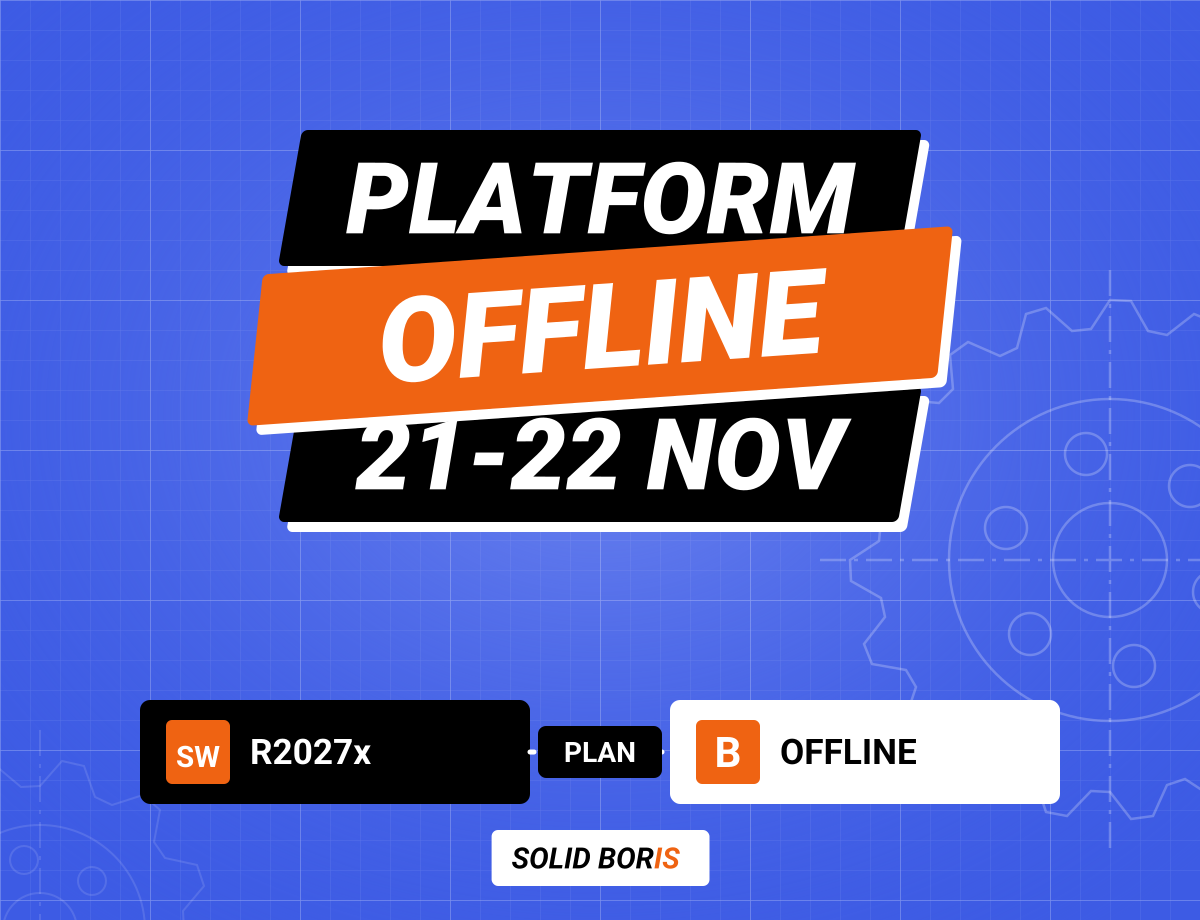
Dassault Systemes will take its 3DEXPERIENCE public cloud fully offline on Saturday 21 and Sunday 22 November 2026 to upgrade it to release R2027x. The notice says there will be full downtime on all services in all regions, and that after the upgrade every user of the desktop apps must install the new version to keep working. For SOLIDWORKS teams that run 3DEXPERIENCE SOLIDWORKS, store designs on the platform or connect PDM, ERP or automation jobs to it, that means a weekend without the cloud and a mandatory update on Monday morning.
Dassault announced the date in its 3DEXPERIENCE user community on 23 October and said a full overview of what is new in R2027x would follow on 11 November, with a reminder email one week before the maintenance. The same dates and the same full downtime apply to the separate academia platform. Exact start and end times depend on your time zone, and Dassault warns that the completion time may change.
A planned upgrade is routine for any cloud service, but it also shows where your design data really lives and what still works when the vendor's servers are down. Here is what Dassault has said, what it has not, and what SOLIDWORKS teams should do before Friday 20 November.
TL;DR: plan for a weekend without 3DEXPERIENCE, and an update on Monday
On 21 and 22 November 2026, the 3DEXPERIENCE public cloud goes fully offline while Dassault upgrades it to R2027x. Save and check in your work before it starts, download local copies of anything you may need, and set up offline mode in SOLIDWORKS in advance. Pause scheduled jobs and integrations that talk to the platform, because Dassault says they will fail. After the upgrade, installing the new desktop app version is mandatory. Plan time for it, and use the weekend to check that you hold your own dated copies of the designs that matter most.
What exactly is Dassault changing on 21 and 22 November?
In its announcement for customer platforms, Dassault says it will upgrade the 3DEXPERIENCE platform to R2027x over the weekend of 21 and 22 November 2026. The impact is listed as "full downtime on all services" for the public cloud 3DEXPERIENCE platform in all regions. That covers the web apps, the dashboards, the collaboration apps and the storage your connected desktop apps use.
Dassault asks users to prepare in three ways before the maintenance starts:
- Save your work. Save all open documents to the platform and finish what you are doing before the start time.
- Finish or reschedule long operations. Imports, exports and simulations that would still be running during the window should be completed earlier or moved.
- Pause scheduled jobs and integrations. Jobs and integrations that connect to the platform will fail during the downtime, so they should be paused or rescheduled.
After the upgrade, Dassault says installing the new version is mandatory for Desktop Apps and Open Apps, the connector apps that link other software to the platform. Users install it from the Compass once the platform is back online. The notice also changes the supported Java runtimes for some connector apps: IBM Semeru Open Edition for Java 25.0.4.0 becomes a validated platform, and later Java 25 builds from IBM Semeru and Oracle become compatible. Live status will appear on Dassault's SaaS availability page.
The announcement does not give regional start and end times, and it does not mention SOLIDWORKS specifically. It is a platform notice, so everything that depends on the platform is affected.
Which SOLIDWORKS users does the R2027x upgrade affect?
Not everyone. If your team runs classic desktop SOLIDWORKS with a standalone or network licence and keeps its files in SOLIDWORKS PDM or on a file server, the platform downtime will not stop you from modelling. The upgrade matters if any part of your workflow runs through 3DEXPERIENCE:
- 3DEXPERIENCE SOLIDWORKS users, also called SOLIDWORKS Connected, whose licence is a role on the platform and whose files are saved to it.
- Teams that connect desktop SOLIDWORKS to the platform to share, review or manage data with apps such as Collaborative Designer, or who use the cloud collaboration features Dassault added in SOLIDWORKS Design 2027 for supplier collaboration.
- Users of browser-based apps such as SOLIDWORKS xDesign, which run entirely on the platform.
- Anyone with automation or integrations that connect ERP, PLM, scripts or reporting tools to 3DEXPERIENCE.
- Students and schools on the academia platform, which has the same weekend of full downtime.
Dassault's latest results, covered in our article on Dassault Systemes' Q3 2026 results, showed strong 3DEXPERIENCE growth and a continued cloud shift.
Can you keep working in SOLIDWORKS while 3DEXPERIENCE is down?
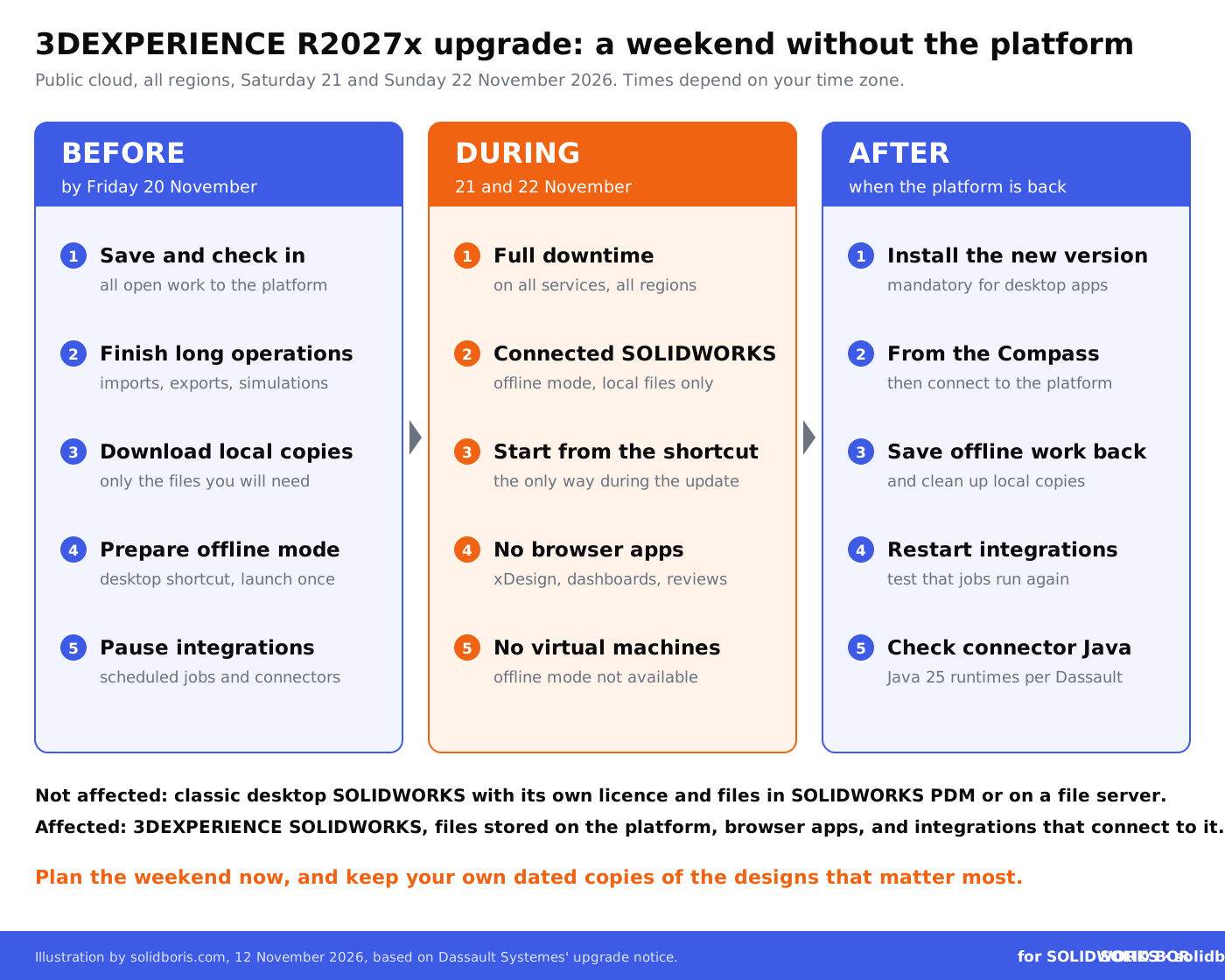
Yes, if you prepare. 3DEXPERIENCE SOLIDWORKS has an offline mode that lets you work for up to 30 days without connecting to the platform, according to Dassault's SOLIDWORKS help. Dassault's support guide on working during platform updates describes the steps for SOLIDWORKS Design, SOLIDWORKS Visualize and Shop Floor Machining:
- Create a desktop shortcut from the Compass (the menu next to SOLIDWORKS Design has a Create Desktop Shortcut option), and launch SOLIDWORKS from it once before the update, so the licensing information is cached on your computer.
- Download local copies of your files through the Open dialog box or the "3DEXPERIENCE files on This PC" tab.
- Start offline mode in advance with Work Offline. For Shop Floor Machining, the guide says you must start offline mode before the update begins.
- During the update, start SOLIDWORKS only from the desktop shortcut. The guide states that the desktop shortcut is the only way to start these apps during a platform update. They then open in offline mode, where you can create new content and edit files you saved locally.
- After the update, reconnect and save your new and changed files back to the platform.
There are limits. Dassault's support notes on unplanned offline mode, available since R2025x FD02, say it only works if the app connected successfully in the previous 30 days, that it is not offered for licence problems such as a removed role, and that it is not available on virtual machines. Engineers who work in a virtual desktop or a cloud workstation should plan for no SOLIDWORKS at all during the downtime.
Makers users went through a similar cycle in October, when Dassault made a platform update mandatory, as we described in our article on the SOLIDWORKS for Makers update deadline.
What stops working during the downtime, and what still works?
Use this table to check your own setup. It is based on Dassault's notice and its offline mode guidance; your licence type and integrations decide the details.
Keep your own dated proof of what your team designed.
BORIS for SOLIDWORKS registers your CAD files with a blockchain timestamp and a certificate of ownership from inside SOLIDWORKS, so you hold a record of your designs that does not depend on any one platform.
👉 Get BORIS for SOLIDWORKS
What does a weekend without the cloud say about your design data?
A planned upgrade is the friendliest possible outage: you know the date weeks ahead. It is still a good test of a question many SOLIDWORKS teams never ask until something goes wrong. If the platform were unreachable for longer, or a role were removed by mistake, which designs could you still open, prove and deliver?
- Where the master copy lives. With auto-save and Content Explorer in SOLIDWORKS Design 2027, the platform becomes the natural home of your files, as we noted in our overview of SOLIDWORKS 2027. That is convenient, but it means local copies are the exception, not the rule. Our guides to SOLIDWORKS cloud security and cloud storage security for CAD files explain what to check.
- Who can reach the files. Local copies made for an offline weekend are often forgotten afterwards on laptops and shared drives. Decide who downloads what, and delete or check in the copies when the platform is back. Our article on digital vaults for CAD storage explains why storage alone is not protection.
- How access depends on licences. On 3DEXPERIENCE, a SOLIDWORKS licence is a role. If the role is gone, offline mode does not help. Our guide to SOLIDWORKS licence management covers how to keep licences under control.
- What proves your designs are yours. Platform history and revision records are useful, but they sit on the vendor's servers. A record of authorship that you hold yourself, with a date, is easier to show to a customer or a court.
Upgrade weekends are also when teams take shortcuts, such as sharing files from personal cloud drives or working from unmanaged laptops. Attackers know this. In recent weeks we wrote about ransomware on unpatched Synology NAS devices and about an IT management platform taken offline after alleged zero-days. Temporary copies need the same protection as the originals.
What should SOLIDWORKS teams do before 21 November?
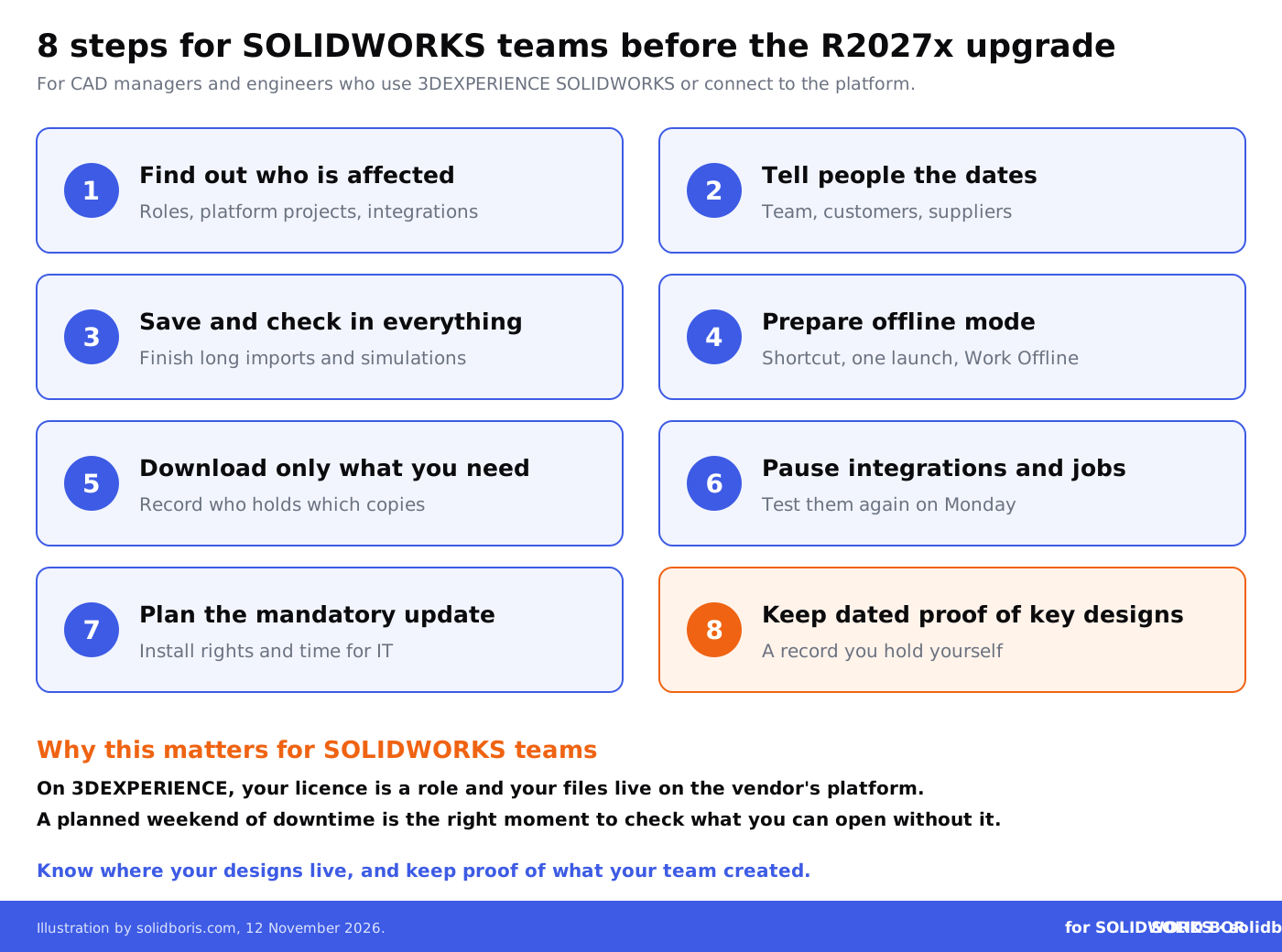
- Find out who is affected. List every user with a 3DEXPERIENCE role, every project stored on the platform, and every integration or script that connects to it.
- Tell people the dates. Share the weekend of 21 and 22 November with your team, and with customers and suppliers who review or edit data with you on the platform.
- Save and check in everything before the start time, and finish or reschedule long imports, exports and simulations.
- Prepare offline mode on each workstation that must keep working: desktop shortcut, one launch beforehand, Work Offline started in advance. Remember that it is not available on virtual machines.
- Download only what you need to local disks, and write down who holds which copies so they can be checked back in and cleaned up afterwards.
- Pause integrations and scheduled jobs, and plan a short test on Monday that they run again after the upgrade. Check the Java runtime of any connector apps against Dassault's new list.
- Plan the mandatory update. Make sure users can install the new desktop app version from the Compass, or that IT has time to do it, so Monday does not start with blocked engineers.
- Keep dated proof of your key designs. Use the weekend to make sure you hold your own timestamped record of the designs that matter most, independent of any single platform.
Will the upgrade change which SOLIDWORKS versions you can use?
Dassault's notice does not say which SOLIDWORKS Design build arrives with R2027x on the platform, so check the release notes before you plan a version change. What Dassault has said is that it is giving users more choice. Its support pages state that going forward, any service pack of the current SOLIDWORKS release and up to two previous releases will be available to install. For R2026x, the oldest available version was SOLIDWORKS 2025 SP5.0.
That helps teams that must stay on an older version to match a customer or a supplier. But SOLIDWORKS files saved in a newer major version generally cannot be opened in an older one, so a single engineer who upgrades early can lock colleagues out of shared files. Agree on one version for each project, and keep revision control in one place, as described in our guide to version control with PDM systems.
Dassault's R2027x keynotes for CATIA and SIMULIA put industrial AI and virtual companions such as LEO, its agentic AI companion at the centre. Before switching on new AI features after the upgrade, check what data they can read and whether that fits your customer contracts.
How does this fit the bigger picture for engineering data?
Across our network this week, the same theme comes up: the systems that hold design data need planning, patching and a clear owner.
- PLM servers. CADChain reports on a new critical vulnerability in PTC Windchill and FlexPLM, the fourth critical Windchill flaw of 2026, with a patch available and no exploitation reported so far.
- Email and Windows sign-ins. BORIS Inventor explains the Outlook zero-day fixed in Microsoft's November Patch Tuesday, which can leak Windows login hashes when a crafted message file is opened.
- Sharing 3D assets. Blended BORIS covers the Blender 5.3 release, including Blender Projects, remote asset libraries and the CC0 rule for asset libraries on the Extensions platform.
Conclusion
The R2027x upgrade on 21 and 22 November 2026 is a planned, announced maintenance window, not an incident. For teams on 3DEXPERIENCE SOLIDWORKS it still means a weekend without the platform, integrations that will fail if left running, and a mandatory update before work can continue. A short checklist now avoids a lost Monday.
It is also a reminder worth acting on: your designs are your company's most valuable data, and you should always be able to open them, show where they came from and prove when your team created them, whatever happens to any single platform.
Prove what your team designed, wherever your files live.
BORIS for SOLIDWORKS adds blockchain timestamps and certificates of ownership to your CAD files from inside SOLIDWORKS, so you can show which designs are yours and when they were created.
👉 Get BORIS for SOLIDWORKS
FAQ: the 3DEXPERIENCE R2027x upgrade for SOLIDWORKS users
When is the 3DEXPERIENCE R2027x upgrade?
Dassault Systemes will upgrade the 3DEXPERIENCE public cloud to R2027x on Saturday 21 and Sunday 22 November 2026. The exact times depend on your time zone, and Dassault says the completion time may change.
Will 3DEXPERIENCE be completely unavailable?
Yes. Dassault lists full downtime on all services for the public cloud platform in all regions. The academia platform has the same dates and the same full downtime.
Can I use SOLIDWORKS during the upgrade?
Classic desktop SOLIDWORKS with its own licence and local or PDM storage is not affected. 3DEXPERIENCE SOLIDWORKS works only in offline mode, started from a desktop shortcut and prepared in advance, on files saved locally. Offline mode is not available on virtual machines.
Do I have to update anything after the upgrade?
Yes. Dassault says installing the new version is mandatory for Desktop Apps and Open Apps to keep working. You install it from the Compass once the platform is back online.
What happens to integrations and scheduled jobs?
Dassault says jobs and integrations that connect to the platform will fail during the downtime, so pause or reschedule them, then check that they run again after the upgrade.
How does BORIS for SOLIDWORKS help?
BORIS does not replace the platform or its offline mode. It registers your SOLIDWORKS files with blockchain timestamps and certificates of ownership, so you hold your own dated proof of which designs your team created.