
A cyberattack stopped production at three factories of the Swedish furniture maker Kinnarps in November 2026. The company found abnormal activity in its network on the evening of Saturday 7 November, shut down its systems and servers to contain the intrusion, and by Monday 9 November its plants in Kinnarp, Jönköping and Skillingaryd stood still. Around 920 people work at the three sites. On 13 November the company said operations were gradually restarting and should be back to normal within days.
Kinnarps, which makes furniture mainly for offices, schools and other public spaces and reported revenue of SEK 4.0 billion for its 2024/2025 financial year, told SVT Nyheter Väst that it had reported the attack to the police and had received no ransom demand. Who is behind the intrusion, how the attackers got in and whether any data was taken have not been made public.
The story matters well beyond furniture. Kinnarps did what security experts usually recommend: it pulled the plug quickly to stop the damage from spreading. The price was a full stop in production. For any manufacturer that designs in SOLIDWORKS and builds from those designs, the question is the same: what still works on the day IT switches everything off, and how fast can design data flow to the shop floor again?
TL;DR: plan for the day the servers go dark
Kinnarps detected an intrusion on 7 November 2026, shut down its servers and halted production at three Swedish factories with about 920 employees. No ransom demand had been made, the attacker is unknown, and the company expected operations back to normal within days of 13 November. Shutting systems down is often the right move, but it also cuts engineers off from PDM vaults, licence servers, file shares and the links that send drawings and CNC programs to production. SOLIDWORKS teams should know which of these systems they depend on, practise working offline, keep offline backups, and hold their own dated records of each design so they can prove which files are genuine after a restore.
What happened at Kinnarps?
Based on statements from Kinnarps' marketing and communications director Ann Cederwall to Swedish media, the timeline looks like this:
- Saturday 7 November, evening. Kinnarps detected abnormal activity in its network. "When we discovered the data breach, we acted immediately and shut down our systems to isolate and minimise the damage," Cederwall told SVT (our translation).
- Monday 9 and Tuesday 10 November. Production stood completely still at the factories in Kinnarp, south of Falköping, in Jönköping and in Skillingaryd. The company website was down, and visitors were asked to call the switchboard.
- 11 November. Swedish trade media reported that the IT department and outside experts had quickly found how the attackers got in. The incident had been reported to the police, and no ransom demand had been made. The company hoped to restart by the end of the week.
- 13 November. Falköpings Tidning reported that production was gradually getting going again. Cederwall said operations would be back to a normal level within the next few days.
Asked whether security had failed somewhere, Cederwall said it was too early to say. She also stressed what was at stake: "It is serious, we are a large employer." About 650 of the 920 people at the three sites work at the main factory in Kinnarp.
What do we still not know about the Kinnarps attack?
A lot. As of 16 November 2026, these questions had no public answer:
- Who did it. No group had claimed the attack in the reports we read, and the company said the attacker was unknown.
- How they got in. Kinnarps said the entry route was found quickly but did not say what it was.
- Whether data was stolen. No ransom demand had been made. That does not prove nothing was taken, because some groups steal first and make demands later, and others never make contact.
- Which systems were hit. The company shut down systems and servers as a precaution and checked each unit. It has not said which ones the attackers actually reached.
We will not guess. What is clear is the pattern: a network intrusion on a weekend, a deliberate shutdown, and two or more days with no production. That pattern is what engineering teams can plan for.
Why does a factory stop when IT pulls the plug?
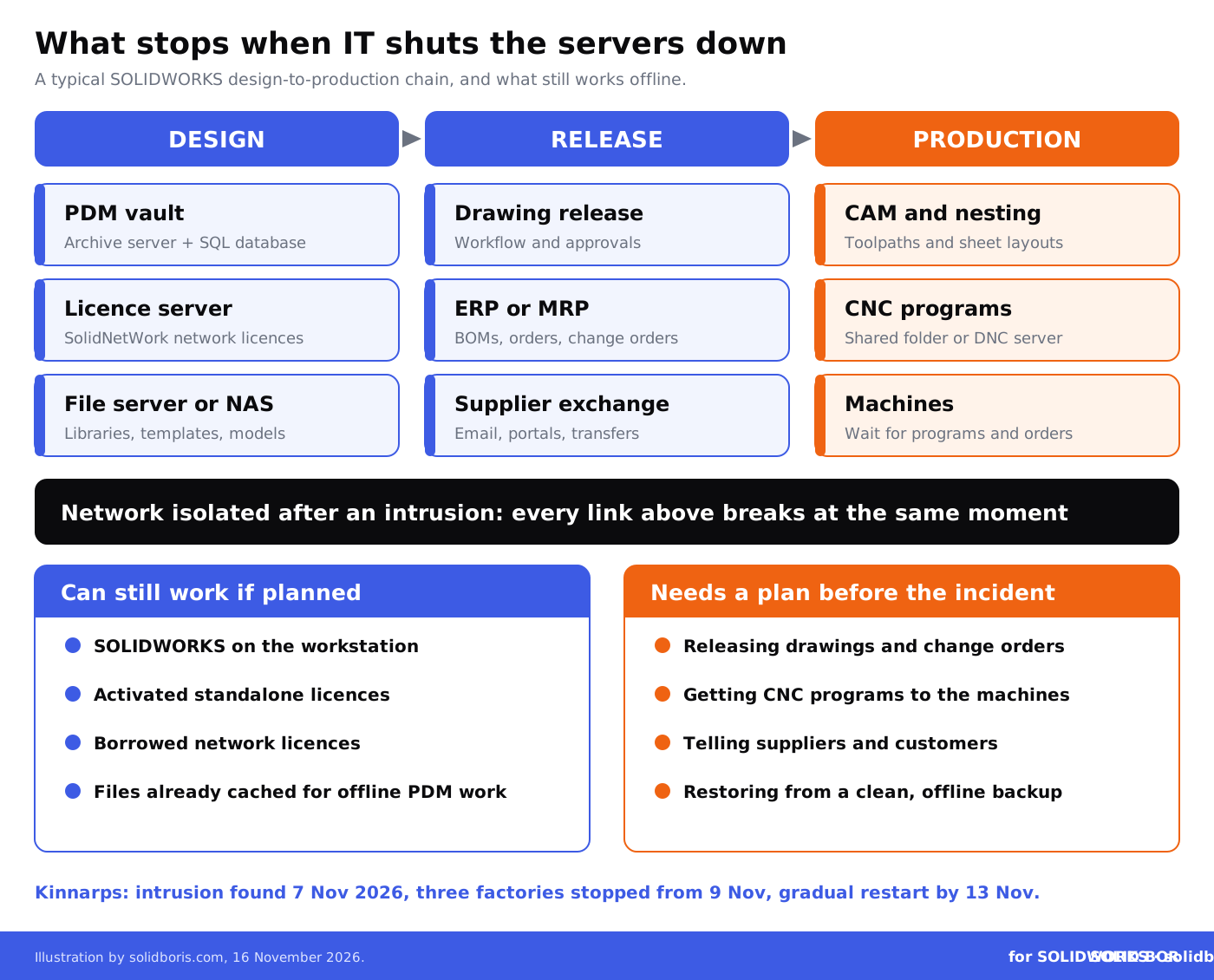
Modern production depends on a chain of systems that most people never see. In a typical manufacturer that designs in SOLIDWORKS, a part moves from a model to a machine through several of them:
- Design data. Models and drawings sit in a SOLIDWORKS PDM vault, which needs an archive server and a SQL Server database, or on a file server or NAS.
- Licences. Many teams use network licences served by a SolidNetWork licence server. If that server is off, SOLIDWORKS may not start.
- Production data. Approved drawings, bills of materials and change orders flow into ERP or MRP systems that plan the work.
- Machine programs. CAM output, nesting files and CNC programs go from shared folders or a DNC server to the machines.
- Suppliers and customers. Email, portals and file transfer tools carry drawings to suppliers and orders back in.
When a company isolates its network, all of these links break at once. Engineers may still have SOLIDWORKS on their laptops, but they cannot check in a change, release a drawing or send a program to a machine. That is why Kinnarps' factories stopped even though, as far as has been reported, the machines themselves were not attacked.
We have seen the same shape in other incidents this autumn. Our reports on the Check Point firewall attacks that wiped ESXi hosts and ransomware on unpatched Synology NAS devices both showed how one compromised server can take PDM archives, licence servers and backups down together.
Is Kinnarps an isolated case?
No. Shutting down production after a cyberattack has become a familiar story in manufacturing. The best-known recent case is Jaguar Land Rover, which stopped production on 1 September 2025 after an attack and did not restart for more than a month. JLR reported £196 million in attack-related costs for the quarter to September 2025, the UK government backed a £1.5 billion loan guarantee for the company, and the UK's Cyber Monitoring Centre estimated the cost to the economy at around £1.9 billion.
Smaller firms rarely make headlines, but they are hit just as often. Ransomware groups now list CAD files as loot, as we explained in our report on ransomware groups listing CAD drawings, and attackers increasingly go through the tools that manage company IT, as in the N-central case that put MSP-managed CAD PCs at risk. Kinnarps' case is a reminder that the cost of an attack is not only what is stolen. It is also the days when nothing gets built.
Keep your own dated proof of every design.
BORIS for SOLIDWORKS registers your CAD files with a blockchain timestamp and a certificate of ownership from inside SOLIDWORKS, so you can show which version is yours and when it was created, even after a restore.
👉 Get BORIS for SOLIDWORKS
Which SOLIDWORKS systems matter when the network is shut down?
Use this table to check your own setup. The details depend on your licences, PDM edition and IT design.
How can SOLIDWORKS teams keep working during a shutdown?
Complete continuity is not realistic in a serious incident, and nobody should reconnect systems before the security team says it is safe. But a little preparation can turn a full stop into a slower week.
Know what works offline. SOLIDWORKS itself runs on the workstation. Standalone licences that are already activated keep working, and network licences can be borrowed for a set period if you plan for it. PDM Professional has a work-offline option for files already in the local cache. The 3DEXPERIENCE platform has its own offline mode, which we described in our guide to the R2027x upgrade weekend on 21 and 22 November. Practise these before an incident, not during one.
Protect the backups. The worst outcome is finding that the backups were on the same network and were encrypted or deleted with everything else. Keep at least one copy of the PDM archive, the SQL database and the licence files offline or in immutable storage, and test a full restore. Our guide to disaster recovery planning for CAD data and guide to recovering previous versions of CAD files go through the details.
Plan the restart order. When IT brings systems back, design data usually needs the database, the archive server and the licence server first, then the links to ERP and CAM. Write that order down with your IT team or provider, together with the person who signs off that each system is clean.
What should CAD managers do now?
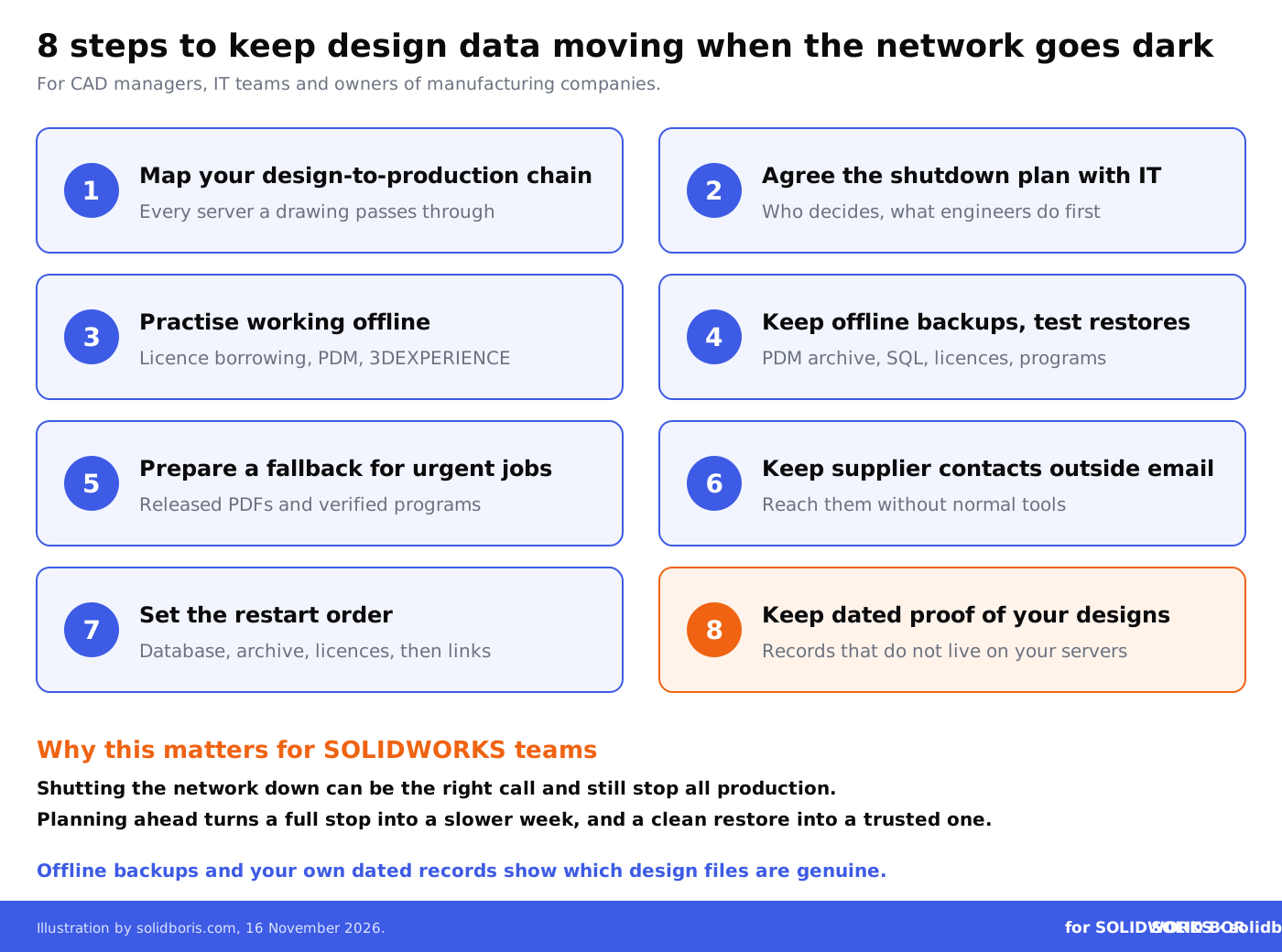
- Map your design-to-production chain. List every server and service a drawing passes through on its way to a machine, including who manages it.
- Agree the shutdown plan with IT. Find out who can decide to isolate the network, and what engineers should do in the first hour.
- Practise working offline. Test licence borrowing, PDM offline work and 3DEXPERIENCE offline mode on a normal day.
- Keep offline backups and test restores. Include the PDM archive, SQL database, licence files, templates and CNC programs.
- Prepare a fallback for urgent jobs. Decide how a released PDF drawing or a verified CNC program can reach production when systems are down.
- Keep a supplier contact list outside email. You will need to tell suppliers and customers what is happening without your normal tools.
- Set the restart order. Database, archive and licence server first, then ERP and CAM links, each checked before reconnecting.
- Keep dated proof of your designs. After a restore, you need to show which files are genuine and when each version was created.
What does a shutdown mean for your design IP?
Production stops are the visible cost. The quieter question is what happened to the design data. When an attacker has been inside a network, a company has to answer three things before it trusts its files again: were any files copied, were any files changed, and are the restored files the right versions?
Copied files become a trade secret and customer contract issue, as we explained in our report on data extortion groups stealing engineering files. Changed or missing files are an engineering issue: a wrong revision sent to a machine after a restore can be as costly as the outage itself. Your PDM history helps, but it lives on the same servers that were shut down.
This is where independent, dated records help. If you hold your own timestamped record of each released design, separate from your servers, you can check restored files against it and show customers, insurers or a court which version existed when. Our SOLIDWORKS PDM security guide and overview of CAD security for manufacturing companies cover the controls that make an attack less likely in the first place.
How does this fit the bigger picture for engineering data?
Across our network this week, the same theme comes up: engineering data is exposed at the points where it leaves the design office.
- Data on equipment that leaves. CADChain reports on the Samsung Display case, where Korean prosecutors say a factory automation supplier tried to take LCD process data out on control PCs of equipment being sold, hidden in folders the pre-sale wipe skipped.
- Remote support tools as a way in. BORIS Inventor explains the ScreenConnect attacks on managed service providers, where rogue extensions gave attackers SYSTEM access to client machines, a risk for CAD PCs and Vault servers managed by an outside provider.
- Rights in AI-generated 3D worlds. Blended BORIS looks at World Labs opening its Atlas world model to everyone, and what its terms say about who owns and may train on uploaded photos and generated scenes.
Conclusion
Kinnarps found an intruder on a Saturday evening, shut everything down and lost several days of production at three factories. It reported the attack, received no ransom demand and expected to be back to normal within days of 13 November. Many details are still unknown, but the lesson for manufacturers is already clear: the decision to isolate the network can be right and still stop the whole business.
SOLIDWORKS teams cannot prevent every intrusion, but they can decide in advance how design data keeps moving when the servers go dark. Map the chain, practise offline work, protect the backups, plan the restart order and keep your own dated records of what your team designed.
Prove which design version is genuine, even after an incident.
BORIS for SOLIDWORKS adds blockchain timestamps and certificates of ownership to your CAD files from inside SOLIDWORKS, so you hold dated proof of your designs that does not depend on your own servers.
👉 Get BORIS for SOLIDWORKS
FAQ: the Kinnarps cyberattack and SOLIDWORKS design data
What happened to Kinnarps in November 2026?
The Swedish furniture maker detected abnormal network activity on the evening of 7 November 2026, shut down its systems and servers, and halted production at its factories in Kinnarp, Jönköping and Skillingaryd from 9 November. About 920 people work at the three sites. On 13 November the company said operations were gradually restarting.
Was the Kinnarps attack ransomware?
That has not been confirmed. The company said no ransom demand had been made and the attacker was unknown. It reported the incident to the police and did not disclose how the attackers got in or whether data was taken.
Why did production stop if the machines were not attacked?
Kinnarps shut down its own servers to contain the intrusion. In most manufacturers, drawings, bills of materials, work orders and machine programs reach the shop floor through those servers, so isolating the network stops production too.
Can SOLIDWORKS run when the network is down?
SOLIDWORKS runs on the workstation, but it needs a valid licence. Activated standalone licences keep working, while network licences depend on the SolidNetWork licence server unless they were borrowed in advance. PDM and 3DEXPERIENCE each have offline options that should be tested before an incident.
What should be in an offline backup for SOLIDWORKS?
At least the PDM archive and its SQL Server database, licence files, templates and design libraries, and the CNC programs and released drawings production needs. Keep one copy offline or immutable, and test a full restore.
How do we know restored CAD files are genuine?
Compare them with records kept outside the affected systems: PDM history from a clean backup, release records and independent timestamps of each released design. That shows whether a file was changed and which version existed when.
How does BORIS for SOLIDWORKS help?
BORIS does not stop cyberattacks or replace backups. It registers your SOLIDWORKS files with blockchain timestamps and certificates of ownership, so you hold dated proof of your designs that does not depend on your own servers.