
On 3 November 2026, the US Cybersecurity and Infrastructure Security Agency (CISA) added a flaw in WordPress itself, CVE-2026-119977, to its catalog of vulnerabilities that attackers are actively exploiting. The bug sits in the core update process: for a few seconds during every update, an attacker who wins a race can take over the site without an account. WordPress fixed it in version 7.1.4 on 28 October, and older branches got the fix the same day.
This is not a SOLIDWORKS vulnerability, and nothing suggests that Dassault Systèmes products are affected. It matters to SOLIDWORKS teams for a different reason: many machine shops, contract manufacturers and product companies run their websites on WordPress, and those websites often collect exactly the files a SOLIDWORKS team cares about most.
Quote request forms take customer STEP files and PDF drawings. Download pages serve your own product models. Partner areas hold price lists and installation drawings. If an attacker becomes administrator of that site, all of it is within reach. Here is what happened, how the attack works and what to check this week.
TL;DR: update WordPress to a fixed release now, block web access to the update folder, and stop keeping customer CAD uploads on the web server
WordPress 7.1.4, released on 28 October 2026, fixes 22 security issues, including a race condition in core updates that can lead to remote code execution. Fixed releases also exist for older branches back to 4.7 (4.7.39); WordPress 4.6 and older get no fix. Security firm Wordfence reported blocking nearly 63,000 attack attempts against the flaw within 24 hours, and on 3 November CISA listed it as actively exploited. No confirmed break-ins have been published so far. For manufacturers, the real risk is what sits on the site: customer drawings sent through quote forms, downloadable CAD models and partner logins. Patch, check for unknown administrators and plugins, move uploaded CAD files off the web server and keep dated proof of your own designs.
What happened to WordPress?
On 28 October 2026, the WordPress project shipped WordPress 7.1.4, a security release that fixes 22 vulnerabilities. Most of them are cross-site scripting issues that need a logged-in user with some rights. One is different: a race condition during core updates that can lead to remote code execution, reported by researcher Umut Bayram of Picus Security.
The flaw was given the identifier CVE-2026-119977 with a CVSS 3.1 score of 8.1 (High) in the public CVE record. The WordPress project's own advisory rates it lower, because the attack is hard to time. Public advisories list WordPress 4.7 to 7.1.3 as affected. Bayram told Hackread that the underlying behaviour goes back to WordPress 2.7, released in 2008, and that he found the chain in about four hours with an AI model as a research partner. In his words: "If an early-career researcher can find a two-decade-old RCE in an afternoon, so can an attacker."
Attackers moved quickly. The Hacker News reported on 30 October that Wordfence had blocked nearly 63,000 attempts against the flaw in 24 hours. On 3 November, CISA added it to the Known Exploited Vulnerabilities catalog as a "time-of-check time-of-use" race condition and gave US federal agencies until 6 November to fix it. CISA has not said who is exploiting it or how many sites were hit, and Wordfence has not reported confirmed compromises.
How does the update-window attack work?
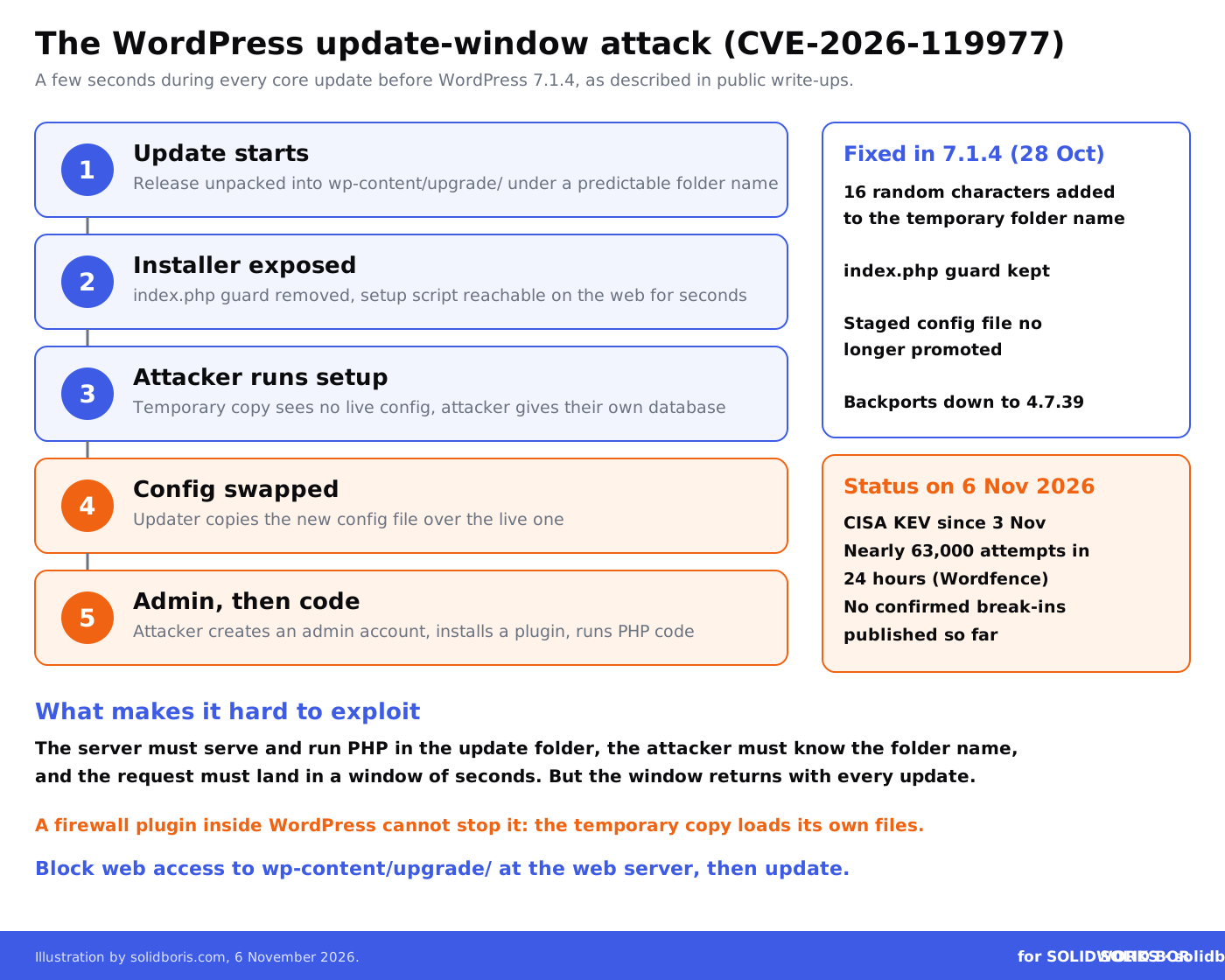
The attack uses the few seconds in which WordPress unpacks a new version of itself. Based on the public write-ups, the chain looks like this:
- The update starts. WordPress extracts the new release into a temporary folder under wp-content/upgrade/. Before 7.1.4, that folder had a predictable name, and a cleanup step removed the index.php file that normally blocks directory listing.
- The installer is exposed. For a few seconds, a full copy of WordPress, including its setup script, sits at a path the web server will serve.
- The attacker runs the installer. The temporary copy does not see the live configuration file, so it behaves like a fresh installation. The attacker points it at a database they control.
- The configuration is swapped. The vulnerable updater then copies the new configuration file over the live one, so the real site now talks to the attacker's database.
- The attacker becomes administrator. With an admin account, the attacker can install a plugin, which on a typical site means running their own PHP code on your server.
Three conditions make this hard to pull off: the server must serve and run PHP files in the update folder, the attacker must know or guess the folder name, and the request must land during the short update window. Security firm Patchstack rated the attack complexity as high. But the window comes back with every core update, including automatic ones, and attackers can simply keep polling. Patchstack also notes that a firewall plugin running inside WordPress cannot stop this, because the temporary copy loads its own files.
WordPress 7.1.4 closes the gap by adding 16 random characters to the temporary folder name, keeping the index.php guard in place and no longer promoting a configuration file from the staging copy.
Why should SOLIDWORKS teams care about a website bug?
Because for many manufacturing SMEs, the website is not just a brochure. It is part of the way CAD files move in and out of the company, and it often runs with far less care than the PDM vault or the file server.
- Quote and RFQ forms. Job shops and contract manufacturers ask customers to upload STEP, IGES, SLDPRT or PDF drawings for a quote. Many form plugins keep those files, and the form entries, on the same server as the website.
- CAD download libraries. Component makers publish 3D models and drawings of their products so that engineers can drop them into SOLIDWORKS assemblies. An attacker with admin rights can quietly replace those files or the links to them.
- Partner and distributor areas. Logged-in areas often hold price lists, installation drawings and spare-part data that you never meant to make public.
- Viewer and tool downloads. Some sites link to viewers, configurators or macros. A swapped download link turns your website into a way to infect your own customers.
Customer drawings are the most sensitive part. Many arrive under an NDA, and some may be export-controlled. If they leak from your website, the problem is not only yours: your customer may lose trade secret protection for those CAD files and will want to know why their data sat on a public web server. We have seen how ransomware groups now treat drawings as loot in our report on CAD drawings on leak sites.
The same pattern keeps returning in our recent news coverage: the weak point is the system next to the CAD data, not SOLIDWORKS itself. It was the VPN in the Ivanti Connect Secure zero-days, the storage box in the Synology NAS ransomware wave and the web stack in the Node2Shell flaw in Node.js portals.
What on a manufacturer's WordPress site is at risk?
If an attacker becomes administrator and can run code, assume they can read, change or replace anything the site stores or links to:
Keep dated proof of your SOLIDWORKS designs, wherever your files end up.
BORIS for SOLIDWORKS registers your CAD files with a blockchain timestamp and a certificate of ownership from inside SOLIDWORKS. If a drawing or model leaks from a website, a portal or a supplier, you can still show what you designed and when.
👉 Get BORIS for SOLIDWORKS
What should SOLIDWORKS teams and manufacturers do now?
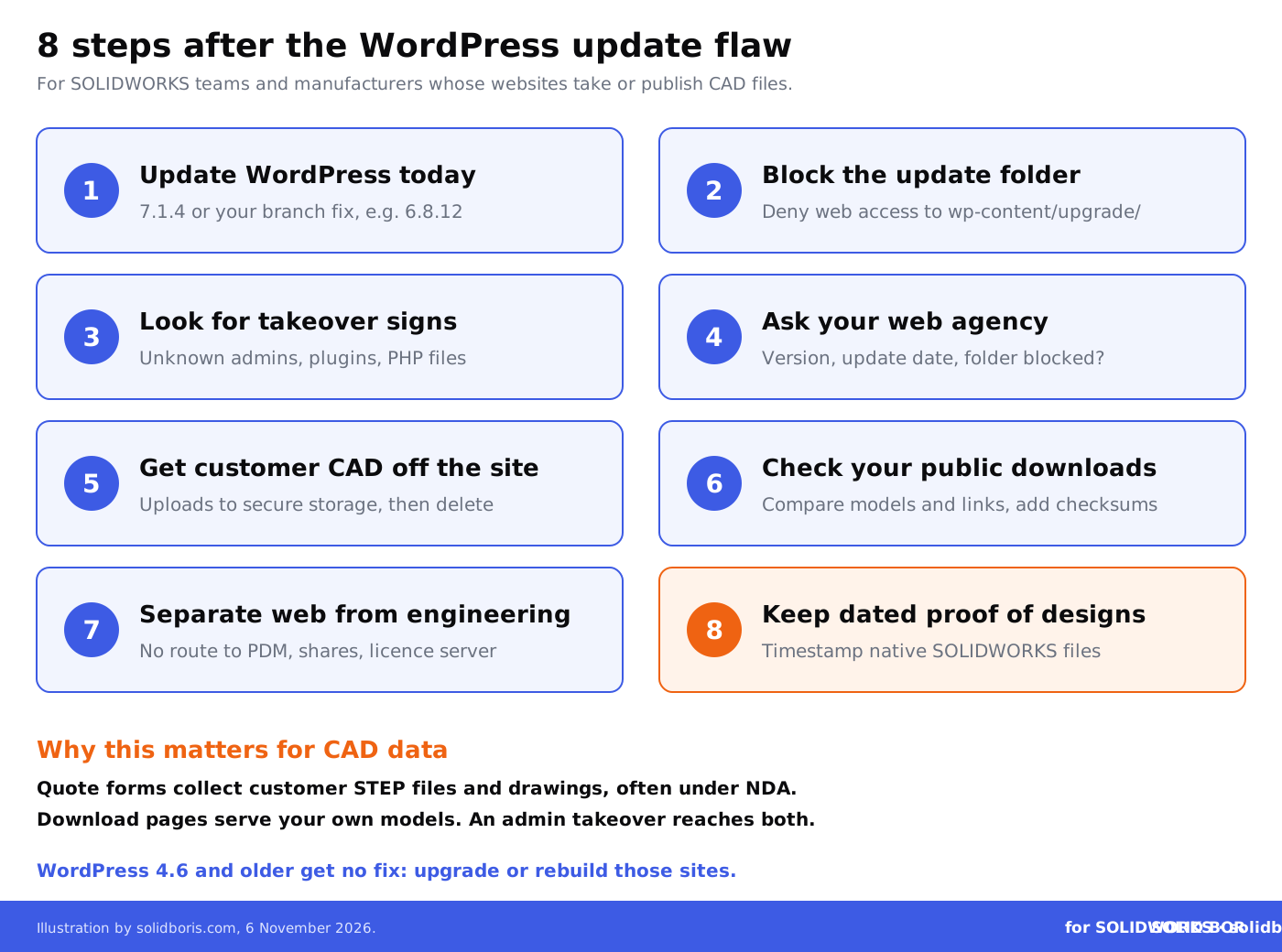
- Update WordPress today. Move to 7.1.4, or to the fixed release of your branch (for example 7.0.8, 6.9.11 or 6.8.12). If your site runs WordPress 4.6 or older, it gets no fix and needs a full upgrade or a rebuild.
- Block the update folder first. Before you update, deny web access to wp-content/upgrade/ in the web server configuration or the root .htaccess file, and check that a request to it returns 403. Updating from the command line uses the same updater, so it does not avoid the risk.
- Look for signs of a takeover. Check for administrator accounts you do not recognise, plugins you did not install, PHP files you did not place and requests to PHP files under wp-content/upgrade/ in the web server logs.
- Ask your web agency or host. Many manufacturer sites are run by an outside agency. Ask them in writing which version you are on, when it was updated and whether they blocked the update folder.
- Get customer CAD off the web server. Configure quote forms to pass uploads to secure storage or a dedicated file transfer service, and delete old uploads and form entries from WordPress.
- Check your public downloads. Compare downloadable CAD models, drawings and links with your originals, and publish checksums for important files.
- Separate the website from engineering. The web server should have no route to the PDM vault, file shares or licence server, and no shared passwords with them.
- Keep dated proof of key designs. Timestamp native SOLIDWORKS files and released drawings, so you can show what you had and when if files leak.
How should customer CAD files reach you instead?
A website form is convenient for customers, but it should be a front door, not a storage room. The safer pattern is to let the form pass files straight to a system built for confidential engineering data, and to keep nothing on the web server once the upload is done.
Our guides to CAD file transfer methods, sharing CAD files without exposing IP and common vulnerabilities in CAD file sharing compare the options. The same rules apply in the other direction, when you publish models: our piece on downloading supplier CAD models explains why engineers should know where a model came from, and neutral CAD formats carry their own risks.
For a wider check of your setup, the CAD security checklist for engineering teams and our overview of CAD security for manufacturing companies are good starting points.
Why does proof of ownership matter after a website breach?
When files leak, two questions follow: what exactly was taken, and whose design was it. A website breach is messy on both counts. Uploaded files may have been renamed, form entries deleted and download files replaced, and logs on small hosting plans are often kept for only days.
Independent, dated records of your own designs help with the second question. Our guides to blockchain timestamping as first-in-time proof and proof of ownership in IP litigation explain what courts look for. For customer files, the answer is different: you need to show that you handled them with care, which is much easier if they never sat on the website in the first place.
How does this fit the bigger picture for CAD users?
Across our network this week, the theme is the systems and rules around engineering data, not the CAD software itself:
- Export rules for design data. CADChain explains why the US suspension of the BIS Affiliates Rule was extended to 10 January 2027, and why technology under US export rules can include drawings, models and CAD files.
- Patching the workstation. BORIS Inventor covers the end of updates for Windows 11 23H2 Enterprise and Education on 10 November 2026 and the Windows Update certificate changes due in 2027. WordPress 7.1.4 also updates its bundled root certificates after the eMudhra certificate revocation.
- New kinds of 3D data. Blended BORIS looks at native Gaussian splats in Blender 5.3 and who owns a 3D capture of a real object.
Conclusion
CVE-2026-119977 is a hard bug to exploit, but it is in WordPress core, it affects almost every release from 4.7 to 7.1.3, and attackers started trying it within days of the fix. For manufacturers, a website takeover is not only a marketing problem when the site holds customer drawings and your own CAD downloads.
Patch now, block the update folder, check for unknown admins and plugins, and move customer CAD files off the web server. Then keep dated proof of your own designs, so a leak never leaves you unable to show what is yours.
Make your SOLIDWORKS designs provably yours, whatever happens to your website.
BORIS for SOLIDWORKS adds blockchain timestamps and certificates of ownership to your CAD files from inside SOLIDWORKS, so you keep independent proof of what you designed and when, even if files leak from a website, a portal or a supplier.
👉 Get BORIS for SOLIDWORKS
FAQ: the WordPress update flaw and SOLIDWORKS teams
Is SOLIDWORKS affected by CVE-2026-119977?
No. The flaw is in WordPress core, the software behind many websites. Nothing suggests SOLIDWORKS or other Dassault Systèmes products are affected. It matters to SOLIDWORKS teams because company websites often collect and publish CAD files.
Which WordPress versions are fixed?
WordPress 7.1.4, released on 28 October 2026, and fixed releases for older branches, such as 7.0.8, 6.9.11, 6.8.12 and down to 4.7.39. WordPress 4.6 and older receive no security updates.
Has anyone been hacked through this flaw?
CISA added it to its catalog of actively exploited vulnerabilities on 3 November 2026, and Wordfence reported tens of thousands of attack attempts. Neither CISA nor Wordfence has published confirmed compromises or victim numbers so far.
Is automatic updating enough?
Automatic updates install the fix, but the risky window opens during the update itself. Block web access to wp-content/upgrade/ first, then update, and check the site for unknown admins and plugins afterwards.
Should our quote form still accept CAD uploads?
Yes, if customers need it, but the files should go straight to secure storage and be removed from the web server. Limit accepted file types and sizes, and do not keep old uploads or form entries in WordPress.
Our website is run by an agency. What should we ask?
Ask which WordPress version the site runs, when it was last updated, whether wp-content/upgrade/ is blocked from the web, whether anyone checked for unknown admin accounts and plugins, and where uploaded files are stored.
How does BORIS for SOLIDWORKS help?
It does not secure your website. It gives your SOLIDWORKS files blockchain-timestamped certificates of ownership, so you can prove what you designed and when if a drawing or model leaks from a website, a portal or a supplier.