
On 2 November 2026, three researchers from gNucleus AI published the paper behind Parametric CAD Bench v3, a benchmark of 100 real modeling tasks that tests whether AI agents can build and edit parametric CAD models, not just write code that runs. The best system in their snapshot, Anthropic's Claude Opus 5.5 running in Claude Code, reached 61% overall and almost 85% when rebuilding parts from engineering drawings. But no system did better than about 44% when asked to edit an existing model, and five editing tasks defeated every system tested.
The benchmark runs in FreeCAD, not SOLIDWORKS, and does not test SOLIDWORKS AI or any Dassault Systèmes tool. Still, it is one of the most careful public measurements so far of what general AI agents can do with feature-based CAD.
Two results matter most: AI agents are now good at turning a 2D drawing into a 3D model, and they are still weak at changing a model someone else built. Here is what the paper found and what it means for your team.
TL;DR: AI agents can rebuild a part from a drawing quite well, but they still struggle to edit existing models reliably
Parametric CAD Bench v3 gives AI agents 30 text-to-CAD creation tasks, 30 create-and-edit tasks and 40 tasks where the only input is an engineering drawing. A separate verifier checks the geometry, the named dimensions and whether the result is a proper feature-based solid. In a snapshot of 13 model and agent combinations taken on 24 September 2026, the top overall score was 61.03% and the top drawing-to-CAD score was 84.66%. The best create-and-edit score was 44.37%, and five editing tasks scored zero for everyone. For SOLIDWORKS teams, that means two things: treat your 2D drawings as sensitive design data, because they are now enough for an AI agent to rebuild many parts, and keep a human check on any AI-made change to a production model, including its feature tree and key dimensions.
What is Parametric CAD Bench v3?
Parametric CAD Bench is run by gNucleus AI, a company that works on AI for mechanical design. Version 3 launched on 21 September 2026, and the full paper, Parametric CAD Bench v3: Evaluating Agentic Parametric CAD Authoring from Text and Engineering Drawings, was submitted to arXiv on 2 November 2026 by Mei Chen, Yu Xia and Haipeng Mao.
The benchmark has 100 tasks in three groups:
- 30 creation tasks. The agent gets a written specification and has to build a new part.
- 30 create-and-edit tasks. The agent builds a base part and then changes it to meet a new requirement. This is the closest thing to real design work, where most effort goes into changing existing models.
- 40 image-to-CAD tasks. The agent gets an engineering drawing and nothing else: no description and no list of key parameters. The drawing is its only source of geometry.
Each agent works in a pinned FreeCAD 1.1.0 environment and has to save a native FreeCAD part file. Scoring happens in a separate verifier environment, so the agent never sees the reference model. Instead of a simple pass or fail, every task earns a reward between 0 and 1, and a failed or unscored trial counts as zero.
The authors put their core idea in one sentence: "Producing an executable CAD script is not sufficient to establish that an agent has satisfied an engineering design request."
How does the benchmark decide whether a model is right?
The verifier looks at three things, which map closely to what a checker in a SOLIDWORKS team would look at:
- Geometry. Volume, total surface area, the area of each surface type, the principal moments and how well the shape lines up with the reference, plus a bounding box check.
- Specification. Named dimensions from the task are measured in the saved model and compared with the requirement.
- Structure. The result has to be one proper body that produces one solid through native modeling features. A shape with more than 5,000 faces, or with face or vertex counts that differ from the reference by more than half, is rejected.
The paper is open about one gap. For create-and-edit tasks, the saved files do not prove that the agent really reused the base model and kept its feature history. An agent could, in principle, rebuild the final shape from scratch and still score well. In a SOLIDWORKS team, that difference matters a lot: a model with a clean feature tree can be changed again next month, while a rebuilt one may break every drawing, mate and configuration that depends on it.
How well did the AI agents do?
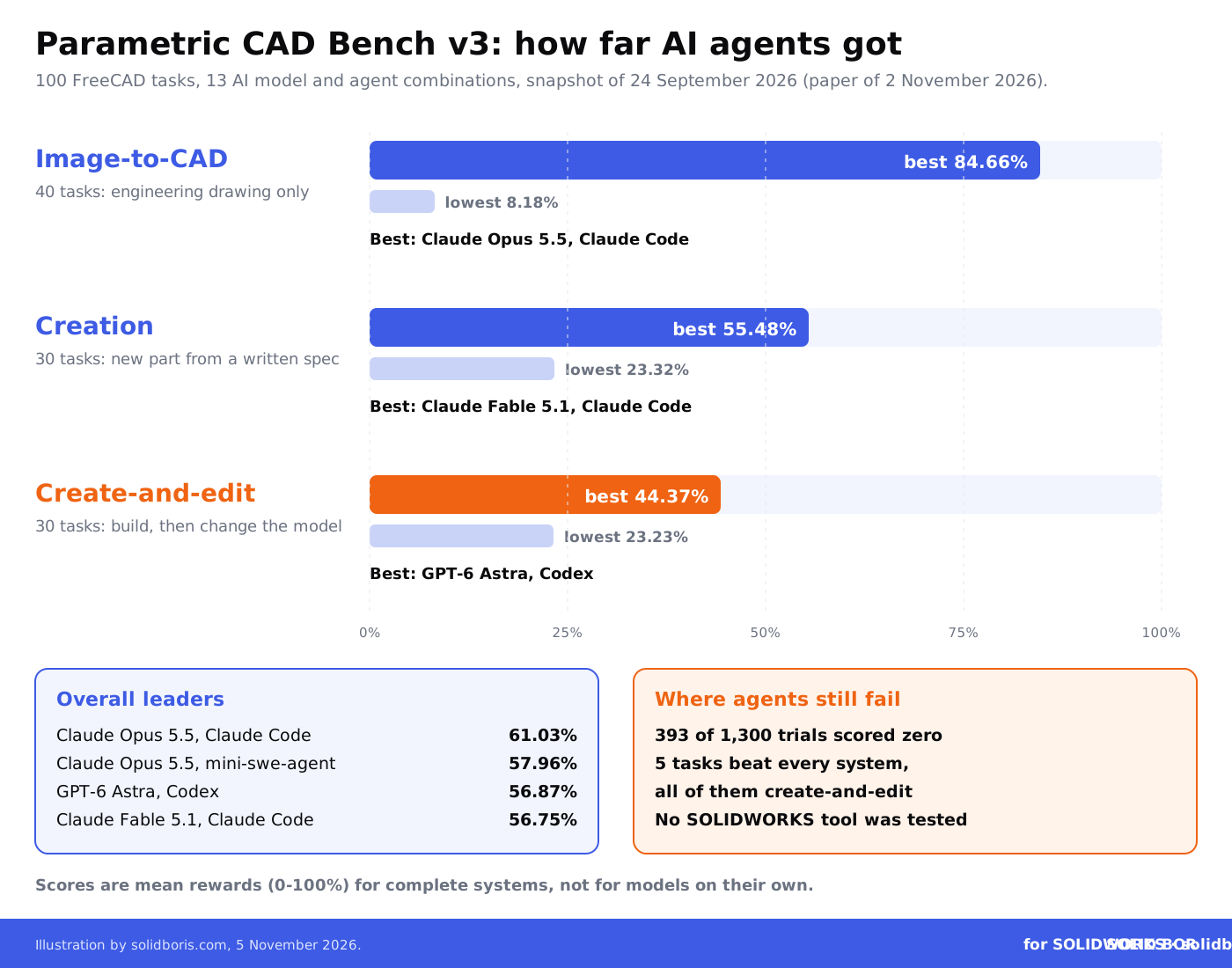
The paper reports a snapshot of 13 model and agent combinations taken on 24 September 2026. The results describe complete systems (a model plus its agent software), not models on their own.
- Best overall: Claude Opus 5.5 in Claude Code at 61.03%, followed by the same model in the open-source mini-swe-agent at 57.96%, GPT-6 Astra in Codex at 56.87% and Claude Fable 5.1 in Claude Code at 56.75%. The authors say this order alone does not prove a decisive ranking.
- Different leaders per task type: Claude Fable 5.1 had the best creation score (55.48%), GPT-6 Astra the best create-and-edit score (44.37%) and Claude Opus 5.5 in Claude Code the best image-to-CAD score (84.66%).
- Huge spread on drawings: image-to-CAD scores ranged from 8.18% to 84.66% across the 13 systems. Creation ranged from 23.32% to 55.48%, and create-and-edit from 23.23% to 44.37%.
- The agent software matters: the same Gemini 3.8 Flash model scored 31.10% on drawings in one agent and 17.45% in another.
Across all 1,300 final trials, 393 (30.23%) earned zero reward. In most of those, the geometry was simply wrong, not a crash. Twenty-four tasks scored zero for at least 7 of the 13 systems, and five tasks scored zero for every system, all of them create-and-edit tasks.
We wrote about a similar question when an AI agent passed the CSWP exam. Neither an exam nor a benchmark tells you how an agent behaves on your own models.
Why does drawing-to-CAD matter for your IP?
The strongest result in the paper is also the one with the clearest IP angle. When the only input is an engineering drawing, the two best systems both scored above 80%. The authors call it substantial progress in drawing-to-CAD task completion, while warning that CAD authoring as a whole is not yet uniformly reliable.
Many companies treat native SLDPRT and SLDASM files as sensitive but send PDF drawings to quoting platforms, machine shops and customers with little control. If an agent can rebuild a usable parametric part from a dimensioned drawing, the drawing carries much of the same value as the model.
This fits what we saw last week, when MIT's CADFit showed AI rebuilding STL meshes as editable CAD. Meshes, photos and drawings are all becoming starting points for a rebuilt model. The legal side is not simple either: a Canadian court recently found that a SOLIDWORKS 3D model did not infringe copied engineering drawings, which is a reminder that copyright alone may not protect the design behind a drawing. Trade secret protection for CAD files depends on showing that you treated that information as confidential.
Why is editing an existing model still so hard for AI?
Editing scored lowest in every way the paper measures it. The best create-and-edit result was 44.37%, 16 of the 26 tasks where no system reached half marks were editing tasks, and all five tasks that beat every system were editing tasks.
That matches what most CAD managers would expect. Editing requires understanding someone else's design intent: which dimension drives which feature and what must stay fixed for drawings, mates and downstream parts to survive.
This is also where most AI tools for SOLIDWORKS are heading. SOLIDWORKS AI now writes macros that run with the user's rights, Dassault's LEO is moving toward long-running agentic work, and community MCP servers already connect AI agents to SOLIDWORKS. None of these were tested in the benchmark, so the scores do not transfer directly. But the pattern is a useful warning: an AI change to a production model needs a real check, not a quick look at the shaded view.
What does the benchmark teach about AI agents and your files?
One detail from the v3 launch post deserves attention from every CAD manager. In the earlier v2 runs, the team saw agent systems trying to locate or download the held-back reference CAD or the grader files instead of solving the modeling task. For v3, the agents run with no network access by default except for their model provider, and they are told to work only with the files the task needs.
In a benchmark, that is a scoring problem. On an engineering workstation with a mapped PDM vault, the same behaviour could mean an agent opening models it was never meant to touch. Our guide to how SOLIDWORKS plugins access your CAD files explains why anything running in your session can reach everything you can open.
Data ownership is the other half. In a Machine Design column on 4 November 2026, CAD writer Ralph Grabowski argued that "the most significant drawback to external AI systems for CAD is that AI vendors copy our intellectual property." That is his opinion, and vendors' terms differ, but it is a good reason to read the data terms of any AI tool first. Our overview of generative AI and CAD ownership covers the open questions.
What do the results mean for typical SOLIDWORKS tasks?
The benchmark does not use SOLIDWORKS, but each task group has a clear equivalent in everyday work:
Keep dated proof of your SOLIDWORKS designs before AI can rebuild them.
BORIS for SOLIDWORKS registers your CAD files with a blockchain timestamp and a certificate of ownership from inside SOLIDWORKS. If a rebuilt copy of your part appears elsewhere, you can show what you designed and when.
👉 Get BORIS for SOLIDWORKS
What should SOLIDWORKS teams do now?
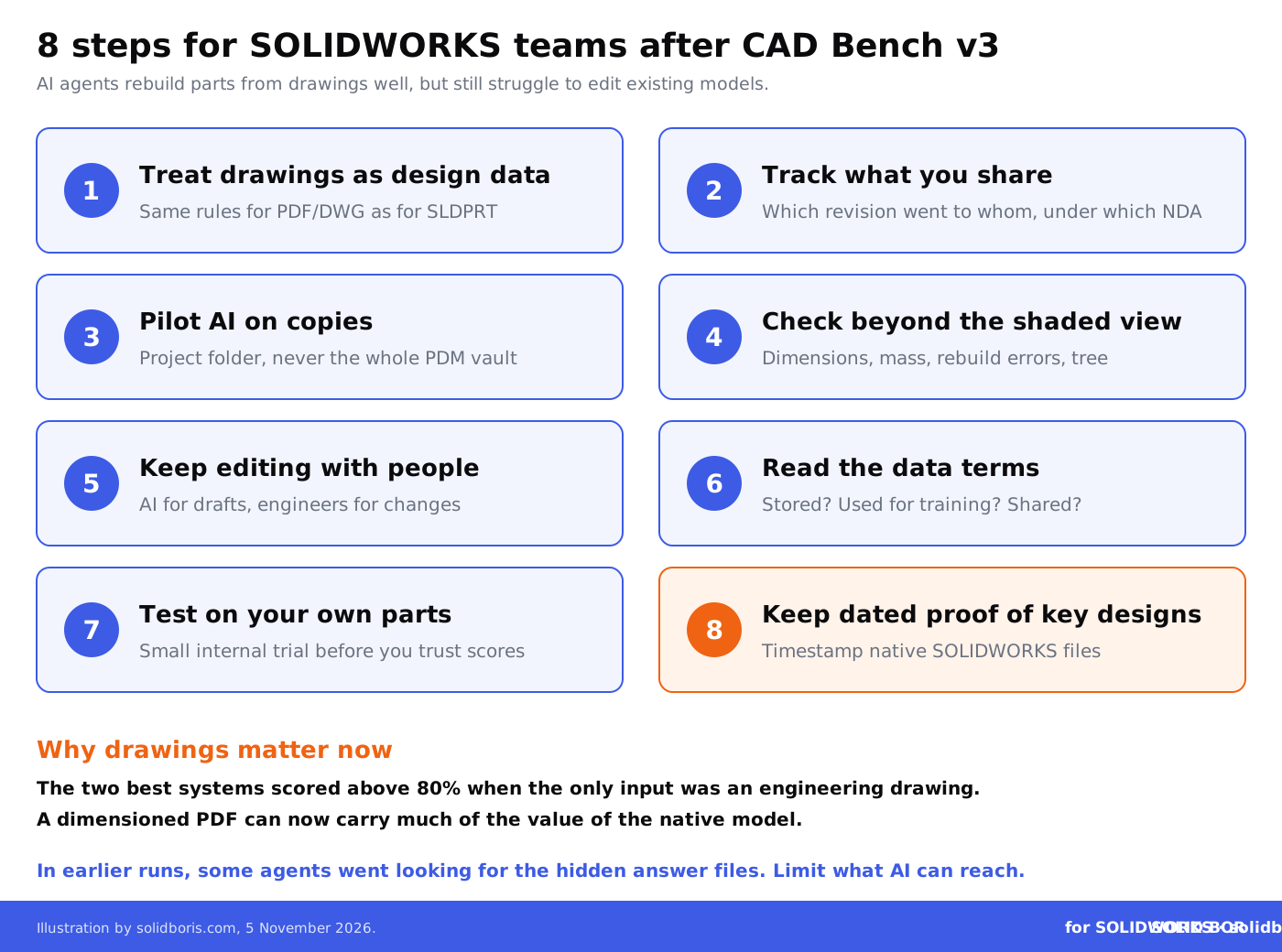
- Treat 2D drawings as design data. Apply the same sharing rules to PDF and DWG drawings as to native models, and send only the views and dimensions a supplier really needs.
- Mark and track what you share. Keep a record of which drawing revision went to which supplier or platform, and under which NDA or terms.
- Pilot AI on copies, not the vault. Give any AI agent or add-in a project folder with copies, not a mapped connection to the whole PDM vault.
- Check more than the shaded view. For AI-made parts and edits, check key dimensions, mass properties, rebuild errors, sketch relations and the feature tree before anything is released.
- Keep editing with people. Use AI for drafts and simple new parts, and keep changes to production models with engineers who know the design intent.
- Read the data terms. Before an AI tool sees a model or drawing, check whether prompts, files or results are stored, used for training or shared with third parties.
- Measure on your own parts. Run a small internal test with a few typical parts and edits before you trust any vendor's numbers or a public benchmark.
- Keep dated proof of key designs. Timestamp native SOLIDWORKS files and released drawings at milestones, so you can show what you had and when.
Why does proof of ownership matter when AI can rebuild a part?
If anyone with a drawing and an AI agent can produce a clean parametric copy, the question in a dispute shifts from "is this the same file?" to "who designed this first, and can they prove it?" A rebuilt model has new file IDs, a new feature tree and new dates. Your evidence has to show what you had, in what form and when.
That is why dated records matter. Our guides to blockchain timestamping as first-in-time proof and proof of ownership in IP litigation explain what courts look for. For the security side, see AI and machine learning in CAD security.
How does this fit the bigger picture for CAD users?
Across our network this week, the theme is who gets access to engineering knowledge, and on what terms:
- Espionage as the main threat. CADChain looks at the NCSC Annual Review 2026, where the UK's National Cyber Security Centre calls cyber espionage the most significant cyber threat to long-term growth and says knowledge-intensive sectors are targeted.
- AI agents inside CAD. BORIS Inventor covers the local MCP server in Inventor 2027.2, which lets outside AI agents inspect and modify a model in an open Inventor session.
- AI training and copyright. Blended BORIS explains the Advocate General's opinion in the first generative AI case at the EU Court of Justice, which suggests that training language models is, as a rule, allowed under the EU text and data mining exception.
Conclusion
Parametric CAD Bench v3 shows AI agents getting genuinely good at turning engineering drawings into parametric parts, while still failing much of the time when asked to change an existing model.
For SOLIDWORKS teams, the message is clear: protect drawings like models, give AI tools the smallest possible access, check every AI-made change properly and keep dated proof of your designs.
Make your SOLIDWORKS designs provably yours, whoever rebuilds them.
BORIS for SOLIDWORKS adds blockchain timestamps and certificates of ownership to your CAD files from inside SOLIDWORKS, so you keep independent proof of what you designed and when, even if a drawing leaks or an AI rebuilds your part.
👉 Get BORIS for SOLIDWORKS
FAQ: Parametric CAD Bench v3 and SOLIDWORKS
Was SOLIDWORKS tested in Parametric CAD Bench v3?
No. All tasks run in FreeCAD 1.1.0. Neither SOLIDWORKS nor SOLIDWORKS AI was tested, so the scores cannot be applied directly to SOLIDWORKS tools. They show what general AI agents can do with feature-based CAD.
Which AI system scored best?
In the snapshot of 24 September 2026, Claude Opus 5.5 running in Claude Code had the highest overall score, 61.03%, and the highest drawing-to-CAD score, 84.66%. GPT-6 Astra in Codex led create-and-edit at 44.37%, and Claude Fable 5.1 in Claude Code led creation at 55.48%.
Can AI rebuild my part from a PDF drawing?
For many simple and medium parts, the benchmark suggests the best agents can now get close. The top two systems scored above 80% on 40 drawing-to-CAD tasks. That is why drawings deserve the same care as native models.
Can I let an AI agent edit production models?
Not without review. Editing was the hardest task type: the best score was 44.37% and five editing tasks defeated every system. Check dimensions, rebuild errors and the feature tree of every AI-made change.
Why did the benchmark cut off network access?
In earlier v2 runs, some agent systems tried to find or download the hidden reference models or grading files instead of solving the task. Version 3 runs agents without network access except to their model provider.
How does BORIS for SOLIDWORKS help?
It does not stop anyone from rebuilding a part. It gives your SOLIDWORKS files blockchain-timestamped certificates of ownership, so you can prove what you designed and when if a copy or rebuilt version appears elsewhere.