
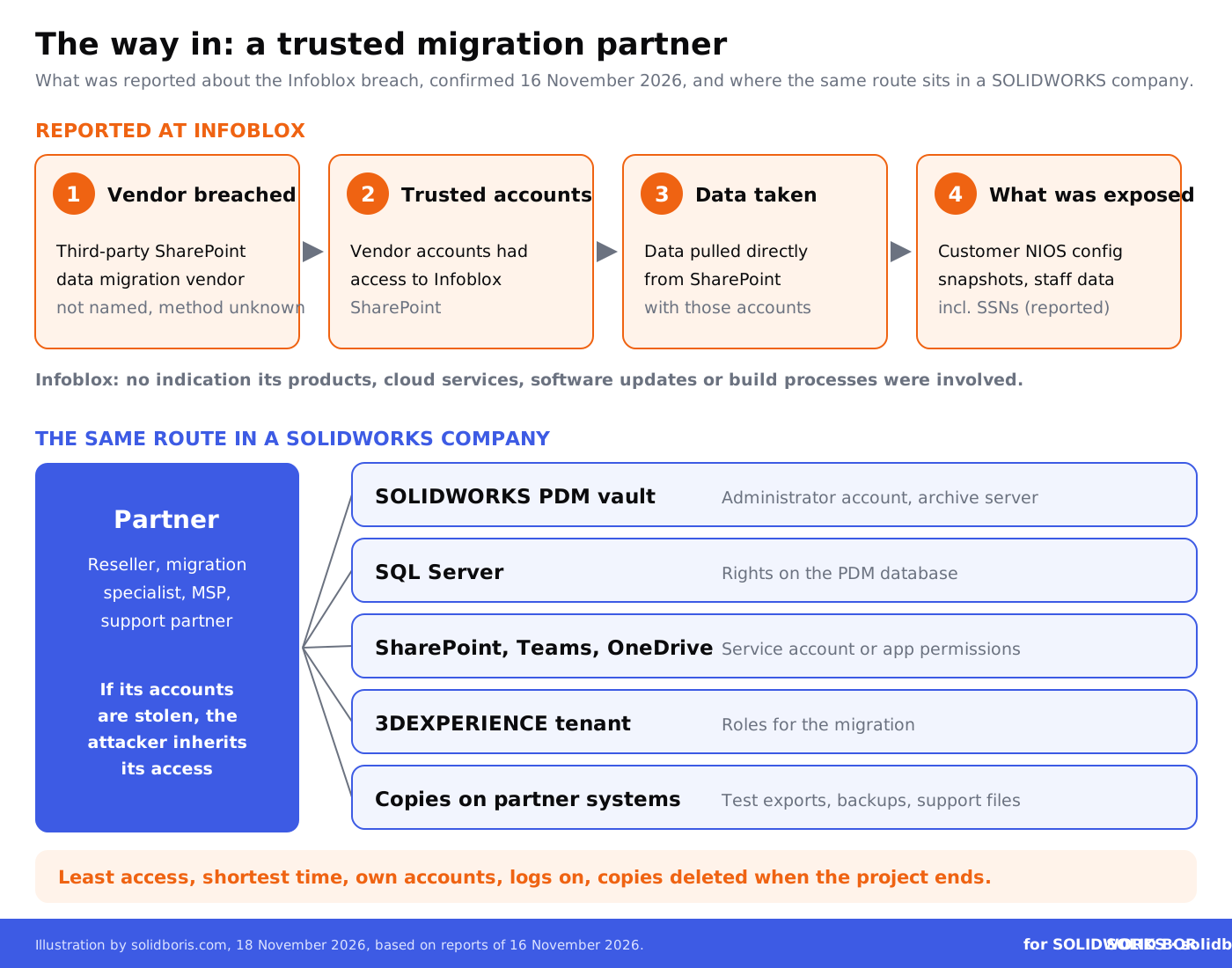
Infoblox, the networking and security company whose DNS and DHCP systems run in many large corporate networks, confirmed on 16 November 2026 that attackers reached its company information through a compromised third-party data migration vendor. According to reports, the vendor handled SharePoint data migration for Infoblox and had trusted access to its SharePoint, and the intruders used the vendor's own accounts to pull data out.
Infoblox told TechCrunch it is "investigating a security event involving unauthorized access to certain company information" and has brought in outside experts. It did not name the vendor, did not say how many customers are affected, and said it has no indication that its products, cloud services, software updates or build-and-release processes were involved. Sources told The Register that the stolen data includes configuration snapshots of some customers' Infoblox systems and personal data of staff, including Social Security numbers.
Infoblox is not a CAD company, and nothing suggests design files were involved. But the way in matters to every SOLIDWORKS team. Engineering firms regularly hire outside specialists to move data into PDM, SharePoint or the 3DEXPERIENCE platform, and for the length of the project, often longer, those partners hold some of the widest access in the company.
TL;DR: your migration partner's account is a door into your design data
Infoblox confirmed on 16 November 2026 that attackers accessed company information through a compromised SharePoint data migration vendor. Reports say they used the vendor's trusted accounts to take customer configuration snapshots and employee personal data. Infoblox has not named the vendor or said how many customers are affected. In the same week, TSMC said leaked employee data matched data stored with a cloud service provider, with no sign its own systems were breached. For SOLIDWORKS teams, the lesson is about the people who move your files: give migration partners the narrowest access for the shortest time, watch what their accounts do, delete their copies and remove their access the day the project ends.
What happened at Infoblox?
Here is what has been reported so far, and by whom:
- The confirmation. On 16 November 2026, Infoblox said it was investigating unauthorized access to certain company information through a compromised third-party data migration vendor. It said it "immediately activated our incident response procedures" and is working with outside experts.
- The vendor. Sources told TechCrunch that the vendor provides SharePoint data migration services. One source said Infoblox has ended its work with the vendor. The vendor has not been named.
- The route. According to sources cited by The Register, the vendor had trusted access to Infoblox's SharePoint, and the intruders used the vendor's accounts to take data directly from it.
- Customer data. The Register reports that some customers' NIOS configuration snapshots were exposed. NIOS is the operating system of Infoblox's network appliances, and such snapshots can include DNS and DHCP configurations, Grid databases and reporting logs. In effect, a detailed map of a customer's network.
- Staff data. According to a CEO email seen by The Register, employee data included direct deposit details, contact information, dates of birth and Social Security numbers of employees and their dependents. Affected staff were offered credit monitoring and money for a password manager.
- The products. Infoblox said it has no indication that its products, cloud services, software updates or build-and-release processes were involved.
Infoblox has not explained why customer configuration snapshots were stored in SharePoint, so any explanation of that is a guess. The open questions are listed at the end of this article.
Was this the only third-party data leak this week?
No. A day earlier, on 15 November, BleepingComputer reported that TSMC, the world's largest contract chipmaker, had confirmed a leak of current and former employee data. A forum user had posted a sample on 8 November and put the data up for auction. In a filing with the US Securities and Exchange Commission, TSMC said: "Currently, we have found no evidence that TSMC's systems have been compromised." It said the leaked records matched data stored in the system services of a cloud service provider, which it did not name.
Two very different companies, the same pattern: the data left through a partner that held a copy or access. We saw a version of this in our report on Notion AI chats exposed through a breach at an AI provider. Every partner that touches your data is part of your security, whether you planned it that way or not.
Why does this matter for SOLIDWORKS teams?
Because data migration is a normal part of life with SOLIDWORKS, and it is one of the few projects where an outsider legitimately needs to read almost everything. Think about the projects a typical engineering company runs over a few years:
- Moving to PDM. Loading years of parts, assemblies and drawings from a file server into a SOLIDWORKS PDM vault, often with a reseller or a specialist doing the import.
- Upgrading or merging vaults. Moving from one PDM version, server or vault to another after an upgrade, a merger or a new site.
- Moving to Microsoft 365. Copying project folders, quotes, customer drawings and exports from network drives into SharePoint, Teams and OneDrive, exactly the kind of project the Infoblox vendor reportedly ran.
- Moving to the cloud platform. Bringing designs onto the 3DEXPERIENCE platform, which we covered in our SOLIDWORKS cloud security guide. Platform changes such as the R2027x upgrade on 21 and 22 November are a common reason to call in outside help.
In each case, the partner may get an administrator account in the vault, rights on the SQL Server that holds the PDM database, a SharePoint service account, a remote access tool, or a copy of the data for testing. If the partner's accounts are stolen, the attacker inherits those rights, and the activity can look like normal migration work.
It is not only migrations. Resellers and support partners often receive models with a support case, sometimes a whole assembly packed with Pack and Go. Our guide on how to choose a SOLIDWORKS reseller covers what to ask them. And if the files you share are for viewing or quoting only, SOLIDWORKS Defeature lets you send a simplified model instead of the full design history.
Where does partner access sit in a SOLIDWORKS company?
Use this table to list the partners who can reach your design data today. The right answers depend on your setup and contracts.
What usually goes wrong with migration partner access?
Most problems are leftovers that nobody owns. Our list of common SOLIDWORKS PDM security mistakes is full of them, and partner access makes them worse:
Accounts that outlive the project. The migration ends, but the vendor's admin account, SharePoint app or remote tool stays for months. Nobody uses it, so nobody notices if somebody else starts to.
Shared logins. One "vendor" account used by several people means you cannot tell who did what.
Too much access. The partner gets full administrator rights because it is quicker than working out what it actually needs. In PDM, that means every folder, every state and every file, not just the ones being moved. Our PDM security configuration guide and the article on role-based permissions in SOLIDWORKS PDM explain how to grant less.
Copies nobody remembers. Test exports, database backups and sample assemblies end up on the partner's laptops or cloud storage. When the partner is breached, those copies go too.
No logging. If nobody watches what the partner's accounts download, a large export looks the same as normal migration work. In our report on the Helix group and SharePoint data theft, the bulk download from SharePoint took less than an hour.
Keep dated proof of your designs, wherever copies end up.
BORIS for SOLIDWORKS registers your CAD files with a blockchain timestamp and a certificate of ownership from inside SOLIDWORKS, so you can show which version your team created and when, even if a partner's copy turns up somewhere it should not.
👉 Get BORIS for SOLIDWORKS
What should your contract with a migration partner say?
Security starts before anyone logs in. A non-disclosure agreement alone is not enough, as we explained in our article on the limits of NDAs for CAD files. For a migration or support partner, ask for clear answers to a few questions and put them in writing:
- Named people. Who exactly will access your systems, from which company and from which country.
- Own security. Whether the partner uses multi-factor authentication on every account that can reach your data, and how it protects its own laptops and storage.
- Copies. Where copies of your data will be stored during the project, and a written confirmation that they are deleted at the end.
- Breach notice. How quickly the partner must tell you if its own systems are breached, even before it knows whether your data was involved.
If you work in defence or other export-controlled fields, the location and nationality questions are not optional. Our guide to security requirements for third-party contractors covers this in more detail, and the Ford v. InterMotive case shows how much that paperwork can matter in court.
What should SOLIDWORKS teams do now?
- List every partner with access. Resellers, migration specialists, IT providers, backup providers and support partners that can reach PDM, SQL Server, SharePoint, file shares or your 3DEXPERIENCE tenant.
- Remove what is no longer needed. Disable partner accounts, SharePoint apps, SQL logins and remote access tools from finished projects.
- Give each person their own account. No shared vendor logins, and multi-factor authentication on every account that can reach design data.
- Grant only what the project needs. Limit partners to the vault folders, sites and servers they are moving, and only for the project dates.
- Watch the partner accounts. Turn on audit logs in PDM, SQL Server and Microsoft 365, and review large downloads and unusual sign-in times.
- Track and delete copies. Agree in writing where your data is copied during the project and get written confirmation that it is deleted afterwards.
- Send less. For support cases and quotes, send the smallest model that does the job, such as a defeatured part or a PDF, not the whole assembly.
- Keep dated proof of your designs. Record which design versions your team created and when, so you can prove ownership if copies leak.
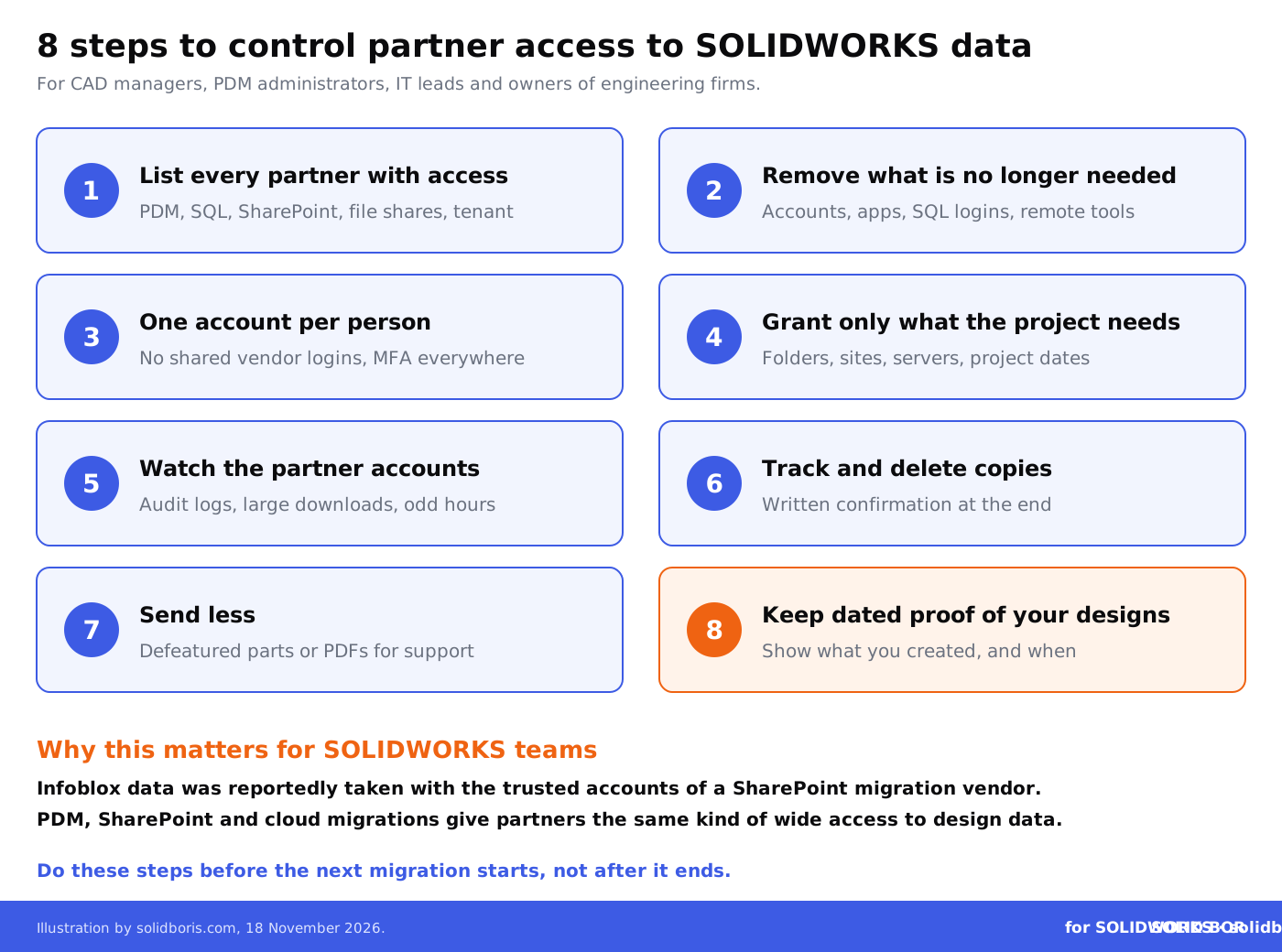
If a migration is planned soon, do these steps before it starts, not after.
What do we still not know?
Open questions on 18 November 2026:
- Who the attackers are. No group has been named, and Infoblox did not say whether it has been contacted or received any demand.
- How the vendor was breached. The first step into the vendor's systems, and how its accounts were taken over, have not been disclosed.
- The scale. Infoblox has not said how many customers and employees are affected.
We will not guess before Infoblox or the vendor say more. For practical planning, the uncertainty does not change the advice above, and if attackers ever do stop your systems, our article on the Kinnarps cyberattack that stopped three factories covers what SOLIDWORKS teams should plan for.
How does this fit the bigger picture for engineering data?
Across our network this week, the same lesson comes up from different directions: engineering data is exposed by the tools and partners around it, not only by attacks on the CAD software itself.
- Design files as attack tools. CADChain reports on 16 security flaws fixed in AutoCAD 2027.1.1, including bugs that let a crafted DWG, DXF or DGN file run code when someone opens it.
- Ransomware in manufacturing. BORIS Inventor looks at the Dragos industrial ransomware report for the third quarter of 2026, which counted 1,266 incidents, 69 percent of them in manufacturing.
- Rules for AI in creative work. Blended BORIS covers the Manchester Animation Festival ban on generative AI films from 2027, and what artists may need to show about how their work was made.
Conclusion
The Infoblox breach did not start with a hacked server or a phishing email to its own staff. According to reports, it started with a partner that had been given trusted access to move data. The same week, TSMC traced leaked employee data to a cloud service provider. Neither case involved CAD files, but both show how much of a company's data now sits within reach of companies it hired.
For SOLIDWORKS teams, the practical response is straightforward. Know which partners can reach your vaults, servers and Microsoft 365, give them the least access for the shortest time, watch what their accounts do, make sure their copies are deleted, and keep your own dated records of what your team designed.
Prove what your team designed, and when.
BORIS for SOLIDWORKS adds blockchain timestamps and certificates of ownership to your CAD files from inside SOLIDWORKS, so you hold dated proof of your designs that does not depend on any partner, platform or file store.
👉 Get BORIS for SOLIDWORKS
FAQ: the Infoblox breach and partner access to SOLIDWORKS data
What happened at Infoblox?
On 16 November 2026, Infoblox confirmed it is investigating unauthorized access to company information through a compromised third-party data migration vendor. Reports say the vendor handled SharePoint migration and that the attackers used its trusted accounts to take data from Infoblox's SharePoint.
What data was taken?
Infoblox has not detailed it. According to sources cited by The Register, the data includes some customers' NIOS configuration snapshots, which can contain DNS and DHCP configurations, Grid databases and reporting logs, and employee personal data including Social Security numbers.
Were SOLIDWORKS or CAD files involved?
Nothing reported so far suggests CAD files were involved. The relevance for SOLIDWORKS teams is the route: a partner with trusted access to move data, which is common in PDM, SharePoint and cloud migrations.
What access does a PDM migration partner usually need?
It depends on the project, but it can include a vault administrator account, rights on the SQL Server that holds the PDM database, access to the archive server and remote access tools. Limit these to the project and remove them when it ends.
How can we safely send models to a reseller for a support case?
Send the smallest model that reproduces the problem, such as a defeatured part, agree how long the reseller keeps it, and ask for it to be deleted when the case is closed.
How does BORIS for SOLIDWORKS help?
BORIS does not manage access rights or migrations. It registers your SOLIDWORKS files with blockchain timestamps and certificates of ownership, so you hold dated proof of which designs your team created and when, even if a copy leaks through a partner.