
On 18 November 2026, the official SOLIDWORKS blog published the full list of what is new in SOLIDWORKS Simulation 2027. The post, by Akriti Tripathi, describes eleven enhancements across SOLIDWORKS Simulation, SOLIDWORKS Plastics and SOLIDWORKS Flow Simulation, from time-based bolt preloading in nonlinear studies to a new option that lets Plastics users choose where study results are stored.
Most of the changes are about accuracy and less manual work: nonlinear springs, beam shear stresses in result tables, a sensor that adds up forces across all bolts, automatic sealing of small gaps in Flow Simulation and a better solver option for coarse meshes in Plastics. One change is about data. Dassault says the new Plastics storage path keeps simulation data separate from CAD files and makes PDM and PLM synchronization simpler.
The post gives no release date. On 19 November 2026, the official SOLIDWORKS technical alerts feed still listed SOLIDWORKS 2026 SP5.2, released on 10 November, as the latest download, and a pre-release (2027 PR1, from 10 August) as the only SOLIDWORKS 2027 build. So this is the moment to plan, not to install in production. This article explains what changes and what it means for the results files that hold some of your most valuable engineering knowledge.
TL;DR: better simulation features, and a reminder that results are design data too
SOLIDWORKS Simulation 2027 adds time-based bolt preloading and general springs to nonlinear studies, beam shear stress columns, a sensor that sums results across selected entities and bonding interface stress plots. Plastics gets a custom storage path for study results, multipoint result queries, Reynolds number plots for cooling channels and a second order solve for fill and pack. Flow Simulation gets automatic sealing of thin slots and a Rebuild All command for sub-projects. No production release of SOLIDWORKS 2027 was listed in the official alerts feed on 19 November. For SOLIDWORKS teams, the practical point is the data: simulation studies record your loads, materials, bolt preloads, mold cooling layouts and validation decisions. Decide now where those results live, who can see them, what you share with customers and suppliers, and how you will prove later what you tested and when.
What is new in SOLIDWORKS Simulation 2027?
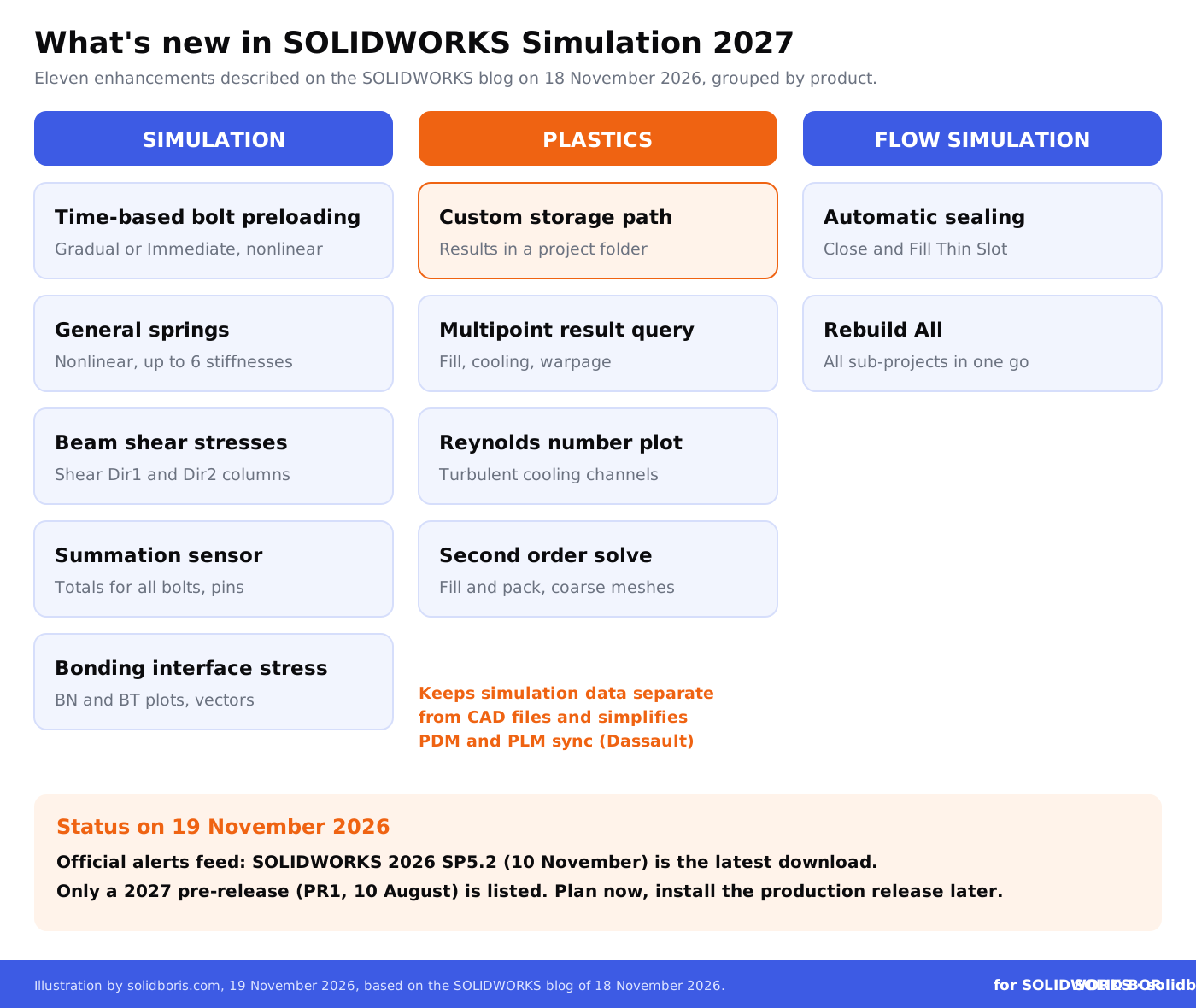
According to the SOLIDWORKS blog post of 18 November 2026, five changes land in SOLIDWORKS Simulation itself:
- Time-based bolt preloading in nonlinear studies. Bolt preloads can now be applied over time in nonlinear static and dynamic studies. The Gradual method tightens bolts between a start time and an end time. The Immediate method applies the preload before the analysis starts. Existing nonlinear studies open with the Immediate method.
- General springs in nonlinear studies. Spring connectors can now be used in nonlinear static and dynamic studies with large displacements. They connect flat, non-flat and concentric cylindrical faces, take up to six stiffness parameters in a local coordinate system, and can reuse spring definitions from linear studies. List Connector Forces reports shear force, axial force, bending moment and torque.
- Beam shear stresses in result tables. The List Stresses table in List Beam Forces gains Shear Dir1 and Shear Dir2 columns, so beam shear stresses can be listed and exported without calculating them by hand.
- A sensor that adds results up. The new Summation of Selected Entities criterion totals results across selected entities, for example the axial force of all bolts in an assembly. For connectors, it can cover a whole type, such as all bolts, pins or bearings.
- Bonding interface stresses. For surface-to-surface bonding, new BN (bonding normal) and BT (bonding tangential) stress plots show stresses at the interface, with values listed at each node and vector plots that show tension or compression.
For teams that design bolted frames, glued joints or flexible mounts, these are practical gains. They also mean that more of the engineering reasoning ends up inside the study: how bolts are tightened, how springs are defined, which totals a sensor tracks.
What changes in SOLIDWORKS Plastics and Flow Simulation 2027?
SOLIDWORKS Plastics gets four enhancements:
- Custom storage path for study results. Users can set a project folder for study output instead of the default locations. Dassault says this keeps simulation data separate from CAD files and simplifies PDM and PLM synchronization.
- Multipoint result query. Results at several locations on a molded part can be compared at once, across filling, cooling and warpage.
- Reynolds number plot in mold cooling. A new plot shows whether cooling channels run in the turbulent regime, which helps tune flow rate, pressure drop and heat transfer.
- Second order solve for fill and pack. An option that improves fill and pack accuracy on relatively coarse meshes.
SOLIDWORKS Flow Simulation gets two:
- Automatic sealing for internal flow. Close Thin Slot and Fill Thin Slot seal small gaps and leaks so internal volumes close, with less manual geometry cleanup. The mesh plot in Cells mode shows the sealed regions before solving.
- Rebuild All for component sub-projects. A command in the Project menu rebuilds and saves every subassembly configuration that includes Flow Simulation sub-projects in one operation.
The post makes no claims about AI or cloud solving for these features, and it does not say which licence level (Standard, Professional or Premium) each enhancement needs. Ask your reseller before you plan training or budgets around a specific feature. For the wider 2027 release, see our overview of SOLIDWORKS 2027 and your design data.
When can you use SOLIDWORKS Simulation 2027?
Dassault has not given a date in the post. The official SOLIDWORKS technical alerts feed, checked on 19 November 2026, listed SOLIDWORKS 2026 SP5.2 (10 November 2026) as the newest download and SOLIDWORKS 2027 PR1 (10 August 2026), a pre-release, as the only 2027 build. For context, SOLIDWORKS 2026 SP0 arrived on 14 November 2025 and SOLIDWORKS 2025 SP0 on 15 November 2024, but a pattern is not an announcement.
Do not confuse the desktop release with the 3DEXPERIENCE platform. The public cloud moves to R2027x on 21 and 22 November 2026, with full downtime, as we explained in our article on the R2027x upgrade weekend. That is a separate event from installing SOLIDWORKS 2027 on your workstations.
When the production release arrives, treat it like any major upgrade: test it on copies of real studies first. The note that existing nonlinear studies open with the Immediate bolt method is helpful, because it suggests old studies keep their previous preload behaviour, but you should still re-run a few reference studies and compare the results before you rely on them.
Why are simulation results part of your intellectual property?
A CAD model shows the shape of a product. A simulation study shows why the shape works. It records the loads and boundary conditions you assumed, the materials you chose, how tightly the bolts are preloaded, how a mold is cooled and where the part warps. For many companies, that is the knowledge that took years to build, and it is often more valuable to a competitor than the geometry.
Simulation results matter in three ways:
- As know-how. Validated load cases, contact settings, mold cooling layouts and process windows are classic trade secrets. They only stay protected if you take reasonable steps to keep them confidential, as our guide to trade secret protection for CAD files explains.
- As evidence. If a part fails, a customer disputes a design or a former employee takes a design to a rival, you may need to show what was tested, by whom and when. Our article on evidence requirements in CAD IP litigation covers what courts look for, and how version history helps assign liability.
- As records. Regulated industries often need to keep validation results for years. Our CAD data retention guide covers how long to keep engineering files and why.
Yet results often live in the least controlled places: local folders on a workstation, a scratch drive, or a project share next to an export folder. That is why the Plastics storage path option is more than a convenience. It lets a team decide where results go, and put that location under the same control as the CAD files.
What does each change mean for your data?
Use this table to see which 2027 changes affect where results sit and what they reveal.
Keep dated proof of what your team designed and tested.
BORIS for SOLIDWORKS registers your CAD files with a blockchain timestamp and a certificate of ownership from inside SOLIDWORKS, so you can show which version of a design existed, and when, if a customer, supplier or court ever asks.
👉 Get BORIS for SOLIDWORKS
Where should simulation results live?
There is no single right answer, but the principle is simple: results that support a design decision should be stored, versioned and protected like the design itself. In practice that means:
- One agreed location per project. Use the new Plastics storage path, and the results folder options in Simulation, to send results to a project folder rather than to each engineer's local drive.
- Under PDM where it makes sense. Many teams keep final study results in SOLIDWORKS PDM next to the models, with the same permissions. Our PDM security configuration guide and the article on version control and PDM integration explain how.
- Large scratch files kept apart. Intermediate solver files can be very large. Keep them out of the vault, but make sure the final results and reports that support decisions are checked in.
- Backed up and protected. Results folders on a NAS or file server need the same backups and patching as CAD data, as our article on ransomware hitting Synology NAS devices showed.
If you already use version control for CAD, extend it to simulation. A clear trail of which model version produced which result is far more useful than a folder of files called final, final2 and final-new. Our guide to building an immutable audit trail for CAD files shows how to make that trail hard to dispute.
What should you check before sharing simulation results?
Customers often ask for simulation reports, and suppliers sometimes need results to set up tooling or to check a joint. A report can reveal more than the CAD model: loads, safety factors, material choices and the weak spots you found. Before you send one, ask:
- Does the recipient need the whole study? Often a summary report with the key results is enough. Send a simplified model where possible, using SOLIDWORKS Defeature to remove the design history.
- What does the contract say? An NDA helps, but as we explained in our article on the limits of NDAs for CAD files, it does not stop a copy from spreading. Agree how long results are kept and how they are deleted.
- Where will it be shared? If suppliers work with you on the 3DEXPERIENCE platform, check who can see which content, as covered in our article on supplier collaboration in SOLIDWORKS 2027.
- Could it be used to train AI? Engineering data is now in demand. Our report on AI data brokers buying CAD archives shows why you should know what happens to the files you hand over.
For a wider checklist, see our guide to sharing CAD files with suppliers.
What should SOLIDWORKS teams do now?
- Read the list and match it to your work. Note which of the eleven enhancements matter for your products: nonlinear bolted joints, springs, bonded interfaces, molded parts or internal flow.
- Check your licences. Ask your reseller which enhancements your Simulation, Plastics and Flow Simulation licences include.
- Wait for the production release. Do not use a pre-release for real projects. Watch the official technical alerts for SOLIDWORKS 2027 SP0.
- Re-run reference studies after the upgrade. Compare a few known studies in 2026 and 2027, especially nonlinear studies with bolts, before relying on new results.
- Choose where results live. Set the Plastics storage path and Simulation results folders to an agreed project location, not local drives.
- Put final results under control. Check final studies and reports in to PDM or your document system with the same permissions as the models.
- Share summaries, not studies. Send customers and suppliers the results they need, with simplified models, under clear terms.
- Keep dated proof. Record which design and which results your team produced, and when, so you can prove it later.
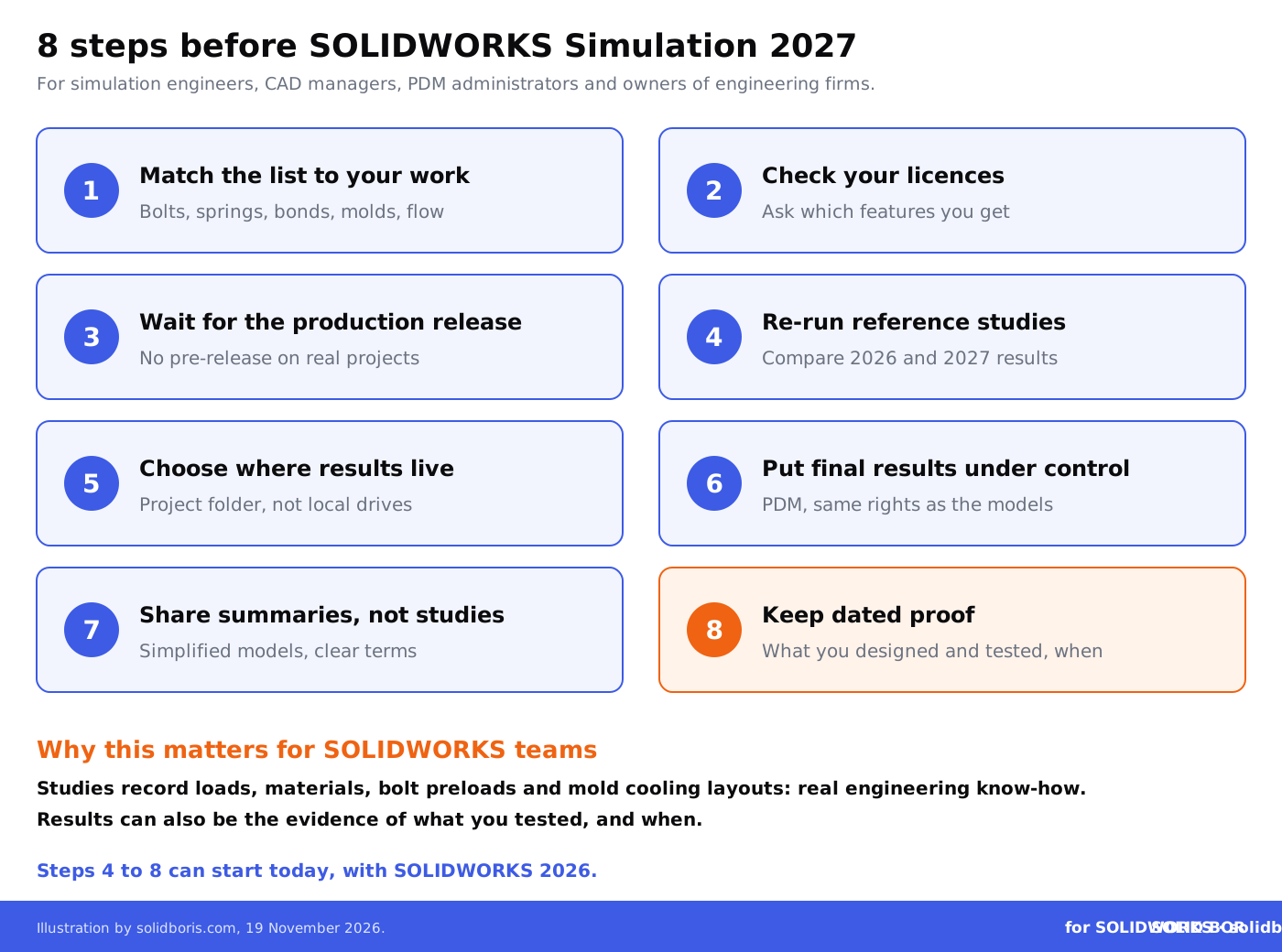
None of these steps needs the new release. Most of them can start today with SOLIDWORKS 2026.
How does this fit the bigger picture for engineering data?
Across our network this week, the same theme comes up: the value of engineering data, and the need to prove where it came from.
- Proving a file has not changed. CADChain reports on the Paris court ruling that invalidated a file-integrity patent asserted against Adobe, OpenAI and the C2PA, and why checking that a file is unchanged is not the same as proving who owns it.
- Installer flaws on CAD workstations. BORIS Inventor looks at a privilege escalation flaw in the Autodesk Installer that can give a local attacker full SYSTEM rights on a workstation.
- Training data in court. Blended BORIS covers the EVOX lawsuit against ByteDance, which claims thousands of car photos were copied to train an image model.
AI is also changing how engineers work with SOLIDWORKS itself. Our article on Dassault's plan to charge for AI by usage covers what that may mean for licences and design data.
Conclusion
SOLIDWORKS Simulation 2027 is a practical release: better nonlinear bolted joints and springs, clearer result tables, a sensor that adds up forces, interface stresses for bonded parts, smarter Plastics results and less cleanup in Flow Simulation. On 19 November 2026 it was not yet listed as a production download, so there is time to plan.
Use that time for the part that no release will do for you. Decide where simulation results are stored, put the final ones under the same control as your models, share only what others need, and keep dated records of what your team designed and tested.
Prove what your team designed, and when.
BORIS for SOLIDWORKS adds blockchain timestamps and certificates of ownership to your CAD files from inside SOLIDWORKS, so you hold dated proof of your designs that does not depend on any server, folder or partner.
👉 Get BORIS for SOLIDWORKS
FAQ: SOLIDWORKS Simulation 2027 and your simulation data
What is new in SOLIDWORKS Simulation 2027?
According to the SOLIDWORKS blog post of 18 November 2026, Simulation adds time-based bolt preloading and general springs in nonlinear studies, beam shear stress columns, a Summation of Selected Entities sensor and bonding interface stress plots. Plastics and Flow Simulation get six further enhancements.
Is SOLIDWORKS 2027 available for production use?
On 19 November 2026, the official SOLIDWORKS technical alerts feed listed SOLIDWORKS 2026 SP5.2 as the latest download and only a 2027 pre-release (PR1). Wait for the production release before using 2027 on real projects.
Will my existing nonlinear studies change after the upgrade?
Dassault says existing nonlinear studies open with the Immediate bolt preload method. Even so, re-run a few reference studies after upgrading and compare the results with SOLIDWORKS 2026.
What is the custom storage path in SOLIDWORKS Plastics 2027?
It lets you set a project folder for Plastics study results instead of the default locations. Dassault says this keeps simulation data separate from CAD files and simplifies PDM and PLM synchronization.
Which licence do I need for these features?
The blog post does not say. Ask your SOLIDWORKS reseller which enhancements are included in your Simulation, Plastics and Flow Simulation licences.
Are simulation results really intellectual property?
Often, yes. Studies record loads, materials, bolt preloads, mold cooling layouts and validation decisions. That know-how can be a trade secret, and results can be evidence of what you tested and when.
How does BORIS for SOLIDWORKS help?
BORIS does not run simulations or manage folders. It registers your SOLIDWORKS files with blockchain timestamps and certificates of ownership, so you can prove which design version your team created, and when.